How to File ITR Online Step-by-Step: Income Tax E-Filing Guide
Filing your Income Tax Return (ITR) is a fundamental civic duty and a crucial financial task for every earning citizen in India. With the digitalization of the Income Tax Department's services, taxpayers can now seamlessly complete this process online from the comfort of their homes or offices. E-filing not only saves time but also reduces errors, ensures faster processing of refunds, and maintains a secure digital record of your financial history. Understanding how to navigate the online filing system is essential for maintaining tax compliance and avoiding last-minute stress. In this comprehensive guide, we will walk you through the structural steps required to file your ITR online, clarify key legal definitions under the Income Tax Act, and explain how to correctly distinguish between different filing periods. Whether you are a salaried employee, a professional, or a first-time filer, mastering this digital process empowers you to manage your tax liabilities confidently and accurately. Let's explore the essential concepts, including tax timelines and legal definitions, that form the foundation of a successful online return filing experience. This guide ensures that you have the clarity needed to complete your submission without relying on complex external help, helping you understand each requirement systematically.
The Definition of an Individual under Section 2(31)
When initiating the online income tax filing process, taxpayers must first identify their filing status. Under the Indian tax framework, different rules and forms apply depending on the category of the taxpayer. The term Individual is covered under the definition of the term person under Section 2(31) of the Income Tax Act, 1961.
Recognizing this legal classification is the first step on the e-filing portal. When you select your status during the online return preparation, choosing the correct category ensures that the portal displays the appropriate tax slabs, exemptions, and deduction fields. For most everyday taxpayers, selecting the Individual status under the Section 2(31) classification is the gateway to accessing simplified return forms like ITR-1.
Clarifying the Assessment Year vs. Financial Year
One of the most common points of confusion for taxpayers filing their returns online is the distinction between the Financial Year (FY) and the Assessment Year (AY). The Financial Year is the twelve-month period starting on April 1st and ending on March 31st of the subsequent calendar year during which you earn your income.
On the other hand, the Assessment Year is the period designated for evaluating and taxing the income earned in the preceding Financial Year. Specifically, the Assessment Year is the year which follows the financial year in which the income is earned. For example, for the financial year 2023-2024, the Assessment Year is 2024-2025. When filing your ITR online, you must select the correct Assessment Year to ensure your tax data is processed for the intended period.
Understanding the Timeline: Financial Year vs. Assessment Year
| Financial Year (FY) | Assessment Year (AY) | Description |
|---|---|---|
| FY 2023-2024 | AY 2024-2025 | Income earned between April 1, 2023, and March 31, 2024, is evaluated in the Assessment Year 2024-2025. |
| FY 2024-2025 | AY 2025-2026 | Income earned between April 1, 2024, and March 31, 2025, is evaluated in the Assessment Year 2025-2026. |
Key Steps to Initiate and Complete Your Online ITR Filing
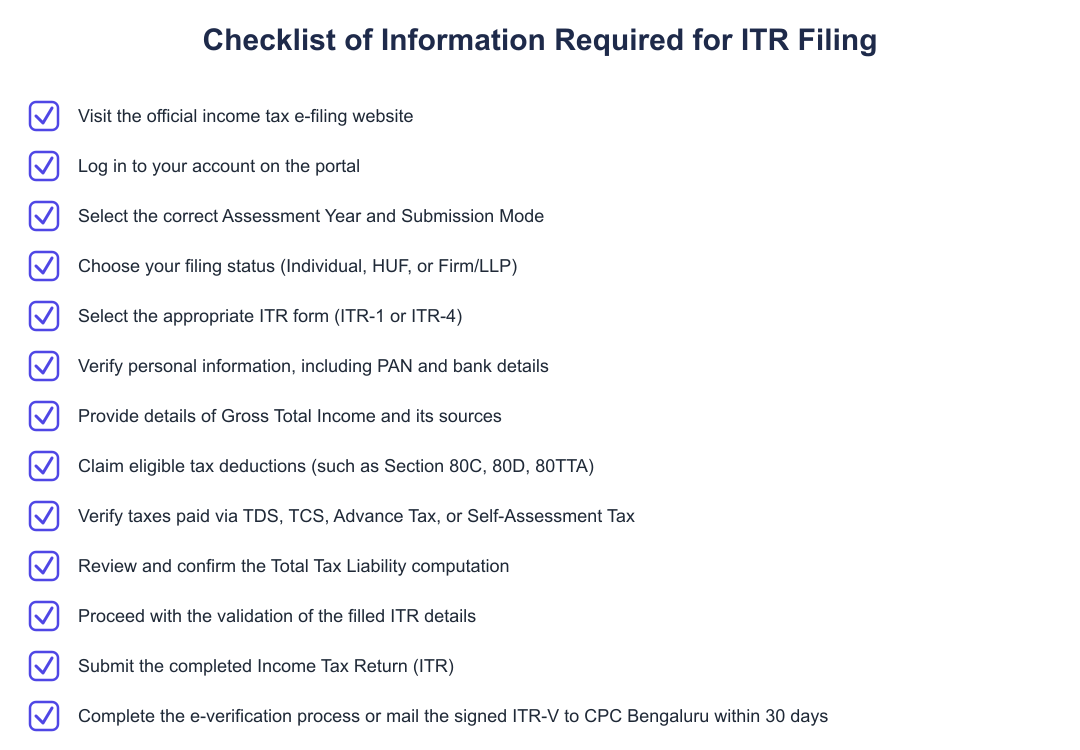
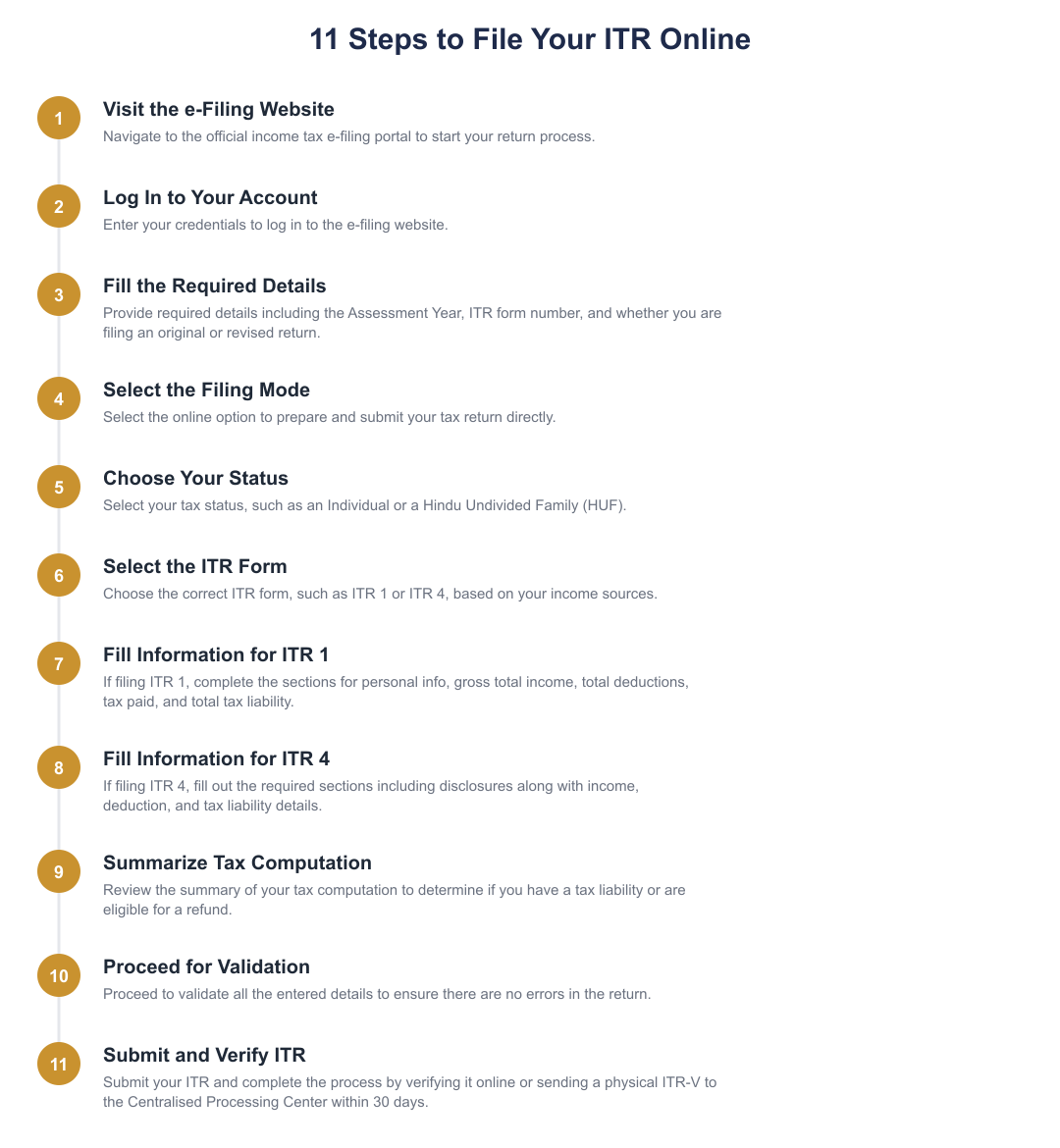
Visit the official income tax e-filing website and log in using your registered credentials such as your PAN or Aadhaar number.
Select the appropriate Assessment Year, which is the year following the financial year of your earnings, and choose the online filing mode.
Select your tax status, identifying as an Individual under the definition of Section 2(31) of the Income Tax Act, 1961, or another applicable category.
Choose the appropriate ITR form, fill in your personal, income, deduction, and tax-paid details, then validate and submit your return.
Filing your Income Tax Return online is a straightforward and systematic process when you understand the basic terminology and rules. By recognizing your status as an Individual under Section 2(31) of the Income Tax Act, 1961, and correctly identifying the Assessment Year following your earning period, you can easily navigate the e-filing portal. Ensuring accuracy in these primary steps prevents processing delays and helps you remain fully compliant with Indian tax laws.
Frequently asked questions
How do I choose between the financial year and the assessment year when filing my ITR online?
When filing your income tax return online, you must select the Assessment Year (AY), which is the year immediately following the Financial Year (FY) in which the income was earned. For example, if you are filing for income earned during the Financial Year 2023-2024, you must select Assessment Year 2024-2025 on the e-filing portal. Selecting the correct year ensures your tax details and computations are mapped to the appropriate tax laws and slabs for that period.
What are the main sections I need to fill out if I am filing ITR-1 online?
To file ITR-1 online, you must complete five key sections: Personal Information, Gross Total Income, Total Deductions, Tax Paid, and Total Tax Liability. Under Gross Total Income, you report earnings from salary, house property, pension, or interest income, while the Total Deductions section captures savings under sections like 80C, 80D, 80TTA, and 80TTB. Finally, the system compares your tax paid (TDS, TCS, advance tax) against your liability to determine if you owe taxes or are due a refund.
How is my final income tax liability or refund calculated on the e-filing portal?
Your final tax liability is calculated by subtracting your total deductions and the taxes you have already paid from your gross total income. Specifically, the formula used is: Tax payable on total income equals your total income minus total deductions minus any tax paid till date (such as TDS, TCS, advance tax, or self-assessment tax). If this calculation results in a positive figure, you must pay the outstanding tax balance; if the figure is negative, you are eligible to claim a tax refund for the excess amount paid.
What are the different filing statuses I can choose from on the income tax portal?
While filing your return online, you must select your tax status from options like Individual, Hindu Undivided Family (HUF), or Firm/LLP. An Individual status applies to any single person (male, female, major, or minor) defined under Section 2(31) of the Income Tax Act. A Hindu Undivided Family (HUF) represents a separate legal tax entity comprising all individuals lineally descended from a common ancestor, including wives and unmarried daughters.
How long do I have to verify my income tax return after filing it online?
You must verify your income tax return within 30 days from the date of online submission to ensure your ITR is processed by the tax department. You can complete this step immediately using e-Verify options like Aadhaar OTP, or you can choose to verify later within the 30-day window. Alternatively, you can print the physical ITR-V form, sign it, and send it via normal or speed post to the Centralised Processing Center (CPC) in Bengaluru within this 30-day timeframe.
What are the main components required to file ITR-4 online?
Filing ITR-4 online requires you to fill out specific schedules including Personal Information, Gross Total Income, Disclosures, Total Deductions, Taxes Paid, and Total Tax Liability. It is primarily meant for taxpayers who opt for presumptive taxation schemes under sections like 44AD, 44ADA, or 44AE. Unlike ITR-1, the ITR-4 form includes a dedicated 'Disclosures' section where you must enter specific financial details related to your business or profession.
Can I file a revised tax return online if I made a mistake in my original submission?
Yes, you can file a revised tax return online on the e-filing portal by selecting the "Revised Return" option during the filing process. This option allows you to correct any omissions, wrong disclosures, or mathematical errors made in your original ITR filing. You will need to provide the receipt number and the date of filing of your original tax return to link the revised submission.
What options do I have for submitting my ITR on the e-filing website?
You can submit your income tax return by choosing the ‘prepare and submit online’ option directly on the e-filing portal. This submission mode allows you to fill out the form steps, validate your details online, and directly submit your return without needing any offline utility tools. Once submitted, you can immediately proceed to e-verify your return to complete the entire process.
Need help staying Income Tax compliant?
MoneyGence's AI Finance OS tracks your compliance, wallet share, and finances in one place, built for agencies and growing businesses.
Get started with MoneyGence