Tax Saving Calculator - Estimate Savings with ClearTax
This guide explains tax saving under Section 80C and how a Tax Saving Calculator helps you estimate the tax benefit from eligible investments. You will learn what qualifies for deduction under Section 80C, the maximum deduction available, how a calculator applies those rules to reduce taxable income, and a step-by-step example using the standard deduction. Understanding these elements matters because choosing the right tax-saving instruments and accurately estimating your taxable income can reduce your tax outgo and help with cashflow and investment planning. The guide also shows how salaried and self-employed taxpayers can use a calculator to compare options and make informed choices on where to place surplus savings.
What is Tax Saving?
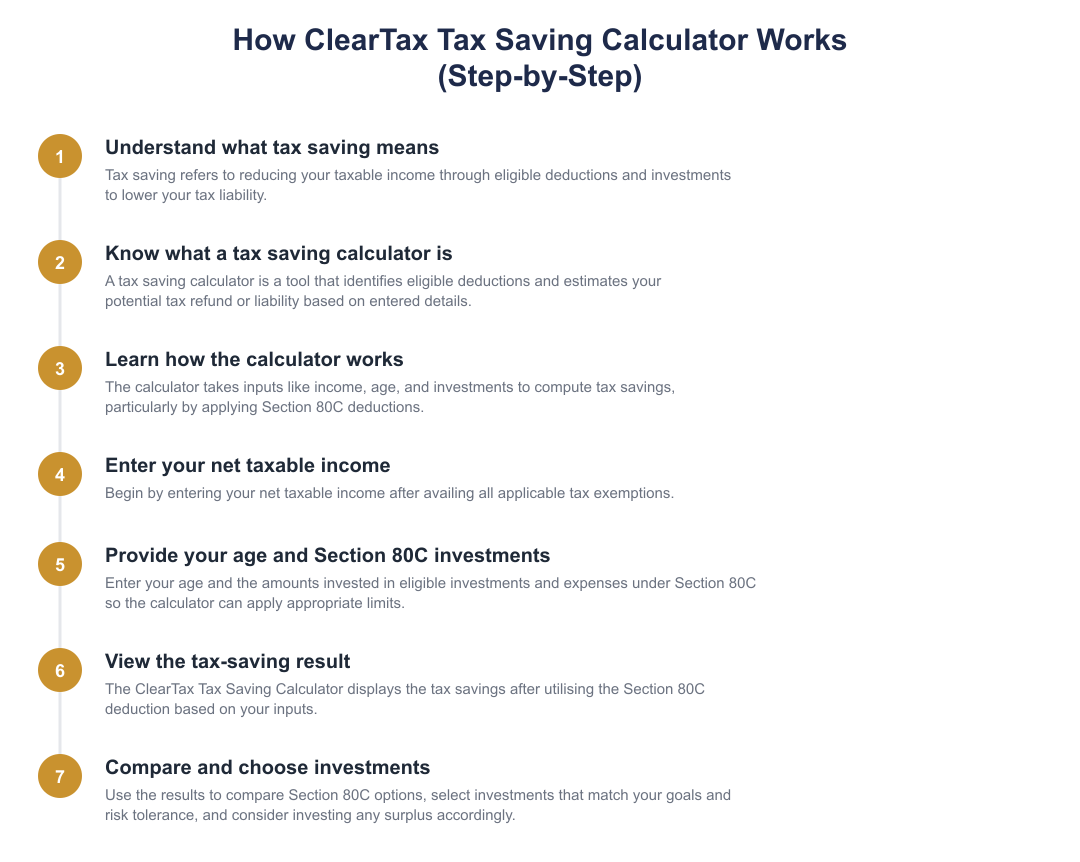
Tax saving refers to legally reducing your taxable income by claiming deductions and exemptions allowed under the Income Tax Act. One of the most commonly used provisions for individual taxpayers is Section 80C, which permits deductions for a variety of investments and expenses. Using these deductions lowers your taxable income and hence the tax you owe for the year.
Both salaried and self-employed taxpayers can access Section 80C deductions by investing in qualifying instruments or by incurring eligible expenses. Knowing which instruments qualify and the annual limit for the deduction helps you plan investments in a tax-efficient manner while meeting financial goals such as retirement, education, or housing.
What is a Tax Saving Calculator?
A Tax Saving Calculator is an online tool that estimates how much tax you can save by using deductions like Section 80C. The calculator applies the rules for eligible investments and the statutory limits to your inputs and shows the impact on your taxable income and tax liability.
Practically, a calculator helps you compare different combinations of investments and expenses allowed under Section 80C, such as PPF, ELSS, NSC, life insurance premiums, or principal repayment on a home loan, to see which mix gives the best tax outcome while aligning with your financial goals.
How Does Tax Saving Calculators Work?
At a basic level, the calculator requires your gross taxable income and the amounts you propose to invest or expenses you plan to claim under Section 80C. It then subtracts the standard deduction for salaried individuals (where applicable) and applies the Section 80C deduction up to the statutory limit to arrive at your net taxable income.
For example, using the verified figures: if gross taxable income is Rs 9,00,000 and the standard deduction (used in the example) is Rs 50,000, and you invest Rs 1,50,000 in eligible Section 80C instruments, the calculator will reduce taxable income to Rs 7,00,000. Note that some calculators may additionally compute cess and other levies; the example given does not consider the 4% health and education cess.
How to Use the ClearTax Tax Saving Calculator?
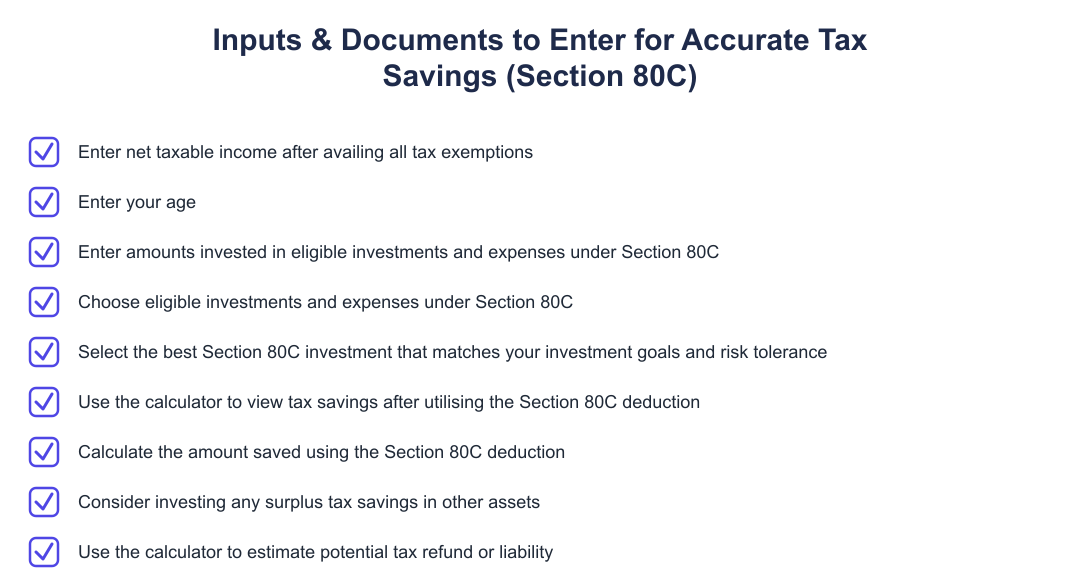
Provide your gross taxable income and apply any exemptions so the calculator starts with the net figure to be taxed.
Specify your age as some calculators differentiate calculations for age-based rules or thresholds.
Input amounts invested in instruments like PPF, ELSS, NSC, life insurance premiums, principal repayment on a home loan, tuition fees for up to two children, and other eligible instruments.
The calculator will show the effect of utilising the Section 80C deduction, up to the maximum Rs 1.5 lakh a year, on your taxable income and the estimated tax saved.
Benefits of ClearTax Tax Saving Calculator
A dedicated calculator simplifies decision-making by aggregating eligible investments and expenses under Section 80C and applying the maximum deduction limit of Rs 1.5 lakh a year. It helps you see how different investment choices change your taxable income and the resulting tax liability.
Using the calculator you can identify whether you have fully utilised the Section 80C limit and decide whether to redirect surplus savings into other assets. Because both salaried and self-employed taxpayers can use these government-offered tax-saving investments, the tool is useful across taxpayer categories to compare tax outcomes for different investment strategies.
Frequently Asked Questions
Which investments and expenses qualify under Section 80C? Eligible Section 80C investments and expenses include PPF, SCSS, EPF, VPF, ELSS, tax-saver FDs, NSC, NPS, specific post office schemes, Sukanya Samraddhi Scheme, premiums on life insurance plans, principal repayment on home loans, and tuition fees for up to two children for full-time education.
What is the maximum deduction under Section 80C? You are eligible for a tax deduction up to a maximum of Rs 1.5 lakh a year under Section 80C.
Does the calculator consider standard deduction and cess? In the example used here, the standard deduction for salaried individuals is Rs 50,000 per year and the example calculation does not consider the 4% health and education cess. Some calculators may include cess in final tax computation, so check the tool's assumptions.
A Tax Saving Calculator that applies Section 80C rules is a practical aid for planning tax-efficient investments. By understanding what qualifies, the Rs 1.5 lakh annual limit, and how standard deduction interacts with your gross income, you can use the tool to reduce taxable income and make better allocation decisions for your savings.
Frequently asked questions
What is tax saving and how does it reduce my income tax liability?
Tax saving means using exemptions, deductions and eligible investments to lower your taxable income and thereby reduce your income tax liability. Common methods include claiming deductions under Section 80C (up to Rs 1.5 lakh a year), standard deduction for salaried taxpayers (currently Rs 50,000), and other specific exemptions like NPS, life insurance premiums or tuition fees. By reducing your taxable income through these routes you move into a lower tax bracket or reduce the tax computed within your existing slab; for example, investing Rs 1.5 lakh under 80C can significantly cut tax for someone in the 20% or 30% slab. Remember some deductions have conditions (age limits, lock-in periods, or specified instruments) and cannot be double-claimed across sections.
What is a tax saving calculator and what does it show me?
A tax saving calculator is an online tool that estimates how much tax you save by claiming specific deductions and investments, especially Section 80C. The calculator takes inputs such as net taxable income after exemptions, your age, and amounts invested in eligible 80C instruments, then computes the tax liability with and without those deductions to show the savings. It gives a quick simulation of your potential tax refund or reduced liability so you can compare investment choices or plan additional investments. Note that such calculators use current tax slabs and may exclude cess or other minor adjustments unless specified.
How does the ClearTax tax saving calculator work step-by-step?
The ClearTax tax saving calculator works by asking you to enter net taxable income after exemptions, your age, and the amounts invested under eligible Section 80C instruments, then computing tax with and without those deductions to show savings. First you input your taxable income (after exemptions like HRA), then choose investments/expenses under 80C and the calculator applies the Rs 1.5 lakh limit to reduce taxable income. It then applies the applicable income tax slabs for your age group to compute old and new tax liabilities and displays the tax saved; this lets you see which investments yield optimal tax benefits. The tool is a simulation and should be used for planning, actual tax computation at filing may require supporting documents and may include cess or surcharge adjustments.
What inputs do I need to use the ClearTax tax saving calculator correctly?
You need to enter your net taxable income after claiming any exemptions, your age (to determine the correct tax slabs), and the amounts invested in eligible Section 80C investments or expenses. Net taxable income means your income after exemptions such as house rent allowance, standard deduction or other specific exemptions; do not enter gross income. For Section 80C, include instruments like PPF, EPF, ELSS, life insurance premium, principal repayment on home loan, tuition fees (subject to limits) up to the Rs 1.5 lakh cap. Accurate inputs help the calculator show a realistic estimate of tax saved and any remaining scope to invest more for deductions.
What benefits will I get by using the ClearTax tax saving calculator?
Using the ClearTax tax saving calculator helps you quickly identify eligible deductions, estimate tax savings from Section 80C investments, and plan where to allocate surplus funds for better returns. It shows the tax impact of current investments and highlights unused deduction space so you can decide whether to invest more in tax-saving instruments like ELSS or PPF. The calculator also aids comparison, helping you pick the best Section 80C option that matches your goals and risk tolerance, and speeds up financial decision-making without manual slab-wise calculations. Keep in mind it provides estimates for planning and is not a substitute for filing with supporting proofs.
Can the tax saving calculator estimate my tax refund or final tax liability?
Yes, the tax saving calculator can estimate your reduced tax liability and potential increase in refund by showing tax computed before and after applying eligible deductions like Section 80C. It highlights the difference between the two computations so you can see how much tax you save or how much a refund could increase, but this is an estimate and depends on accurate inputs and declared investments. The actual refund at filing may differ because of other factors like TDS deducted, advance tax paid, cess, surcharge, or missing proofs. Use the calculator for planning; confirm final figures when you prepare and submit your income tax return with documentation.
Who should use a tax saving calculator and when should I use it?
Anyone who wants to plan taxes, salaried individuals, self-employed professionals, and investors, should use a tax saving calculator when making investment decisions or before the financial year ends. Use it to estimate how much tax you can save by investing in 80C instruments or to check whether you should increase investments to fully utilise the Rs 1.5 lakh deduction. It is particularly helpful at the start of a financial year to set investment targets and near year-end to plug any deduction shortfall. Remember it’s a planning tool, always retain proofs and review results when filing your return.
Are there any limitations or assumptions in the ClearTax tax saving calculator I should know about?
The ClearTax tax saving calculator is a simulation and assumes you will have the necessary proofs to claim entered deductions; it may not account for cess, surcharge, or all exemptions unless specified. It typically focuses on Section 80C deductions up to Rs 1.5 lakh and uses standard tax slabs based on your age, so other deductions (like 80D, 80E, HRA exemptions) may not be fully modelled. The calculator’s accuracy depends on precise inputs, enter net taxable income after exemptions, and real filing outcomes can change based on TDS, advance tax, and eligibility verifications. Use results for planning and verify final tax computation when filing your income tax return.
Can the tax saving calculator help me choose between different 80C investments like ELSS, PPF or tax-saving FD?
The tax saving calculator will show the tax impact of investing a certain amount under Section 80C, but it does not pick the single best investment for your risk profile, rather it helps compare how much tax you save by investing specified amounts in different instruments. For example, entering Rs 1.5 lakh invested in ELSS versus PPF will show identical immediate tax savings (since 80C treats them the same up to the limit), but you must consider lock-in, expected returns, and risk, ELSS has market risk and a 3-year lock-in, PPF has a long-term lock-in with fixed government returns. Use the calculator to quantify tax benefit and then evaluate liquidity, returns and risk separately to choose the right product for your goals.
Need help staying Calculators compliant?
MoneyGence's AI Finance OS tracks your compliance, wallet share, and finances in one place, built for agencies and growing businesses.
Get started with MoneyGence