PF Withdrawal Online: 8 Easy Steps to Withdraw PF (2026 Guide)
This guide explains how to withdraw Employees’ Provident Fund (EPF) online in eight clear steps, and what you must have in place before you begin. You will learn who is eligible to make an online claim, which documents and KYC elements must be seeded on the UAN portal, the difference between Aadhaar-based and non-Aadhaar (offline) composite claims, common reasons claims get rejected, and which statutory forms apply to different types of withdrawal. The guide also summarises the tax outcome for long-tenured employees and highlights a few compliance checks, such as ensuring your UAN is activated, your Aadhaar, PAN and bank details are verified, and your service history (including Date of Exit) is accurate, that can prevent delays. This is useful whether you are planning a full settlement after leaving employment, a partial advance while working, or claiming pension-related withdrawal under EPS. Emphasis is placed on the paperless, Aadhaar-based flow introduced as part of EPFO’s digital updates so you can understand what you can complete online versus when employer attestation or an offline visit to the EPFO office is still necessary.
Who Can Withdraw PF Online?
Online PF withdrawal is available to members who have an activated UAN and whose KYC, especially Aadhaar and bank account details, are linked and verified on the UAN portal. The Aadhaar-based, paperless claim route is the EPFO-preferred digital path and is intended to allow members to submit and settle eligible claims without paperwork or employer approval in most cases.
Employer approval is not required for most online claims when the member has used the Aadhaar-based composite route and the required KYC is in place. However, some situations still need attention to service history and exit dates: Form 10C or Form 19 cannot be filed unless the Date of Exit is updated in your service history, and overlapping employment dates across employers should be corrected before submitting a claim.
Documents Required For PF Withdrawal Online
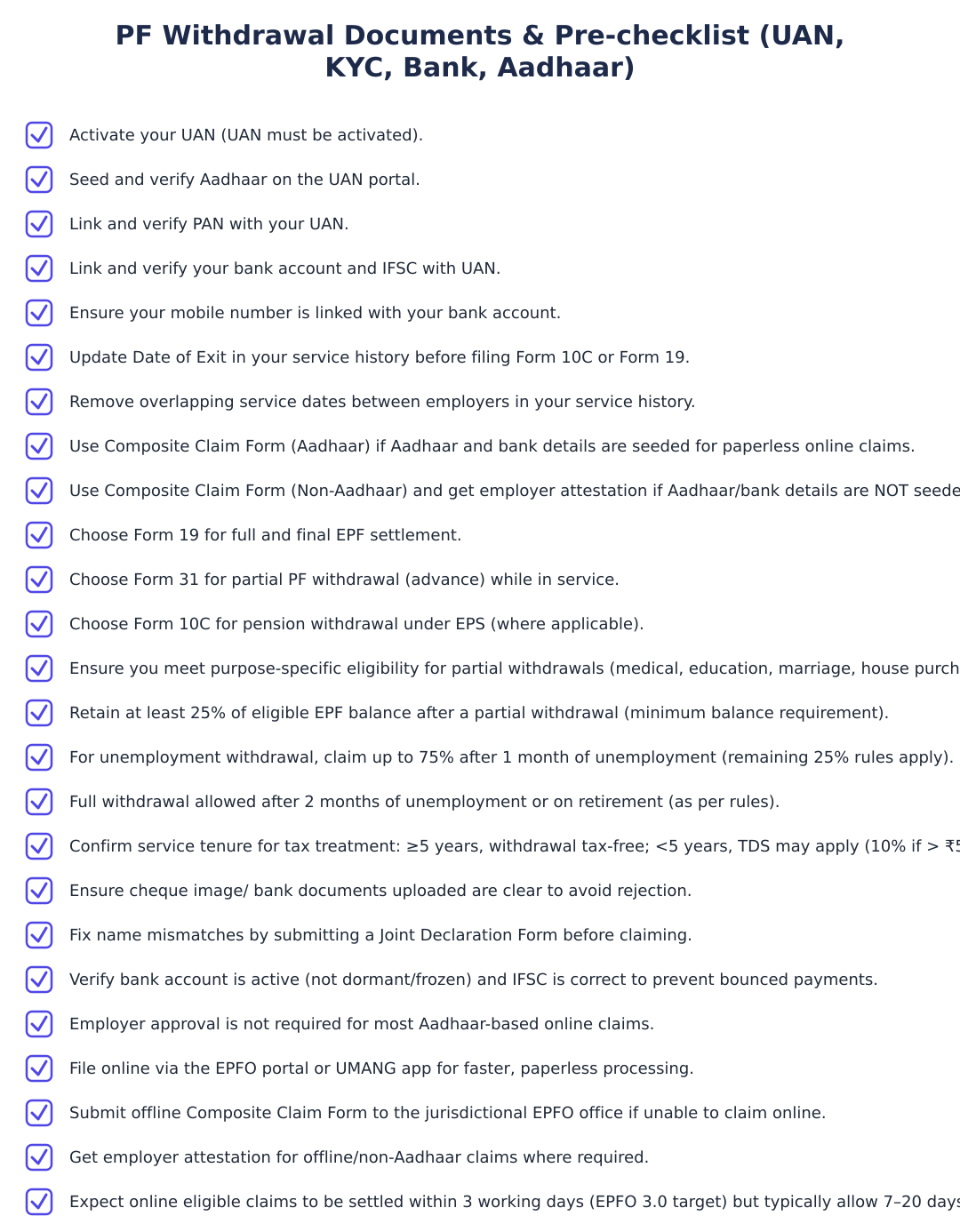
To use the online, Aadhaar-based claim process you must have an activated UAN and seeded, verified KYC on the UAN portal. Key items to ensure are linked and verified: Aadhaar, bank account details and PAN. The Aadhaar and bank linkage allow the paperless Composite Claim Form (Aadhaar) route which avoids employer attestation.
If any of the above KYC elements are missing or unverified you may not be able to complete the online claim. In such cases members often need to correct details on the UAN portal or use the non-Aadhaar composite form which requires employer attestation and submission to the jurisdictional EPFO office.
How to Withdraw PF Online in 8 Steps
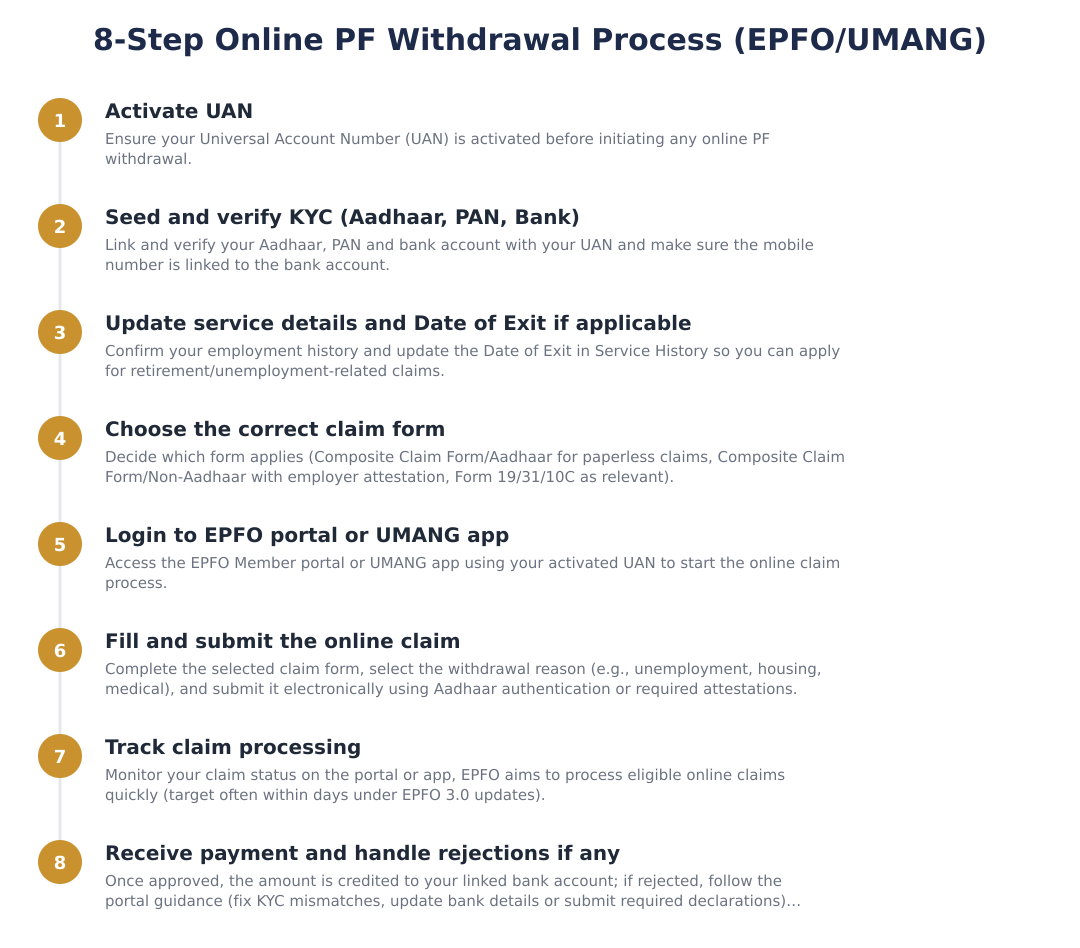
Ensure your UAN is activated on the EPFO portal; online withdrawal requires an activated UAN.
Seed and verify Aadhaar and bank account details on the UAN portal; these KYC items are prerequisites for Aadhaar-based online claims.
Update your Date of Exit in the service history if you have left employment; Form 10C or Form 19 cannot be applied unless the exit date is recorded.
Ensure there are no overlapping employment dates across employers in your service history before filing a claim.
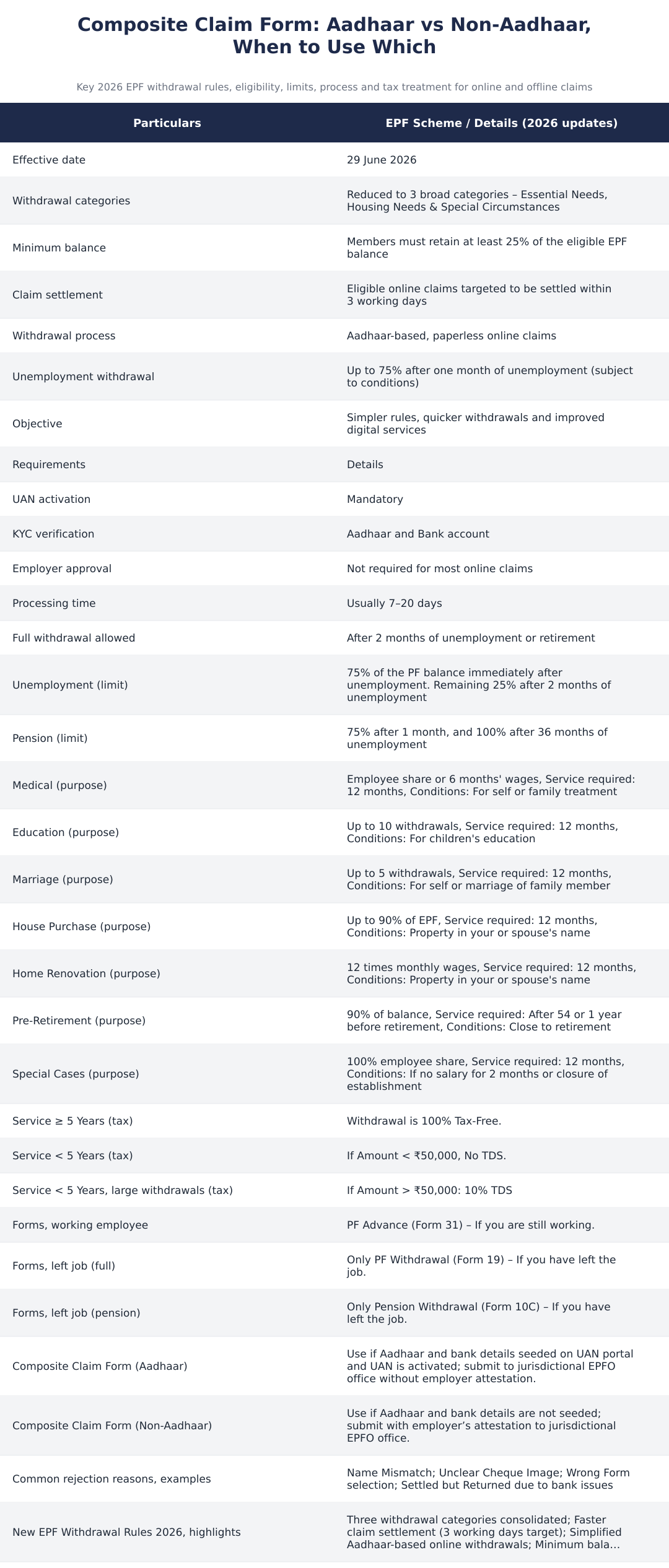
Use the Composite Claim Form (Aadhaar) if Aadhaar and bank details are seeded and UAN is activated; otherwise plan for the non-Aadhaar composite route which needs employer attestation.
File the paperless claim through the UAN portal using the Aadhaar-based composite form; employer approval is not required for most such online claims.
Monitor your claim status on the UAN portal to see updates and any officer remarks that may indicate issues to resolve.
If the claim succeeds, the payout is completed into the bank account seeded and verified on your UAN profile.
How to Withdraw PF via UMANG App
The UMANG app supports EPFO services and provides another channel for members to access online, Aadhaar-based PF withdrawal workflows. The same prerequisites apply: an activated UAN and verified Aadhaar and bank details on the UAN portal are required to use the paperless claim options available through the app.
Using UMANG mirrors the portal experience in that employer approval is not generally required for Aadhaar-based composite claims. Members should still confirm that their service history and Date of Exit (where applicable) are correctly recorded before initiating a claim from the app.
How to Withdraw PF Offline
If Aadhaar and bank details are not seeded or verified on the UAN portal, members must use the Composite Claim Form (Non-Aadhaar) and submit it to the jurisdictional EPFO office. Unlike the Aadhaar-based composite form, the non-Aadhaar composite claim requires employer attestation before submission.
The offline route remains necessary where digital KYC is incomplete or where members prefer to submit physical paperwork. Make sure your service history and Date of Exit are in order before submitting any offline forms to avoid rejections or delays.
Which Form to File for PF Withdrawal?
| Form | Purpose / Notes |
|---|---|
| Form 19 | Full and final settlement (Form 19 is used for EPF full withdrawal) |
| Form 31 | Partial withdrawal / PF Advance (Form 31 is used for advances and partial withdrawals) |
| Form 10C | Pension withdrawal under EPS (Form 10C is used for pension withdrawal claims) |
Why was PF Withdrawal Claim Rejected?
EPFO commonly rejects PF claims for a handful of repeatable reasons that can often be prevented with a quick pre-check. Name mismatches between your EPFO record and Aadhaar or bank records are a frequent cause: if the name on your Aadhaar or the bank account differs from the EPFO database, the claim can be blocked until records are reconciled.
Other common rejection reasons include an unclear cheque image (making the account name or IFSC unreadable), submission of the wrong form or selection of an incorrect reason (for example selecting an out-of-service reason with an advance form), and instances where a payment was processed but returned because the bank account was dormant, frozen or the IFSC was incorrect. Checking these items before filing reduces the risk of rejection.
PF Withdrawal, Basic Tax Treatment by Service Tenure
| Service Tenure | Tax Treatment |
|---|---|
| Service 5 years | Withdrawal is 100% tax-free. |
| Service < 5 years | If Amount < 0,000, No TDS. |
| If Amount > 0,000 | 10% TDS |
New EPF Withdrawal Rules 2026, What Changed
EPFO’s recent digital updates emphasise Aadhaar-based, paperless online claims to speed up and simplify the withdrawal experience for members. The updated approach removes the need for employer approval in most online claim cases and focuses on KYC verification and UAN activation as prerequisites.
Practically, this means members who maintain updated and verified KYC on the UAN portal can use the composite Aadhaar form and complete claims without additional attestation. Where KYC is missing, or other service-history issues exist, the member must follow the non-Aadhaar offline route which requires employer attestation and submission to the EPFO office.
PF Customer Care Numbers
For service-specific help or to follow up on claim-related problems, members should use the official EPFO help channels or the contact numbers listed on the EPFO website. Representatives can guide you on status checks, document requirements and the correct form to file based on your situation.
Keep your UAN, Aadhaar and bank details handy when calling so the service agent can quickly locate your record and provide actionable guidance.
Frequently Asked Questions
Q: Can I file a PF withdrawal online without employer approval? A: Yes, for most Aadhaar-based online claims, employer approval is not required once your UAN is activated and Aadhaar and bank KYC are verified.
Q: What if my Date of Exit is not updated? A: You will not be able to apply for Form 10C or Form 19 unless your Date of Exit is updated in the service history. Correct the record before applying to avoid rejection.
Withdrawing PF online is designed to be fast and largely paperless when you keep your UAN activated and KYC (Aadhaar, PAN and bank) verified on the UAN portal. Use the Aadhaar-based composite claim for a paperless path that usually does not need employer attestation; otherwise prepare to file the non-Aadhaar composite form with employer sign-off at your jurisdictional EPFO office. Verify service history, Date of Exit and bank details before submission to avoid common rejections and ensure a smooth receipt of funds.
Frequently asked questions
Who can withdraw PF online through the EPFO portal or UMANG app in 2026?
You can withdraw PF online if your UAN is activated and your Aadhaar and bank details are seeded and verified on the UAN portal or UMANG app. Members must also have their mobile number linked to the bank account and either be unemployed, retired, or meet the conditions for a partial withdrawal (medical, marriage, education, house, etc.). Employer approval is not required for most Aadhaar-based online claims, and the EPFO targets settling eligible online claims within 3 working days under the EPF Scheme 2026 update. If your Date of Exit or service history is not updated, you may need to update those details before applying online.
What documents do I need to withdraw PF online in 2026?
You need an activated UAN with Aadhaar and bank account seeded and KYC-verified on the UAN portal to make a paperless online claim. In addition, your PAN should be linked (for tax purposes), your mobile must be linked to your bank account for OTPs, and you may need scanned cancelled cheque or bank passbook image if uploading documents for non-Aadhaar claims. For offline composite claim forms you may need employer attestation (if Aadhaar is not seeded) and identity/address proofs as specified by EPFO.
How do I withdraw PF online in 8 easy steps on the EPFO portal?
Log into the UAN Member e-Sewa portal with your UAN and password, ensure KYC (Aadhaar, PAN, bank) is verified, go to 'Online Services' → 'Claim (Form-31, 19 & 10C)', verify your bank details, select the claim reason and amount, and complete Aadhaar authentication to submit an Aadhaar-based composite claim. The typical processing time under normal circumstances is usually 7–20 days, though EPFO's 2026 objective is to settle eligible online claims within 3 working days for paperless Aadhaar claims. Keep screenshots of the claim acknowledgement and track status on the portal; if Aadhaar is not seeded you must use offline Composite Claim Form (Non-Aadhaar) with employer attestation.
How can I withdraw PF using the UMANG app?
You can withdraw PF on the UMANG app by logging in with your mobile number linked to your UAN, selecting the EPFO service, choosing 'Claim (Form-31/19/10C)', filling in claim details and completing Aadhaar OTP authentication for paperless claims. The UMANG app supports Aadhaar-based composite claims without employer attestation and aims to leverage the EPF 3.0 digital upgrades for faster processing. Make sure your UAN is activated and KYC (Aadhaar and bank) is seeded on the EPFO records before initiating the claim on UMANG.
How do I withdraw PF offline using the Composite Claim Form (Aadhaar and Non-Aadhaar)?
If you prefer offline, use the Composite Claim Form (Aadhaar) when your UAN is seeded with Aadhaar and bank details, submit it to the jurisdictional EPFO office without employer attestation; for Non-Aadhaar composite claims submit the form with employer attestation and required ID/bank proofs. The offline route is used when digital seeding or Aadhaar authentication is not possible, but it typically takes longer (processing often 7–20 days or more) compared to Aadhaar-based online claims. Always use the correct form version (Aadhaar or Non-Aadhaar) and attach a clear cancelled cheque or passbook copy to avoid rejections.
What are the types of PF withdrawal and their limits under the 2026 rules?
PF withdrawals are consolidated into three broad categories in 2026: Essential Needs, Housing Needs and Special Circumstances, each with specific limits, for example, housing purchase allows up to 90% of EPF balance, home renovation up to 12 times monthly wages, and medical withdrawals up to the employee share or 6 months’ wages. For unemployment, members can withdraw up to 75% of the PF balance immediately after one month of unemployment (with the remaining 25% available after 2 months or as per conditions); pension rules allow 75% after 1 month and 100% after 36 months of unemployment in specified cases. Members must also normally retain at least 25% of the eligible EPF balance after a partial withdrawal as per the 2026 minimum balance requirement.
When is PF withdrawal taxable and what about TDS under the 2026 rules?
If you have served five years or more, EPF withdrawal is fully tax-free; if service is less than five years, withdrawals are taxable and TDS of 10% applies on amounts over ₹50,000 at source. Withdrawals below ₹50,000 for service under five years are not subject to TDS, but the full amount may still be taxable and should be declared while filing income tax returns. Always verify your PAN is linked to UAN to prevent higher TDS rates and retain proof of service period to claim correct tax treatment.
Why is my PF withdrawal claim rejected and how do I fix it?
Common reasons for PF claim rejection include name mismatch between EPFO records and Aadhaar/bank details, unclear cheque image or wrong IFSC in uploaded documents, selecting the wrong form or claim reason, and bank account issues like dormant or frozen accounts causing returns. To fix rejections, submit a Joint Declaration Form to correct name mismatches, re-upload clear bank cheque/passbook scans with correct IFSC, choose the correct form/reason, and ensure your bank account is active and correctly seeded to UAN. After rectifying errors, you can re-submit the claim online or follow EPFO instructions in the rejection message to reapply offline if required.
What are the new EPF withdrawal rules introduced in 2026 that affect claims?
The 2026 EPF changes simplify withdrawal categories into Essential Needs, Housing Needs and Special Circumstances, mandate Aadhaar-based paperless claims with faster digital processing targets (eligible online claims aimed to be settled within 3 working days), and require members to retain a minimum of 25% of their eligible EPF balance after partial withdrawals. The scheme also clarifies unemployment withdrawal limits (up to 75% after one month and staged release of remaining balance) and streamlines documentation and KYC requirements to reduce employer involvement for most online claims. These updates are intended to make withdrawals simpler, quicker and more transparent while keeping purpose-specific eligibility and limits intact.
Need help staying Payroll compliant?
MoneyGence's AI Finance OS tracks your compliance, wallet share, and finances in one place, built for agencies and growing businesses.
Get started with MoneyGence