PF Calculator - Accurate EPF Calculator & Retirement Planner
A Provident Fund (PF) calculator helps salaried individuals estimate the future value of their Employees' Provident Fund (EPF) savings by projecting contributions, employer share and accrued interest over time. This guide explains what an EPF calculator does, how it complements your retirement planning, and the practical EPF rules you should know before relying on any projection. You will learn what EPF is, which authority manages it, key compliance points that affect your account, and the reliable ways to check your PF balance online. Understanding these elements matters because a calculator’s projection is only as useful as the underlying inputs and the stability of the scheme, for example, contribution rules, portability of your account when you change jobs, and the annual interest rate decisions that the EPFO makes. This page does not provide personalised financial advice or specific numeric projections; instead it focuses on how to use an EPF calculator sensibly and the verified administrative facts that determine how your PF actually behaves. Read on to get clear, practical guidance on the EPF ecosystem, what to watch for when you interpret calculator outputs, how account governance (like nomination, Aadhaar linking and UAN portability) affects accessibility, and the official channels you can use to check balances and manage your account.
What is EPF?
The Employees’ Provident Fund (EPF) is a retirement-oriented savings arrangement for employees in India. The scheme is administered by the Employees' Provident Fund Organisation (EPFO), a statutory body that runs multiple schemes to provide social security benefits to wage earners.
The EPFO operates three distinct schemes under its umbrella: The EPF Scheme 1952, The Pension Scheme 1995, and The Insurance Scheme 1976. Together these schemes provide a mix of lump-sum savings, pension benefits and insurance cover designed to protect employees during retirement or unforeseen events.
What is an EPF Calculator?
An EPF calculator is a digital tool that projects the future corpus in your EPF account based on inputs such as current balance, monthly contributions and an assumed rate of interest. Calculators vary in sophistication: some show year-by-year growth, others let you test different contribution levels or retirement ages to see how outcomes change.
Keep in mind that a calculator’s accuracy depends on the correctness of the inputs and assumptions. One key variable under institutional control is the EPF interest rate, which the EPFO Central Board of Trustees fixes every financial year after consulting the Ministry of Finance. Because the rate can change annually, projections should be treated as indicative rather than guaranteed.
How can a PF Calculator Help You?
A PF calculator gives you a quick view of likely retirement savings under different contribution scenarios. That helps in setting realistic retirement goals and deciding whether you need to augment PF savings with other investments.
Beyond long-term planning, calculators are useful to test short-term choices, for example, the impact of increasing voluntary contributions or the effect of pauses in contributions during career breaks. Use the tool to compare scenarios, but cross-check key assumptions (especially the interest rate) against official EPFO communications.
Things to Know About EPF Contributions and Account Management
Certain administrative and compliance features of the EPF system affect how your account behaves and how you access funds. Any organisation or firm with 20 or more employees comes under the purview of the EPFO, which means employees of such organisations are typically covered by EPF rules.
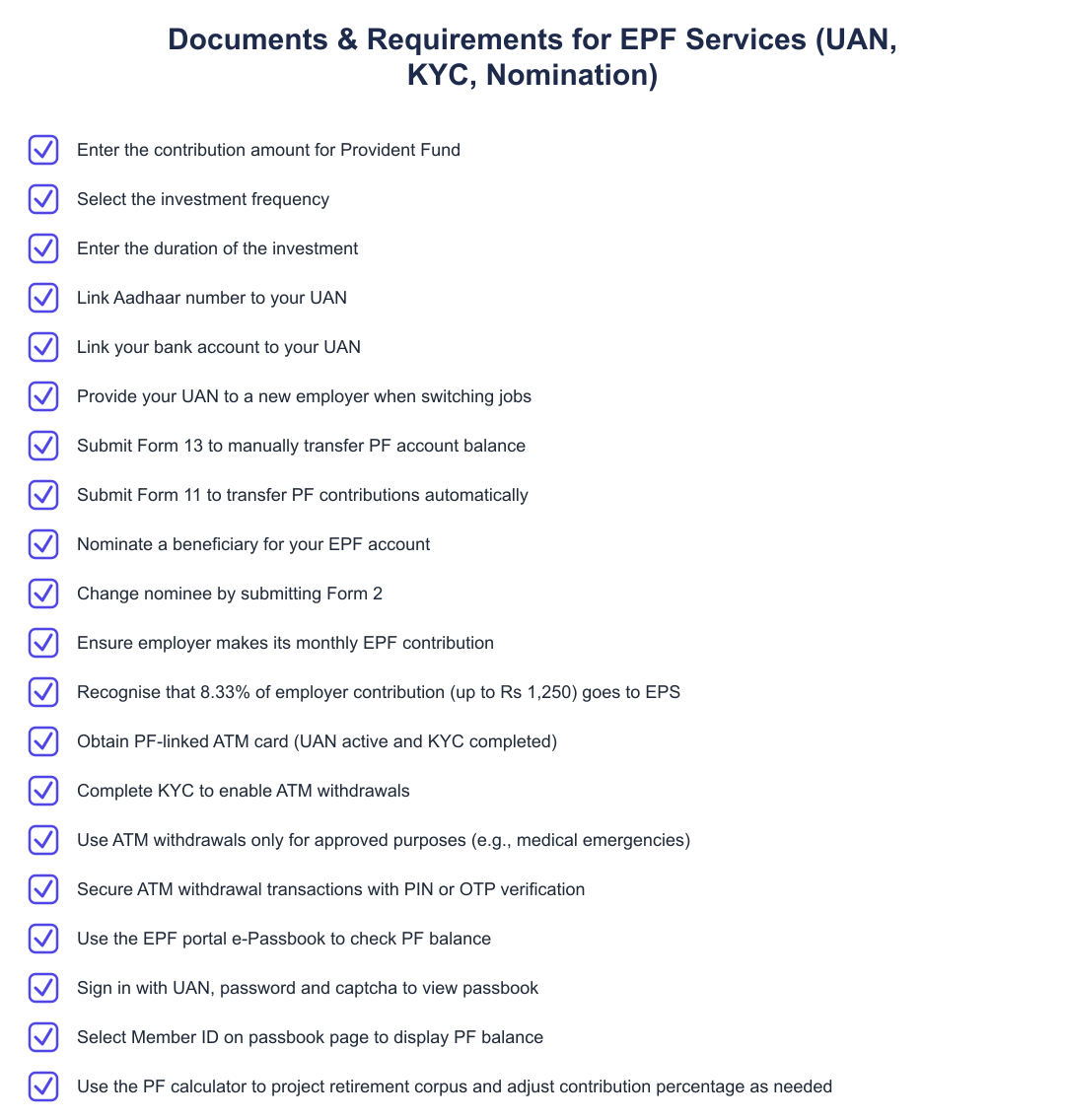
Members must link their Aadhaar number and bank account to their Universal Account Number (UAN). The UAN is the primary identifier that keeps your PF records portable across employers: you do not have to withdraw or close your EPF account when you change jobs, simply provide your UAN to the new employer and the new PF number will be mapped to your existing UAN.
You can nominate anyone to receive the balance in your EPF account; in the event of the account holder’s death, the nominee is entitled to the account balance. If you need to change your nominee, you can do so by submitting Form 2. Finally, the EPFO provides online access for members to check account balance, track transfer requests and claim or withdrawal status, and raise grievances using its portal or the UMANG app, reducing the need for offline submissions.
How to Check PF Balance
Visit the official EPFO portal and sign in using your UAN and password to access member services.
Select the 'e-Passbook' option after signing in; this provides a consolidated view of your PF transactions and current balance.
On the passbook page, select the relevant Member ID to view the PF balance and contribution history for that account.
An EPF calculator is a practical first step in retirement planning, but its projections should be interpreted alongside official scheme rules and account details. Use the calculator to model scenarios, verify the assumptions (notably the annual interest rate set by EPFO), and manage your account proactively, link Aadhaar and bank details to your UAN, keep your nomination updated via Form 2, and use the EPFO portal or UMANG app to monitor balances, transfers and claims.
Frequently asked questions
What is an EPF calculator and why should I use it?
An EPF calculator is an online tool that estimates your Provident Fund (PF) savings at retirement by projecting contributions and interest over time. It uses your monthly contribution, contribution frequency, applicable interest rate, and investment duration to compute the accumulated EPF corpus so you can plan retirement goals and adjust contributions if needed. The calculator helps with immediate tracking of total contributions and interest accrued, and lets you see how increasing your contribution percentage or changing the retirement age affects the final corpus. This makes it useful for salaried individuals who want to optimise retirement savings alongside other investments.
How does the EPF calculator formula work?
The EPF calculator uses a compound interest formula that adds monthly contributions and accrues interest periodically to project the final balance at retirement. Typically it sums employee and employer contributions each period, applies the prevailing annual interest rate (for example, EPF interest was 8.25% for FY 2025-26) converted to the calculation frequency, and compounds over the total number of periods (years or months) until retirement. The formula can also separate the Employer Pension Scheme (EPS) contribution (about 8.33% of employer contribution up to Rs 1,250) from the EPF corpus because EPS is used for pension calculation rather than the lump-sum EPF balance. Many calculators let you change contribution percentage, frequency and duration to model different scenarios.
What inputs do I need to use the PF calculator?
You need to enter your monthly PF contribution amount, select the contribution or investment frequency (monthly/annual), and specify the duration of investment or years until retirement. Optionally you may provide your current basic salary and dearness allowance so the tool can compute the statutory 12% employee contribution and employer splits (for example, employer EPF 3.67% and employer EPS 8.33% of basic up to limits). Some calculators also ask for the expected annual interest rate and current EPF balance so they can give a more accurate projected corpus. Make sure your UAN-linked details like current balance are accurate if you add the existing balance for projection.
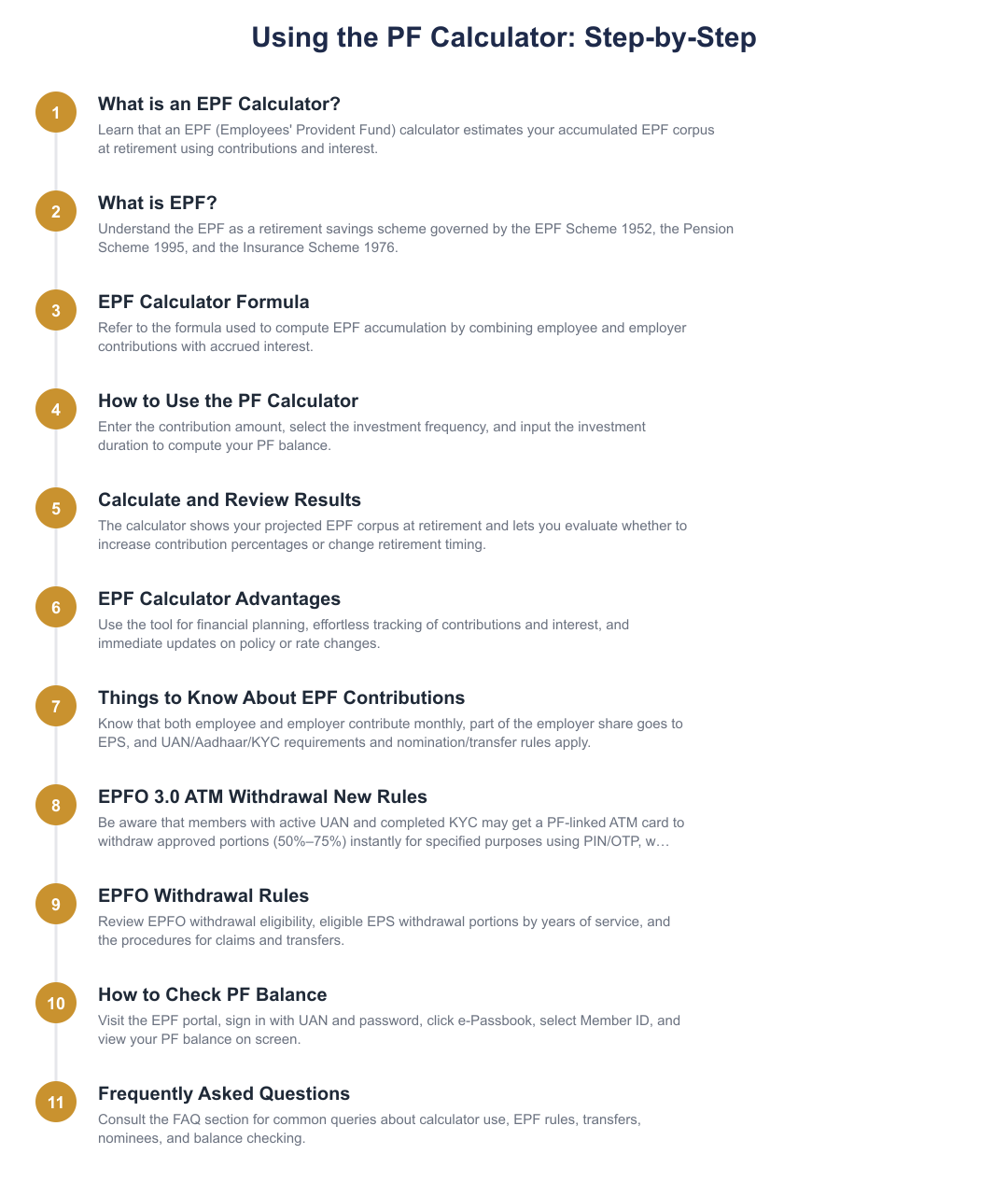
How do I use the PF calculator step by step?
To use the PF calculator, enter the contribution amount, choose the investment frequency (e.g., monthly), and enter the duration of the investment or years until retirement. The calculator will then compute the accumulated EPF funds by compounding contributions and interest over the selected period and show you the projected corpus at retirement. Many tools also let you adjust contribution percentage or interest rate to run ‘what-if’ scenarios so you can evaluate whether to increase contributions or delay retirement. Results typically display total contributions, interest earned, and the final corpus split between EPF and any EPS portion if applicable.
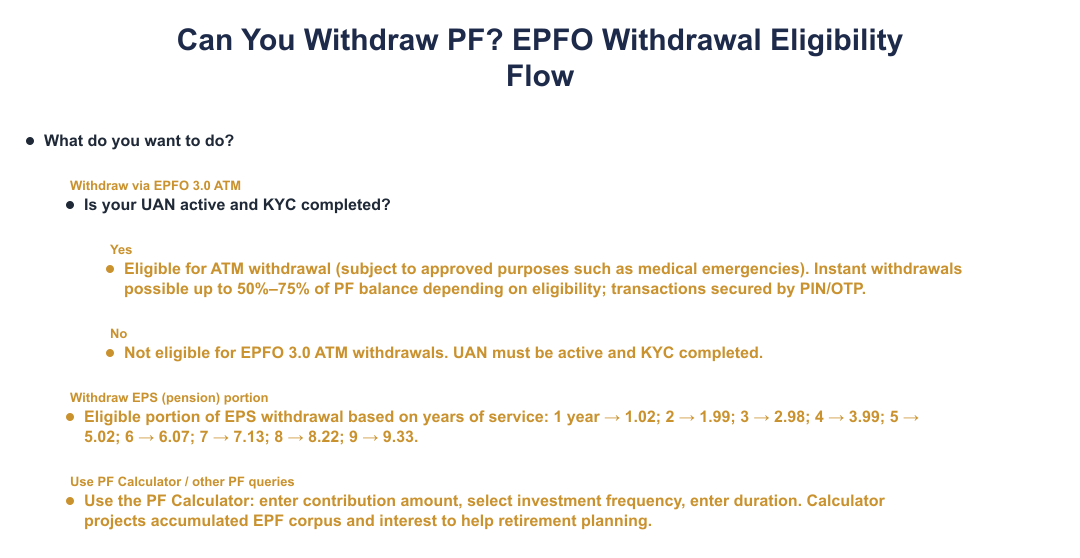
What are the EPFO 3.0 ATM withdrawal rules I should know about?
EPFO 3.0 ATM withdrawal will give members a PF-linked ATM card to access balances and make withdrawals instantly without filing a claim, subject to conditions and purpose limits. Withdrawals will allow up to about 50%–75% of the PF balance based on eligibility, require an active UAN and completed KYC, and will be permitted only for approved purposes like medical emergencies; transactions will be secured using PIN or OTP. The rollout is expected in phases with a target by mid-2026, and access will depend on EPFO approvals and compliance with the new system’s security checks. Note that full withdrawal rules, limits and exact eligibility criteria will be defined by EPFO as the feature is implemented.
How much do employer and employee contribute to EPF, can you give an example?
Both employer and employee contribute to EPF, with the standard employee contribution being 12% of basic salary plus dearness allowance and the employer contributing a matching amount, though the employer’s share is split between EPF and EPS. For example, if basic + DA = Rs 14,000, the employee contribution at 12% is Rs 1,680; the employer’s EPF contribution shown here is 3.67% (Rs 514) and the employer’s EPS contribution at 8.33% is Rs 1,166 (subject to the EPS ceiling). About 8.33% of the employer’s contribution (up to Rs 1,250) goes to the Employee Pension Scheme (EPS) while the remainder goes into the EPF account, and EPFO sets interest rates each year for the EPF corpus.
What are the EPFO rules for withdrawing PF and when can I withdraw?
You can withdraw EPF subject to EPFO rules which permit full or partial withdrawals for specific reasons, with some conditions on service length and purpose; full withdrawal is generally allowed at retirement or unemployment beyond certain periods. Partial withdrawals (loans or advances) are allowed for purposes such as medical emergencies, education, or home purchase subject to limits and eligibility; EPS rules determine pension eligibility and portions. You must usually ensure your UAN is active and KYC is updated to file online claims through the EPFO portal or UMANG app, and forms like Form 13 (transfer) and Form 11 (nomination/details) are used for transfers and updates; timing and tax implications depend on continuity of service and withdrawal type. Always verify the latest EPFO notifications because rules and permissible withdrawal percentages may change.
How can I check my PF balance online step by step?
You can check your PF balance online via the EPF portal by using the e-Passbook option: sign in with your UAN and password, click ‘Passbook’, select your Member ID and your PF balance will be displayed. Alternatively, you can use the UMANG app or EPFO services to view balance, transfer requests, claim status and raise grievances if needed, provided your UAN is active and KYC details like Aadhaar and bank account are linked. Keep your UAN password secure and ensure Member ID selection corresponds to the correct employer period when viewing historic balances. If you face issues, reach out to your employer or EPFO grievance portal for help.
What important things should I know about EPF contributions, nomination and transfers?
EPF contributions come from both employee and employer, employees contribute 12% of basic+DA and employers match contributions but redirect about 8.33% (up to Rs 1,250) to EPS for pension; these contributions continue when you change jobs via the same UAN. You must link Aadhaar and bank account to your UAN and can nominate anyone for your EPF account (changing nomination requires Form 2); on switching jobs you can transfer your PF balance using Form 13 or provide Form 11 for automatic transfer of future contributions. You do not have to withdraw PF when changing employers; maintain your UAN to keep continuity and use EPFO online services or UMANG app to check balance, transfer status, claims and grievances.
How does EPS eligible withdrawal portion vary with years of service?
The eligible portion of EPS withdrawal increases with years of service according to EPFO tables that determine pension entitlement; for example, after 1 year the eligible portion is 1.02 units, after 5 years it is 5.02 units, and after 9 years it is 9.33 units as per the provided schedule. This table reflects how the EPS payout factor or eligible portion grows with completed years of service and is used when calculating pension or commuted amounts on exit. Exact pension and withdrawal amounts also depend on your pensionable salary, total years of service, and prevailing EPS calculation rules, so use the EPS schedule or EPFO tools to compute precise payouts.
Need help staying Calculators compliant?
MoneyGence's AI Finance OS tracks your compliance, wallet share, and finances in one place, built for agencies and growing businesses.
Get started with MoneyGence