Invoice Templates India, ERP, Excel, Word, PDF & Google
Choosing the right invoice template is one of the simplest decisions that can have an outsized impact on cash flow, recordkeeping and professional perception. This guide explains what you will learn: how to evaluate the invoicing format that best fits your business, the common template types used in India, and the practical advantages and limitations of each option. Whether you run a solo practice, a small enterprise, or a larger firm, the invoice format you pick affects ease of use, the ability to customise, accuracy of calculations, and how well the document integrates with your bookkeeping and tax compliance processes. By the end of this guide you will be able to compare pen-and-paper invoices, word processor and spreadsheet templates, cloud-based docs, PDFs, and dedicated invoicing tools, and make an informed choice based on your operations, customers and compliance needs. The goal is to help you select a template that simplifies billing, reduces errors, and presents a consistent commercial image to your clients.
Deciding which invoicing template best suits your business
Selecting an invoice template begins with understanding your business needs rather than the tool itself. Consider factors such as how many invoices you will issue, whether you need automated calculations, how you store records, and whether invoices must integrate with other systems. The right template should reduce repetitive work, minimise manual entry errors, and support whatever documentation your clients or statutory processes require.
Customer expectations and the nature of your products or services should also influence your choice. If you sell simple goods with standard pricing, a basic template could work; for services with variable time or material components, a more flexible template with line-item detail and clear description fields is useful. Also weigh the importance of branding, some templates let you add logos and styling, while others prioritise functionality and speed.
Finally, think about scalability and collaboration. A solution that is easy for a single owner to use may become cumbersome as the business grows. Templates that live in cloud platforms or integrate with accounting tools typically make it easier to share access, track invoice status, and maintain consistent records across a team.
Pen and Paper
Pen-and-paper invoices are the most basic form of billing and can be useful for very low-volume, face-to-face transactions. Their main advantage is immediacy: an invoice can be produced at the point of sale without any digital device. This makes them convenient in informal settings or where digital infrastructure is limited.
However, handwritten invoices carry clear drawbacks. They are prone to legibility issues, arithmetic mistakes and inconsistency in format. Managing paper invoices for storage, retrieval and audit purposes increases administrative overhead. For businesses that need accurate records, frequent invoicing, or digital sharing, paper-based templates usually become inefficient quickly.
Invoicing in Word
Word-processor templates offer a middle ground between informal paper bills and fully digital invoice systems. They provide good control over layout and branding, allowing businesses to include logos, letterheads and custom text fields. For users comfortable with document editing, these templates are simple to adapt to different customer situations.
On the flip side, word-processor invoices are not optimised for numerical accuracy or bulk invoicing. Manual entry increases the risk of calculation errors, and tracking invoice status or extracting data for accounts can be time-consuming. Word templates work best for occasional invoices or when presentation and customized text are primary concerns.
Invoicing in Excel
Spreadsheet templates are widely used because they combine formatting flexibility with built-in calculation features. With spreadsheets you can create line-item tables, apply formulas for totals and taxes, and maintain a ledger of invoices. This makes them particularly useful for businesses that need accurate arithmetic and a degree of automation without adopting specialised software.
Spreadsheets can grow cumbersome when multiple people need access or when you need to sync data with other systems. Care is also needed to prevent accidental modification of formulas. Still, for many small businesses, a well-designed spreadsheet template provides a reliable balance of control, functionality and affordability.
Google Docs invoicing
Cloud-based document templates combine the presentation of word processors with the convenience of online access. Using a cloud doc for invoices allows real-time collaboration, easy sharing with clients, and centralised storage so documents are accessible from multiple devices and locations.
The main limitation is that cloud documents are generally not geared for numeric automation the way spreadsheets are. For invoices that require calculations or bulk issuance, pairing cloud docs with a spreadsheet or a specialised tool tends to be a better approach. Nevertheless, cloud document templates are excellent when you want editable, shareable invoices with a strong emphasis on layout and messaging.
Google Sheets invoicing
Online spreadsheet templates provide calculation power along with accessibility. A cloud spreadsheet can store records, auto-calculate totals, and be shared with team members or advisors. Because they run in a browser, they also reduce the risk of version conflicts that happen with local files circulated by email.
As with offline spreadsheets, ensure you protect formula cells and manage access rights to prevent accidental edits. When used with other cloud services, online spreadsheets can also be part of larger workflows, such as linking invoice records to inventory or client databases.
PDF invoicing
PDF invoices are a common final format for sending bills to customers because they preserve layout and are not easily altered by recipients. Converting invoices to PDF helps create a consistent, professional document for delivery by email or download.
Generating PDFs from templates, whether from a word processor, spreadsheet or invoicing tool, also aids archiving and audit trails. The trade-off is that PDFs are not editable for corrections without specialised tools, so it’s helpful to keep editable source files and clear version control practices.
Invoicing tools
Dedicated invoicing tools consolidate template design, automated calculations, customer management and payment tracking into a single platform. They reduce manual tasks like repeating line items, calculating totals, and maintaining a customer ledger. Many tools also provide options to customise invoice appearance while enforcing consistent fields across all bills.
These solutions are especially useful for businesses that issue invoices regularly or want to integrate billing with accounting, inventory or payment gateways. While such platforms can offer efficiency gains, evaluate whether the feature set and access model match your volume and complexity before committing.
Advantages of using invoicing templates
Using standard templates brings consistency and professionalism to billing. Templates ensure that every invoice contains the essential information customers expect and makes it easier for your finance team to reconcile payments, file records, and prepare for tax or audit activities.
Templates also improve efficiency: preset fields and formulas reduce repetitive data entry and help avoid errors in amounts and calculations. When templates are stored in cloud systems or integrated tools, they additionally enable collaboration, faster delivery to clients, and easier tracking of outstanding invoices.
There is no single ‘best’ invoice template, the right choice depends on your transaction volume, need for automation, desire for branding, and how you keep records. Start by mapping your invoicing needs, choose a format that balances accuracy and convenience, and keep a consistently branded, auditable approach. As your business evolves, be prepared to migrate to a more automated or integrated solution to save time and reduce errors.
Frequently asked questions
What types of invoice templates are commonly used in India?
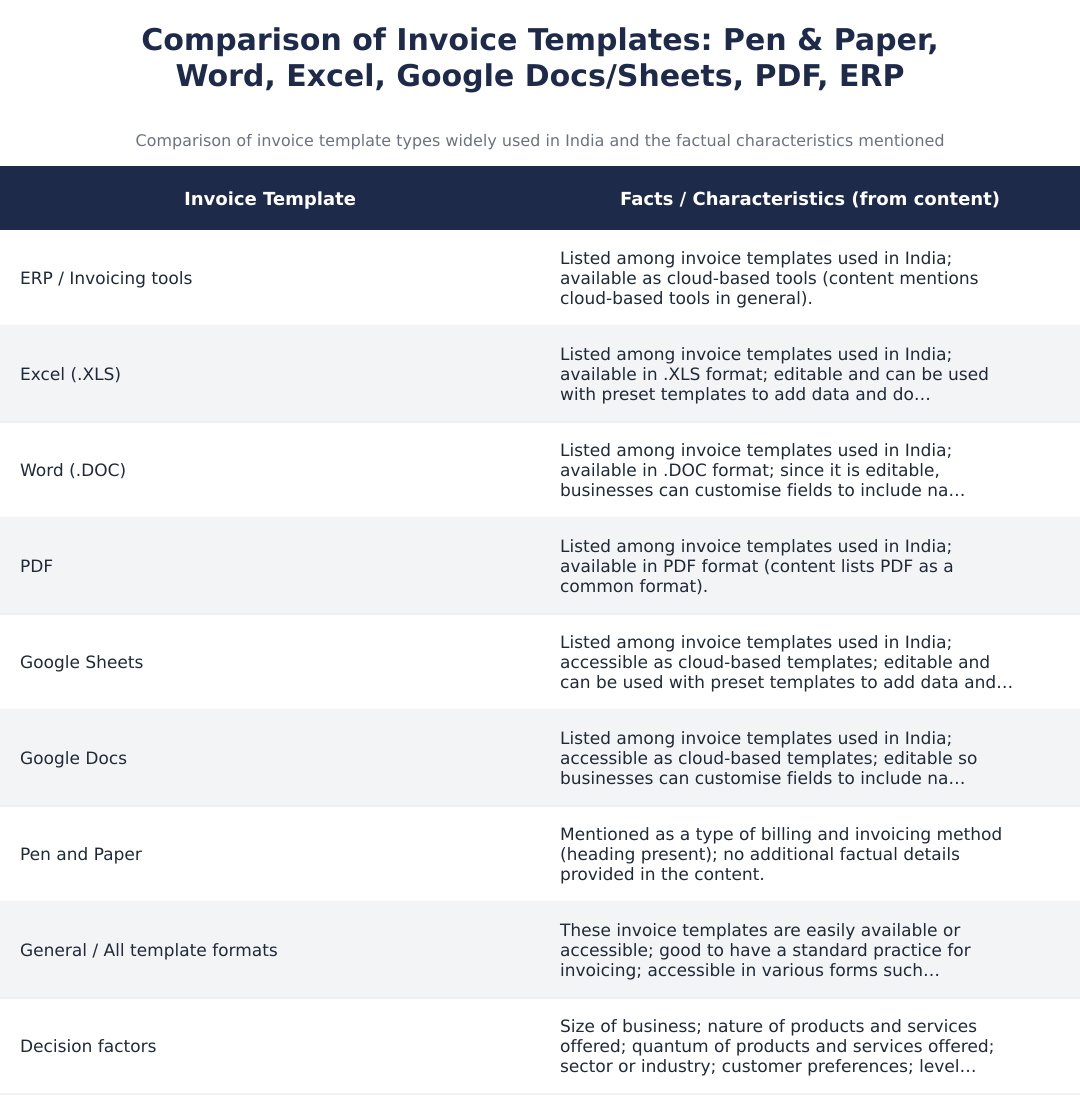
Common invoice templates used in India include ERP-generated invoices, Excel and Word templates, PDF invoices, Google Sheets and Google Docs templates. ERP systems are suited for larger businesses needing automation, while Excel/Word are popular for customizable offline use; Google Sheets/Docs offer cloud collaboration; PDFs are ideal for fixed, non-editable final invoices. Many businesses choose templates based on scale, tax compliance (like e-invoice or e-way bill requirements), and customer preferences.
How do I decide which invoicing template best suits my business?
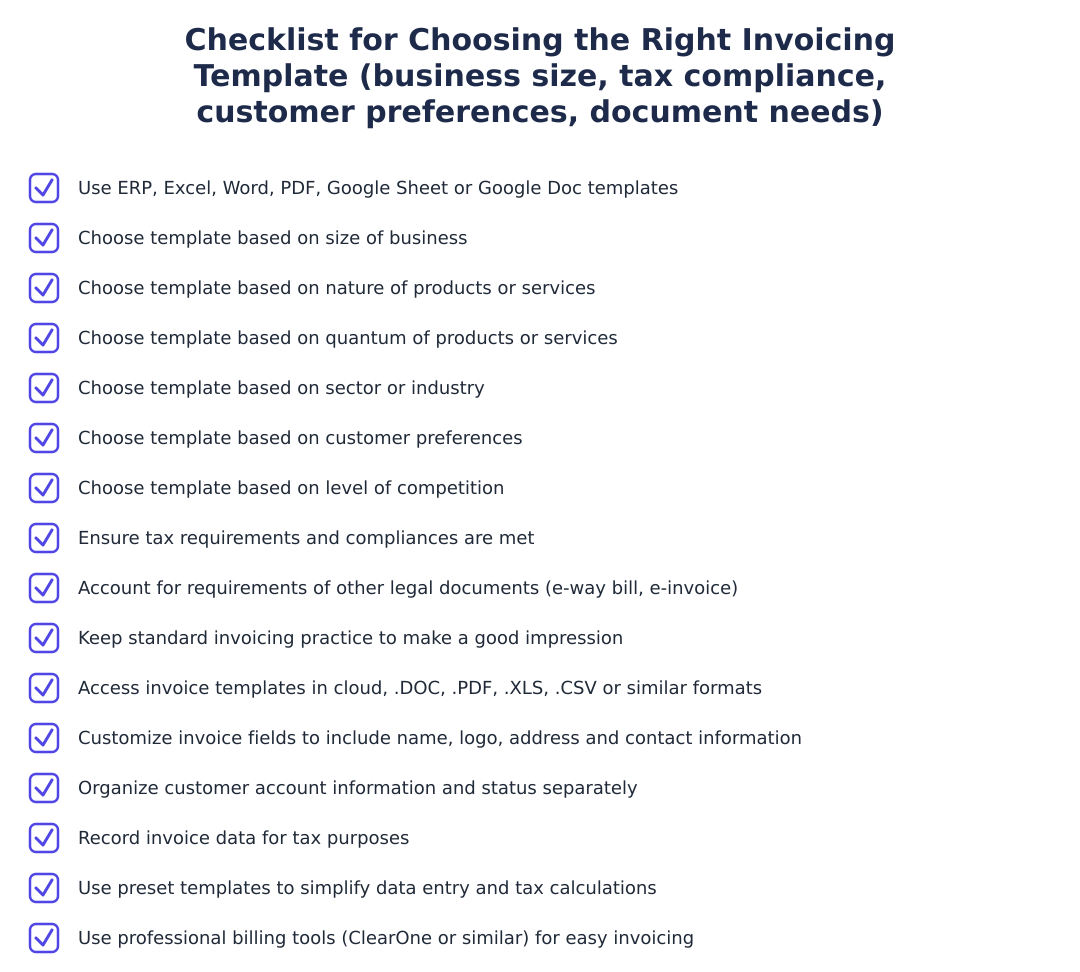
Choose an invoicing template based on your business size, nature and volume of products/services, industry sector, customer preferences, competition, tax requirements and other legal document needs like e-invoices or e-way bills. For example, small freelancing businesses may prefer simple Word or Google Docs templates, medium enterprises often use Excel or Google Sheets with formulas, and large businesses usually adopt ERP systems with integrated GST and e-invoice capabilities. Also factor in whether you need cloud access, multi-user collaboration, automated calculations, and record-keeping for tax audits.
Is pen-and-paper invoicing still a valid option in India?
Pen-and-paper invoicing is still used by some very small or informal businesses but has clear limitations compared to digital templates. It lacks easy record-keeping, automated tax calculations, and is harder to store or share securely; it may not meet formal GST documentation needs where digital records are preferred or mandatory for e-invoicing thresholds. For better professionalism and compliance, most businesses transition to Word, Excel, PDF or cloud-based templates that can be saved, backed up and integrated with accounting systems.
What are the benefits of using Word invoice templates?
Word invoice templates are easy to customize for branding, contact details and invoice fields and are suitable for businesses that need a printable, editable layout without complex calculations. They work well for simple billing needs and client-facing documents, and can be converted to PDF for secure sharing; however, they do not perform automatic math, so manual calculation increases risk of errors. Use Word when presentation and customization matter more than automated accounting features.
When should I use Excel invoice templates instead of Word?
Use Excel invoice templates when you need built-in calculations, itemized totals, tax computation and basic tracking of invoice data; Excel is ideal for medium-sized operations that require numeric accuracy and running summaries. Excel templates support formulas for GST, discounts, subtotals and can be extended into basic bookkeeping, but they are less collaborative than cloud options unless shared via Drive or SharePoint. Choose Excel if automating calculations and maintaining ledger-like records are priorities.
What are the advantages of using Google Sheets or Google Docs for invoices?
Google Sheets and Google Docs provide cloud-based, collaborative invoice templates that multiple users can edit in real time and are accessible from any device with internet access. Google Sheets adds calculation capability similar to Excel (useful for GST math and summaries), while Google Docs is better for polished, printable invoices; both can be exported to PDF for secure client delivery. They also help with version control and easy sharing, which is useful for remote teams and clients.
When should I use PDF invoices and what are their benefits?
Use PDF invoices when you need a non-editable, professional final invoice that preserves layout and prevents accidental changes during transmission. PDFs are widely accepted by clients and tax authorities as official documents, can be generated from Word/Excel/Google templates, and are suitable for emailing or archiving; however, they are not editable for quick adjustments and require source files for updates. PDFs are recommended for sending final bills after verification and for maintaining immutable records for audits.
What are invoicing tools and when should I upgrade to them?
Invoicing tools are cloud or desktop software (including full ERP systems) that automate invoice generation, GST calculations, customer ledgers, e-invoice and e-way bill integration, and reporting; upgrade when your transaction volume, compliance needs or need for automation outgrow manual templates. Small businesses might start with templates and move to accounting or invoicing tools as they scale to reduce errors, ensure timely GST compliance and integrate with banking or ERP workflows. Choose tools that support Indian GST features, bulk invoicing, and export/import with your accounting processes.
What are the main advantages of using invoice templates?
Invoice templates save time, ensure consistency and make tax calculations and record-keeping easier by providing editable, standardised formats that can include logos, GST details and customer fields. They help maintain professional presentation, organise customer account information, facilitate tax filing and reduce arithmetic errors when preset formulas are used, and are available in cloud or common file formats like .DOC, .XLS, .CSV or PDF. Templates also make it simpler to scale processes, customise fields for legal requirements such as e-way bills, and improve the customer experience with consistent invoices.
Need help staying Finance Templates compliant?
MoneyGence's AI Finance OS tracks your compliance, wallet share, and finances in one place, built for agencies and growing businesses.
Get started with MoneyGence