How to Verify MSME Registration of Vendors: Step-by-Step Guide
This guide explains practical ways to check whether your suppliers and service providers are registered as MSMEs and why that verification matters for buyer organisations. You will learn where MSME registration records are available, the limits of public search tools, and a simple, defensible approach to collecting and retaining vendor registration evidence. The goal is to help procurement, accounts payable and compliance teams build a vendor verification routine that reduces legal and operational risk while creating an auditable trail. Accurate knowledge of a vendor’s MSME registration affects multiple compliance touchpoints under the Micro, Small and Medium Enterprises Development Act, 2006 and related company-level reporting referenced in the Companies Act, 2013. Because some government portals allow MSMEs to self-register and download certificates but do not provide a public lookup for third parties, buyer organisations must rely on vendor-supplied documentation and internal recordkeeping. This guide focuses on reliable sources of information, what those sources do, and do not, offer, and a practical process you can adopt immediately to capture and store MSME evidence from your vendors.
Why verifying vendor MSME status matters
Verification of a vendor’s MSME registration is an important compliance control for organisations. Where laws and company-level reporting reference MSME status, buyers need a reliable record showing whether a vendor is registered. Absent that evidence, procurement and accounts teams may not be able to demonstrate the steps they took to identify MSME suppliers.
Because MSME registration is initiated by the enterprise itself, a buyer’s primary responsibility is to collect and retain whatever certificate or documentary proof the vendor provides. That evidence supports any internal categorisation of vendors and creates an audit trail for compliance teams and company officers who must consider obligations under the Micro, Small and Medium Enterprises Development Act, 2006 and related filings under the Companies Act, 2013.
What the official portals do, and what they don’t provide
| Portal / Source | What it does | Limitations for buyers |
|---|---|---|
| Udyam Registration Portal | Allows MSMEs to self-register and download their own certificate. | Not searchable by third parties. |
| MSME Samadhaan Portal | Allows MSMEs to file delayed payment complaints against buyers. | Does not offer buyer-side vendor lookup. |
| Ministry of MSME Website | Contains policy information and schemes. | Does not provide registration verification for third parties. |
A simple process to check and document vendor MSME registration
Ask vendors to provide a copy of their Udyam registration certificate (the document they download after self-registration). This is the primary evidence a buyer can hold because public lookup is not available.
Keep a dated copy of the certificate and retain the correspondence as proof of evidence received or not received. Internal records should show whether the vendor supplied the certificate or denied registration.
Use a vendor register to track the presence or absence of a registration certificate and to store the certificate copy so compliance and accounts teams can refer back to it when required under company reporting obligations.
How these checks align with legal references
The Micro, Small and Medium Enterprises Development Act, 2006 establishes the framework for MSME-related rights and processes. For buyers, that framework is the reason why documenting whether a supplier is an MSME matters in the first place.
Company-level reporting and compliance obligations referenced under the Companies Act, 2013 can require a clear trail of how a company treated its vendors. While neither Act prescribes a specific public lookup mechanism for buyers, maintaining supplier-provided certificates and correspondence helps organisations demonstrate a proactive compliance approach.
Practical tips and common pitfalls
Do not assume public portals allow third-party searches. Because the Udyam portal and other official services are designed primarily for MSMEs to self-register and manage their certificates, buyers cannot rely on an online search function to confirm a vendor’s status.
Make vendor-supplied certificates the cornerstone of your vendor file. If a vendor cannot or will not provide a copy of their registration document, treat that absence as a gap in your evidence and record it accordingly so decisions about supplier categorisation and reporting are based on documented facts.
Because official portals do not provide a public lookup for third parties, buyer organisations should build simple, documented routines to request, collect and store Udyam registration certificates from vendors. Treat vendor-supplied certificates as primary evidence and maintain an internal register so procurement, accounts and compliance teams can demonstrate consistent, auditable practices aligned with MSME-related legal references.
Frequently asked questions
How can I quickly check if a vendor is MSME-registered when there is no public lookup portal?
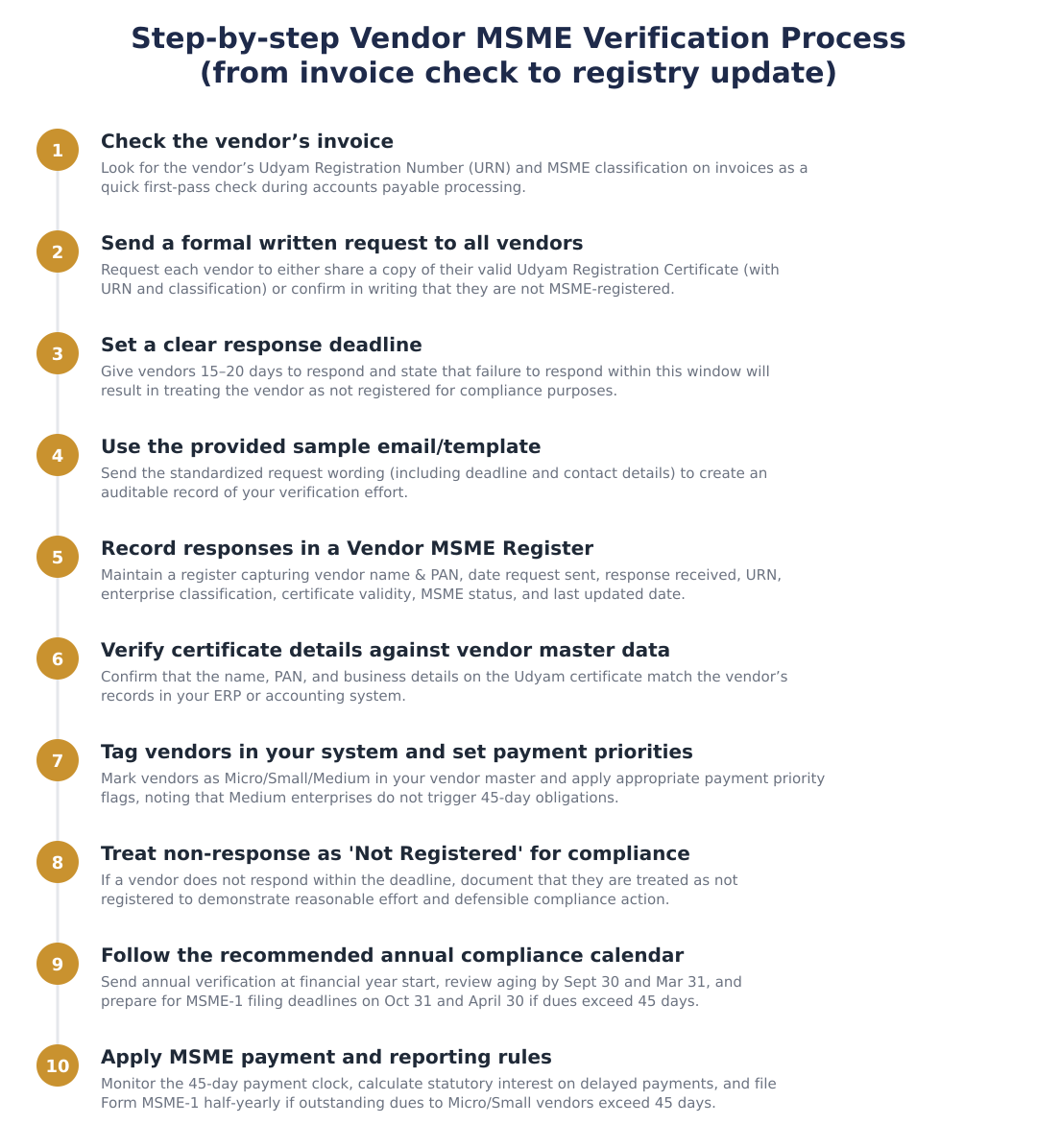
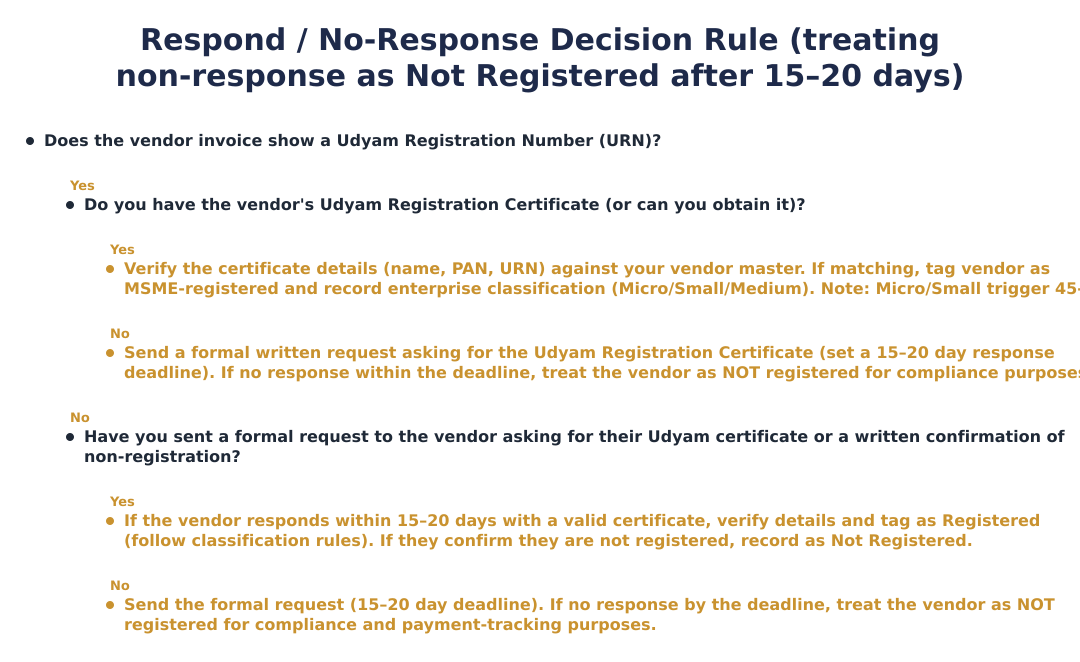
Check the vendor’s invoice for a Udyam Registration Number (URN) and then request a copy of their Udyam Registration Certificate for verification. Many MSME-registered vendors print the URN and classification (Micro/Small/Medium) on invoices, which is a quick first-pass; however invoice disclosures are self-reported and not independently verifiable. Always match the certificate details (name, PAN, business address) to your vendor master data before treating the vendor as registered. If the vendor does not provide the certificate on request, treat them as not registered for compliance purposes.
What is the most legally defensible way to verify MSME status of all my suppliers?
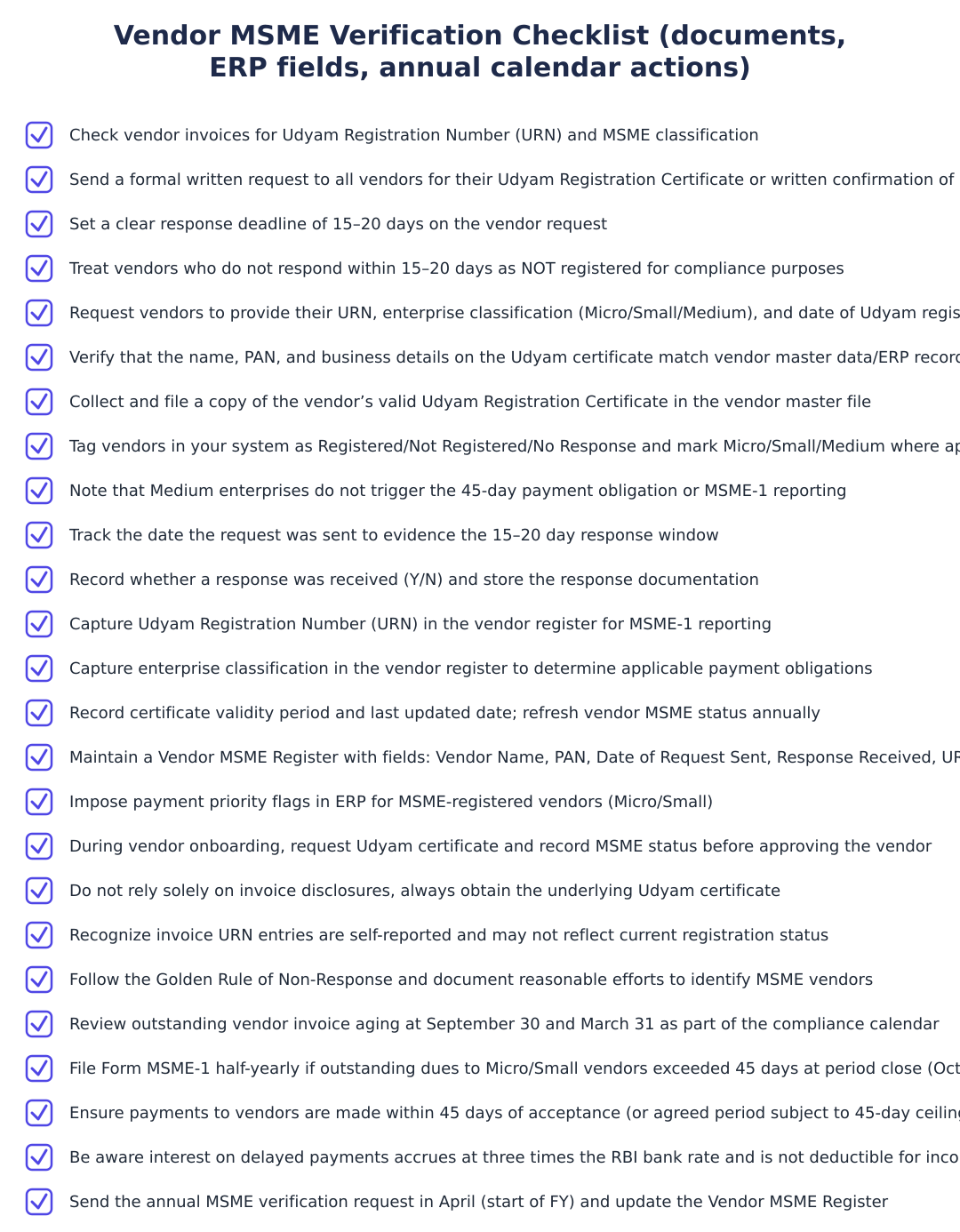
The most legally defensible method is to send a formal written request to every vendor asking for their Udyam Registration Certificate or a written confirmation that they are not registered, and keep proof of the request and responses. Set a clear response deadline of 15–20 days and record the date the request was sent and whether a response was received; if no response arrives within that window, treat the vendor as not registered. Maintain a Vendor MSME Register with fields such as vendor name, PAN, URN, enterprise classification, certificate validity, MSME status (Registered/Not Registered/No Response) and last updated date. This demonstrates reasonable effort and creates an audit trail for compliance and MSME-1 filing decisions.
What should I do if a vendor does not respond to my MSME status request within 20 days?
If a vendor does not respond within the 15–20 day deadline, treat the vendor as NOT registered under MSME for all compliance and payment-tracking purposes. This is the recommended practical and legally defensible position in the absence of a government lookup portal, and you should document the non-response in your Vendor MSME Register. Treating non-responders as not registered helps you correctly determine payment timelines, avoid incorrectly omitting MSME-1 filings, and demonstrate due diligence if queried by regulators or auditors.
Do I need to collect the Udyam Registration Certificate from every vendor or is the invoice enough?
You should collect the actual Udyam Registration Certificate from every vendor who claims MSME status; the invoice alone is not sufficient evidence. Invoice disclosures are self-reported and cannot be independently verified without the underlying certificate, and vendors may change classification over time. Verify that the name, PAN and address on the certificate match your ERP/vendor master and then tag the vendor as Micro/Small/Medium in your system with appropriate payment flags. Retain the certificate in your vendor file to support MSME-1 filings and interest/payment compliance reviews.
What happens to my payment obligations if a vendor is a Micro or Small enterprise?
If a vendor is classified as Micro or Small, you must pay within 45 days of acceptance of goods or services (or within the agreed period subject to a 45-day ceiling) and report outstanding dues beyond 45 days in Form MSME-1 when applicable. Statutory interest accrues automatically at three times the RBI bank rate on any unpaid amount beyond 45 days, and interest paid for delayed MSME payments is not deductible as a business expense under the Income Tax Act. Note that Medium enterprises do not trigger the 45-day payment obligation or MSME-1 reporting, only Micro and Small vendors create those statutory obligations.
When should I file MSME-1 and what vendor data do I need for it?
You must file Form MSME-1 half-yearly (by October 31 for April–September and by April 30 for October–March) if there are outstanding dues to Micro or Small enterprise vendors exceeding 45 days at the half-year cutoff. For filing you need vendor details such as name, PAN, Udyam Registration Number (URN), enterprise classification (Micro/Small), invoice dates and amounts, and the ageing of outstanding dues. Maintain an annual compliance calendar, send verification requests in April, review ageing by September 30 and March 31, and update your Vendor MSME Register before each filing deadline.
What fields should I maintain in a Vendor MSME Register to be audit-ready?
Maintain fields including Vendor Name & PAN, Date of Request Sent, Response Received (Y/N), Udyam Registration Number (URN), Enterprise Classification (Micro/Small/Medium), Certificate Validity Period, MSME Status (Registered/Not Registered/No Response), and Last Updated date. These fields evidence that you sent requests, tracked responses within the 15–20 day window, verified certificate details, and treated non-responders appropriately; they also feed directly into MSME-1 filing decisions and payment-priority flags in your ERP. Refresh the register annually and whenever vendor details change to remain compliance-ready.
Can I rely on government portals to verify a vendor’s MSME status?
No single government portal provides a public lookup for third-party verification of Udyam registrations; the Udyam Registration Portal and related platforms allow self-registration and certificate download by the enterprise but are not searchable by buyers. Portals like Udyam Assist and MSME Samadhaan serve registration facilitation and dispute resolution respectively but do not offer buyer-side lookup functionality. Therefore, obtaining and verifying the vendor’s Udyam Registration Certificate and maintaining documentation is the practical approach for buyers.
Is there a sample email I can use to request MSME status from vendors and what should it say?
Yes, use a concise, action-oriented email that asks for either a copy of the valid Udyam Registration Certificate with URN and enterprise classification if they are registered, or a brief written confirmation that they are not registered, and give a clear deadline 15–20 days from the email date. The sample subject could be: 'Request for MSME / Udyam Registration Status, Action Required', and the body should state the compliance reason, list the two response options, mention that non-response by the deadline will be treated as not registered, and provide a contact person for queries. Save the sent email and any responses to support your Vendor MSME Register and compliance audits.
Need help staying MSME compliant?
MoneyGence's AI Finance OS tracks your compliance, wallet share, and finances in one place, built for agencies and growing businesses.
Get started with MoneyGence