GST Registration Deficiency Notice Reply: How to Respond Quickly
This guide explains how to respond if tax officials issue a notice seeking information or pointing out deficiencies in your GST registration application, with a specific focus on the single verified compliance requirement: GST registration is PAN-based. Many notices relate to mismatches between the GST application and information held against a PAN. Understanding what PAN-based registration means, how PAN-related mismatches arise, and what to correct in your reply will help you resolve notices quickly, reduce delays in obtaining registration, and lower the risk of further queries. You will learn what to check in your records before drafting a response, how to align your application data with PAN records, and practical considerations to make your reply clear and verifiable to the tax officer. This guide is aimed at business owners, tax professionals, and authorized signatories who are filing or have filed GST registration and who want to minimise back-and-forth with tax authorities by ensuring PAN-related data is consistent and accurate.
Why PAN-based GST registration matters
GST registration in India is tied to the PAN (Permanent Account Number) of the applicant. Because the registration system references PAN records, any discrepancy between the details you enter in the GST application and the details available against the PAN can trigger a notice from tax officials asking you to rectify or explain the mismatch.
Practically, this means the core identity details used in the GST application, such as the PAN itself, the legal name associated with that PAN, and the constitution of the business as recorded for the PAN, must correspond to official PAN records. A notice related to deficiencies often arises when those fields do not match, or when the PAN is not in an active or valid state according to PAN data.
How to prepare your reply when you receive a notice
Before drafting a reply, verify the PAN details you used in the GST application against the authoritative PAN records. Confirm that the PAN number entered is correct, that the legal name and constitution of the business in your application match the details shown in PAN records, and that the PAN itself is not cancelled. Since PAN forms the primary anchor for GST registration, resolving any inconsistency here should be your first step.
In your response to the tax official, clearly point out the actions you have taken to reconcile the GST application with PAN records. If the application contained a typographical error in the PAN or name fields, state that explicitly and indicate the corrected details. If the PAN record itself requires correction, explain that you are taking or have taken steps to update PAN data (mentioning only that PAN data must be corrected, do not include timelines or external steps beyond the PAN alignment). Keep the reply focused on aligning the GST application fields with the PAN data to demonstrate that the registration now reflects the same identity.
Common PAN-related issues that trigger notices
Notices commonly arise when details submitted in the GST application do not match PAN records. Examples include entering an incorrect PAN number, using a legal name or business constitution that differs from the PAN record, or attempting registration using a PAN that is not valid in the issuing database. Any such inconsistency will prompt the tax official to seek clarification because the GST system depends on PAN as the primary identifier.
When you receive a notice pinpointing a PAN-related deficiency, focus your response on demonstrating consistency between the GST application and PAN records. Provide the corrected PAN-aligned details in your reply and indicate that the GST application has been updated to mirror the PAN record. This direct approach addresses the core reason for the notice and helps the official close the query without broader follow-ups.
Precautions to avoid PAN-related notices
Since GST registration is PAN-based, take time before submission to ensure the PAN number, the exact legal name, and the constitution of the business in your GST application match the PAN database entries. A careful pre-submission check reduces the likelihood of receiving a deficiency notice and speeds up the overall registration process.
If you are preparing applications on behalf of clients or multiple entities, adopt a standard verification step that cross-checks the PAN data you will enter against the official PAN record. Prioritise alignment of identity fields rather than relying on memory or documents that differ from the PAN database; resolving discrepancies at source is the most effective way to avoid notices.
Because GST registration is anchored to PAN, most registration notices about deficiencies can be resolved by ensuring the GST application mirrors PAN records exactly. Verify the PAN, legal name and business constitution before filing, and when replying to any notice, make PAN-aligned corrections the focus of your response. This targeted approach will address the root cause of many queries and help obtain a clean registration outcome.
Frequently asked questions
Why did I get a GST notice asking for clarifications on my registration application?
You received a GST notice for clarifications because the tax officer found deficiencies or mismatches in your registration application that need explanation or corrected documents. Common triggers include mismatches between PAN and applicant name, incorrect or cancelled PAN, promoter details not matching PAN/DIN/Aadhaar databases, wrong CIN, invalid or missing supporting documents, transcription errors in entered data, or an incorrect jurisdiction/address. The notice will list specific queries and may require you to either modify the original application or submit a separate query response on the GST portal. Responding correctly and promptly avoids rejection or delay in processing your registration.
How do I reply to a GST notice about deficiencies in my registration application?
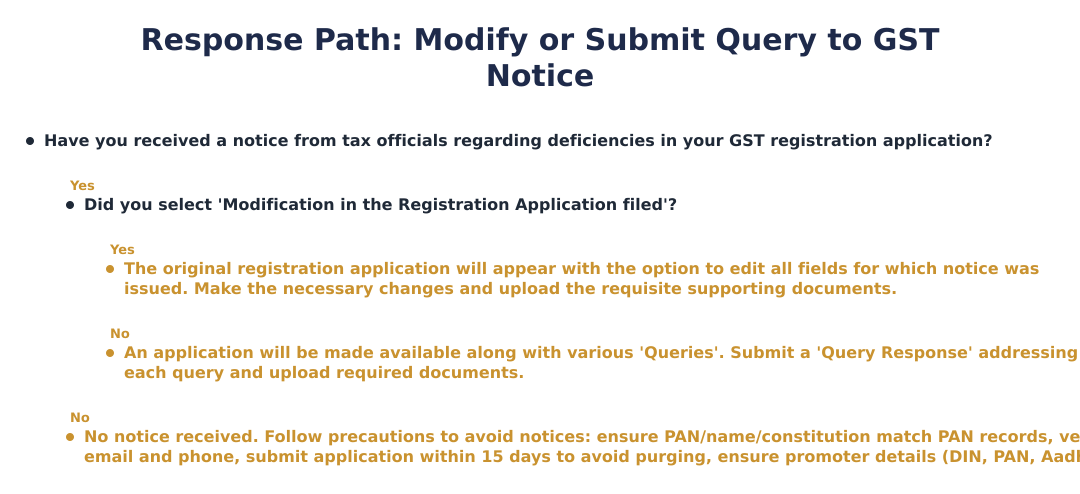
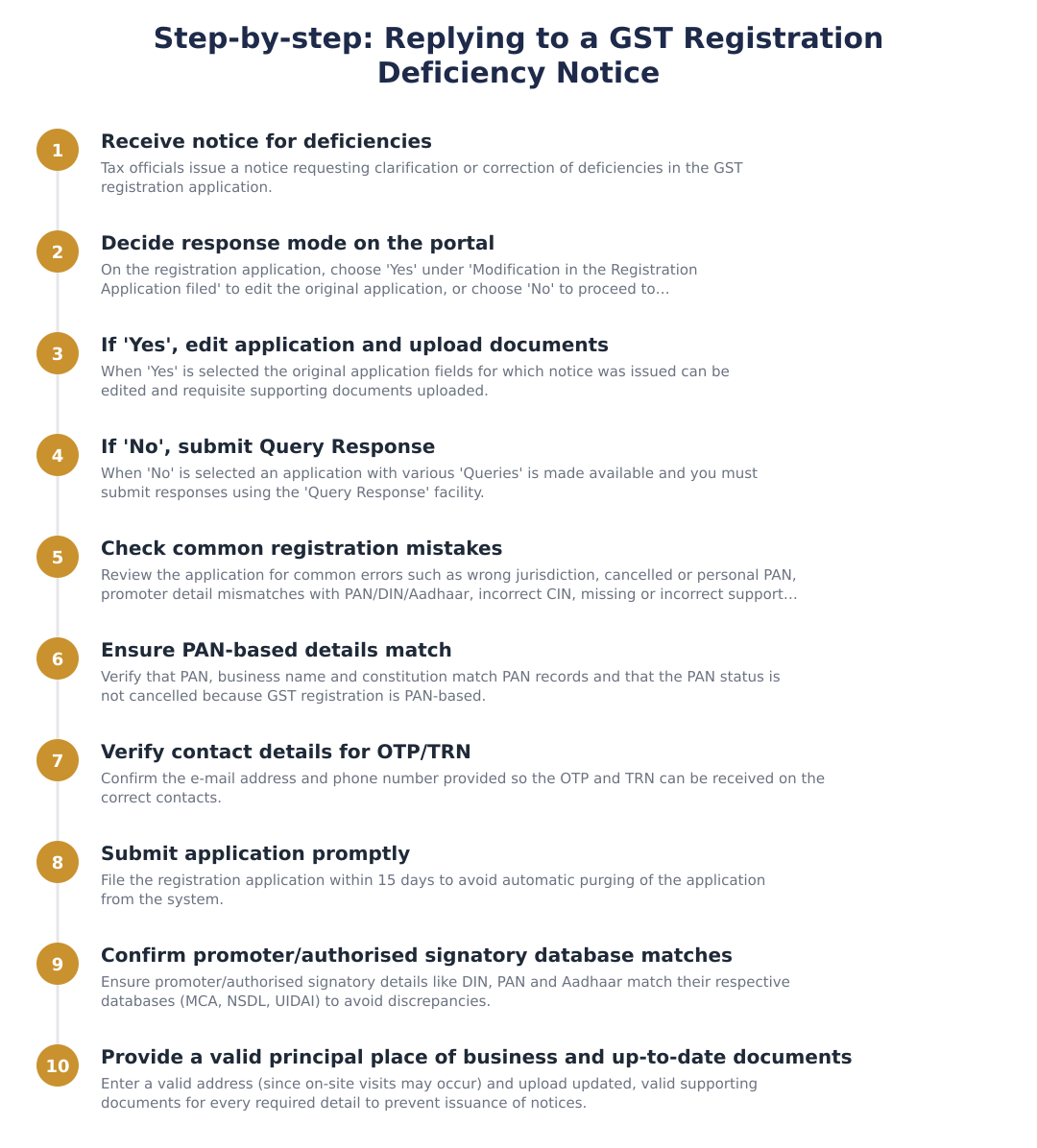
To reply, log in to the GST portal, go to Services > Registration > Application for Filing Clarifications, locate the notice by its reference number or ARN, and submit your response or modify the application as instructed. If you choose ‘Yes’ under ‘Modification in the Registration Application filed’, the original application opens and you can edit only the fields mentioned in the notice and upload the required documents; if you choose ‘No’, a query-response form is presented for uploading explanations and supporting evidence. Make sure to attach valid, up-to-date documents and correct data that match government databases (PAN, DIN, UIDAI, MCA) before submitting. Keep copies of your submitted replies and uploaded files for record and future reference.
What happens if I select ‘Yes’ to modify my GST registration application after receiving a notice?
If you select ‘Yes’ to modify the registration application, the original application reappears with editing enabled for only those fields the notice identified as deficient, allowing necessary corrections and document uploads. You must correct the specific errors (for example, PAN, promoter details, address, or constitution of business) and re-upload valid supporting documents for those fields. After saving the changes and submitting, the revised application will be reprocessed by the tax officers; ensure the corrected data matches external databases like PAN, MCA (DIN/CIN) and UIDAI to avoid further notices. Keep proof of changes and uploaded documents, since the portal logs modifications.
What if I select ‘No’ and submit a query response instead of modifying the application?
If you select ‘No’, the GST portal presents a structured set of ‘Queries’ where you must submit a ‘Query Response’ explaining each point and uploading supporting documents as required by the officer. This route is used when the application itself need not be edited but the officer requires clarifications or evidence, for example, proofs of business address, promoter declarations, or explanations for apparent mismatches. Make your responses precise, attach the specific documents requested, and ensure uploaded files are current and legible to prevent further back-and-forth. Retain copies of your answers and attachments because these form part of the application record and may be relied upon during final processing.
What documents can I use as proof of principal place of business for GST registration?
Acceptable proofs of principal place of business include documents specified by the GST portal such as ownership documents, rental/lease agreement, utility bills, or a no-objection certificate from the lessor, but the portal and officers have prescribed a list that must be followed. Importantly, officers are advised not to demand unnecessary documents like the PAN or Aadhaar of a lessor, so provide only the documents requested in the notice or that are listed on the portal. Ensure documents are valid, in date, legible, and correspond to the address entered in the application because officers may conduct an on-site visit to verify the address. If you are a lessee, provide a clear lease agreement plus any NOC required by rules to avoid additional queries.
What are the common mistakes applicants make when filing GST registration?
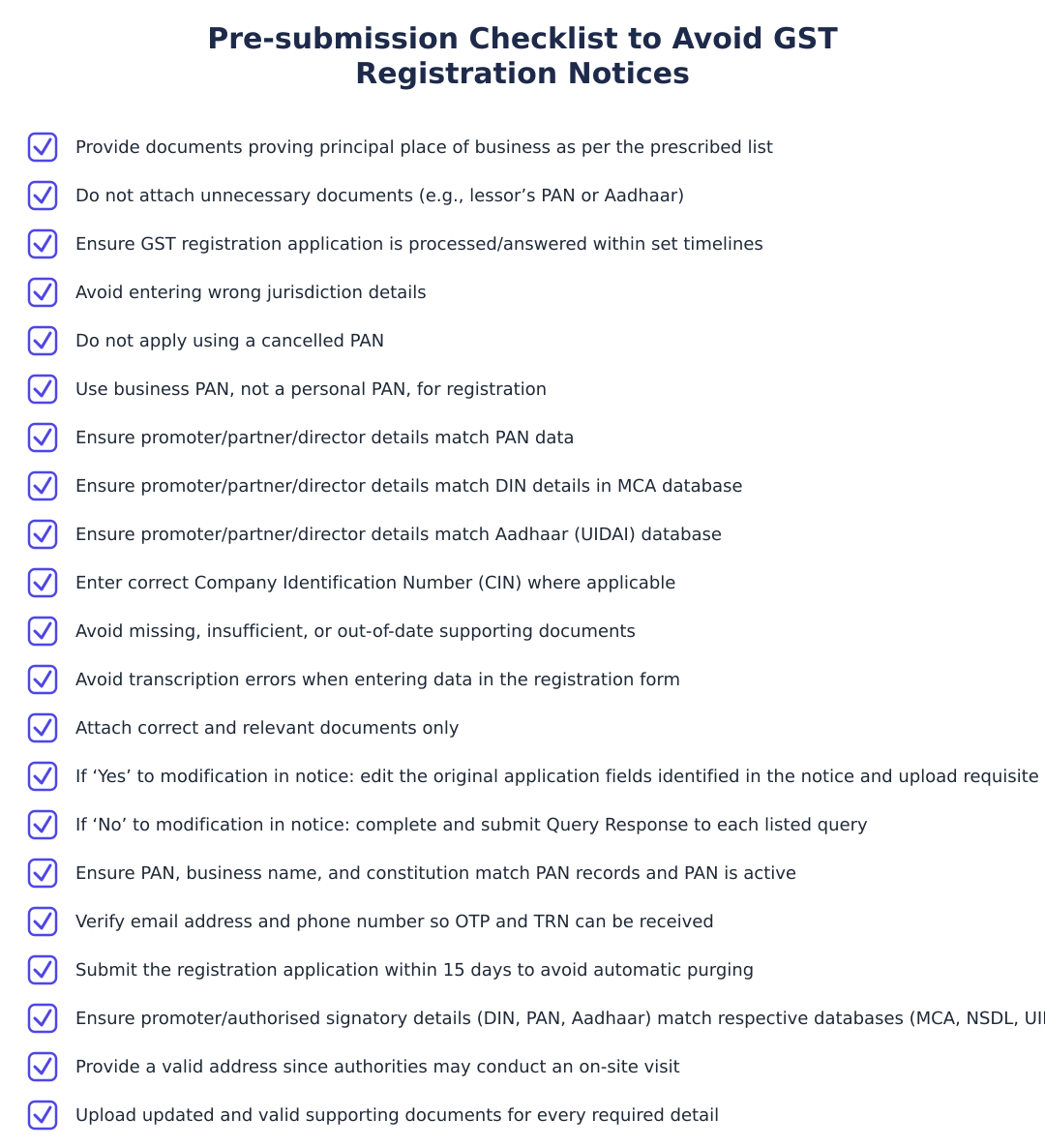
Common mistakes include entering the wrong jurisdiction, using a cancelled PAN or personal PAN instead of business PAN, mismatches between promoter information and databases (PAN, DIN, Aadhaar), incorrect or missing CIN, uploading missing/insufficient/out-of-date supporting documents, transcription errors while entering data, and attaching incorrect documents. These errors frequently trigger deficiency notices from tax officers and delay registration processing. To prevent problems, cross-check all details against PAN, MCA and UIDAI records, and ensure every uploaded document is current and corresponds exactly to the data entered. Small errors like wrong email/phone can also prevent receipt of OTPs or TRN, so verify contact details carefully.
What precautions should I take to avoid getting a GST registration deficiency notice?
To avoid notices, ensure PAN-based details like PAN number, business name, and constitution match PAN records and that the PAN is active (not cancelled); verify promoter/authorised signatory details (DIN, PAN, Aadhaar) against MCA, NSDL and UIDAI databases; and upload valid, current supporting documents for every required field. Also confirm your email and phone number so you can receive OTPs and the Temporary Reference Number (TRN), enter a valid business address (since on-site verification may occur), and submit the registration application within 15 days to avoid automatic purging from the system. Double-check entries for transcription errors and ensure you attach the correct documents in the prescribed format to minimize queries and processing delays.
What if my PAN is cancelled or shows mismatch after submitting a GST registration application?
If your PAN is cancelled or there is a mismatch between PAN records and the information in your GST application, the tax officer will issue a deficiency notice and you must either correct the PAN-related fields or explain and provide valid supporting evidence; a cancelled PAN must be resolved with the Income Tax department before GST registration can proceed. You should verify PAN status on the NSDL/IT portal and, if required, apply for PAN rectification or reissue corrected documents, then modify the GST application or submit the query response with proof of the corrective action. Continuing with a cancelled or mismatched PAN will likely lead to rejection of the registration, so address the PAN issue at source and then update the GST application accordingly. Keep all receipts and communication related to PAN correction when replying to the GST notice.
What happens if I ignore or don’t respond to a GST registration deficiency notice?
If you ignore or fail to respond to a GST registration deficiency notice, your registration application may remain unprocessed and can be rejected or purged from the GST portal, especially if the application is not submitted within the stipulated 15 days. Non-response prevents the tax officer from clearing the deficiencies and may force you to reapply, causing further delay in obtaining GST registration and business inconvenience. Additionally, persistent failure to correct material discrepancies (like use of cancelled PAN or false documents) could invite scrutiny or other compliance action by the authorities. To avoid adverse outcomes, respond promptly through the portal, either by modifying the application or submitting a query response with proper documentation.
Need help staying GST compliant?
MoneyGence's AI Finance OS tracks your compliance, wallet share, and finances in one place, built for agencies and growing businesses.
Get started with MoneyGence