GST Calculator Online - Compute GST Inclusive & Exclusive Rates
This guide explains how to calculate Goods and Services Tax (GST) on a sale and how an online GST calculator applies the basic formula. You will learn the straightforward mathematical approach used to arrive at the tax amount and the final invoice price, why the formula works for any taxable value, and how to interpret the results when preparing invoices or pricing products. The piece uses a worked example with GST at 18% so you can see the formula applied to concrete numbers. Understanding this calculation matters for accurate billing, compliance, and clear communication with customers about price components. By the end of this guide you will have a clear step-by-step method to compute GST on a given product value, the exact formula used in most calculators, and a simple example that demonstrates the output, the tax amount and the total invoice price.
How to Calculate GST: Step-by-Step Guide
Calculating GST for a sale involves applying a stated tax rate to the taxable value of the product or service. The process begins with identifying the taxable base, the value of the product, and the applicable GST rate. Once these are known, the tax amount is computed and then added to the base value to arrive at the invoice price.
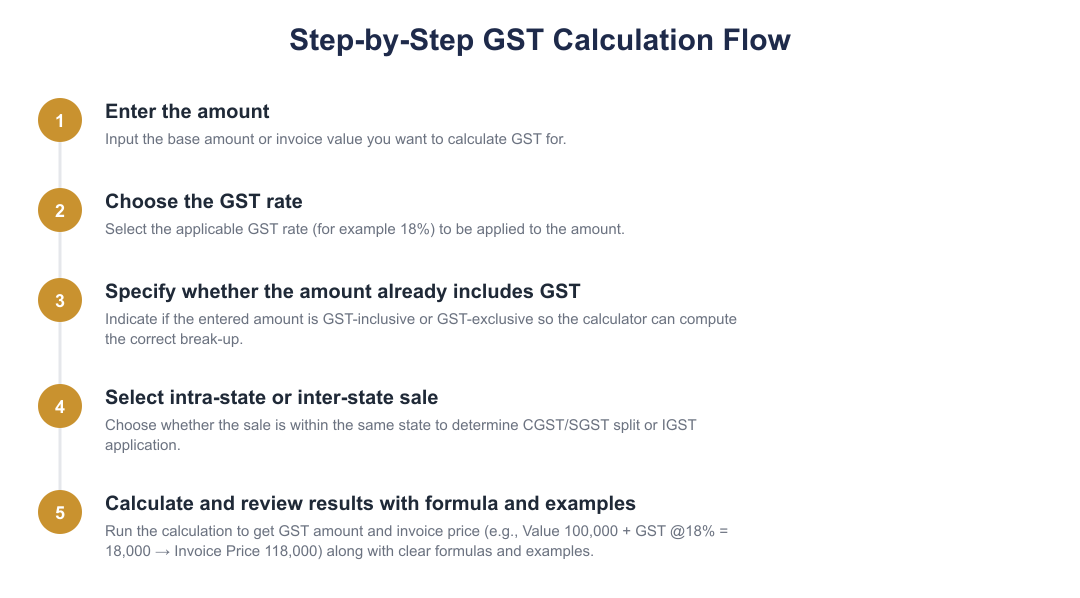
A step-by-step approach reduces errors: confirm the product value, confirm the GST rate to be applied, compute the tax using the standard formula, and add the tax to the product value for the final amount payable. This method is what most online GST calculators automate, producing the tax amount and the total invoice price from the input value and selected rate.
GST Calculator Formula
Use the taxable sale price (the product value) as the base for calculation.
Apply the formula (Value of product × GST rate) / 100 to compute the tax amount.
Add the computed GST amount to the original product value to get the invoice price.
GST Calculation Examples
| Particulars | Amount |
|---|---|
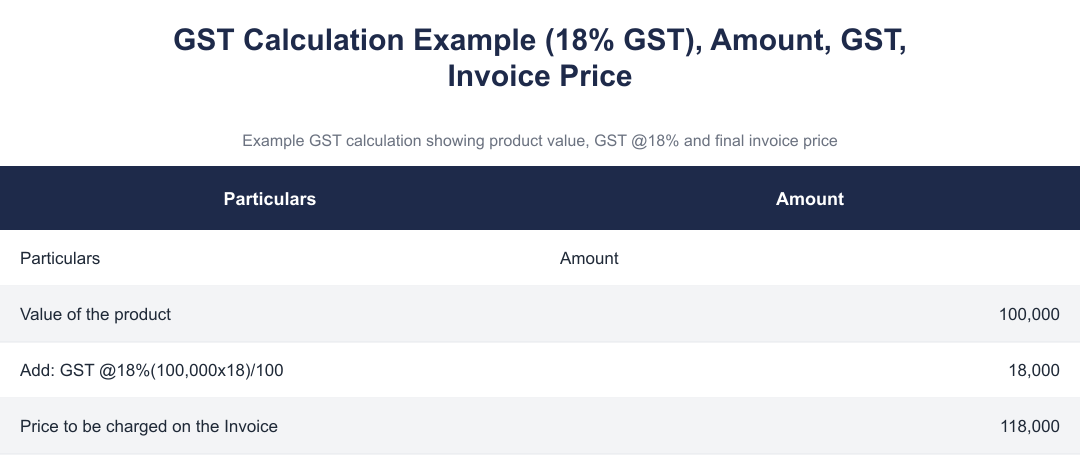
| Value of the product | 100,000 |
| Add: GST @18% (100,000 × 18) / 100 | 18,000 |
| Price to be charged on the Invoice | 118,000 |
Tax Components Under GST
When you calculate GST for a sale you obtain two key figures: the tax amount and the total invoice price. The tax amount is the result of applying the GST calculation formula to the product value. The total invoice price is the sum of the product value and that tax amount.
In the example used here, applying 18% on a product value of ₹100,000 produces a tax amount of ₹18,000 and a final invoice price of ₹118,000. These results are what an online GST calculator returns when provided with the same inputs and rate.
Frequently Asked Questions
How does the formula scale for different product values? The formula (Value of product × GST rate) / 100 is proportional: doubling the product value doubles the computed tax, and the invoice price moves up by the same tax increment. Any online calculator using this formula will produce consistent results across different values.
What does the worked example demonstrate? The example with GST @18% on a product value of ₹100,000 shows the mechanical application of the formula: the tax amount is ₹18,000 and the invoice price is ₹118,000. This simple case illustrates the inputs required and the outputs produced by a GST calculator.
Using the standard GST calculation formula makes it easy to compute tax and final invoice price for any taxable value. An online GST calculator simply automates the steps shown here: enter the product value and the GST rate, apply (Value × Rate) / 100 to get the tax amount, and add it to the base value to get the amount to charge. The worked example with an 18% rate on ₹100,000 illustrates the outcome you can expect from this method.
Frequently asked questions
How do I use an online GST calculator to find GST amount?
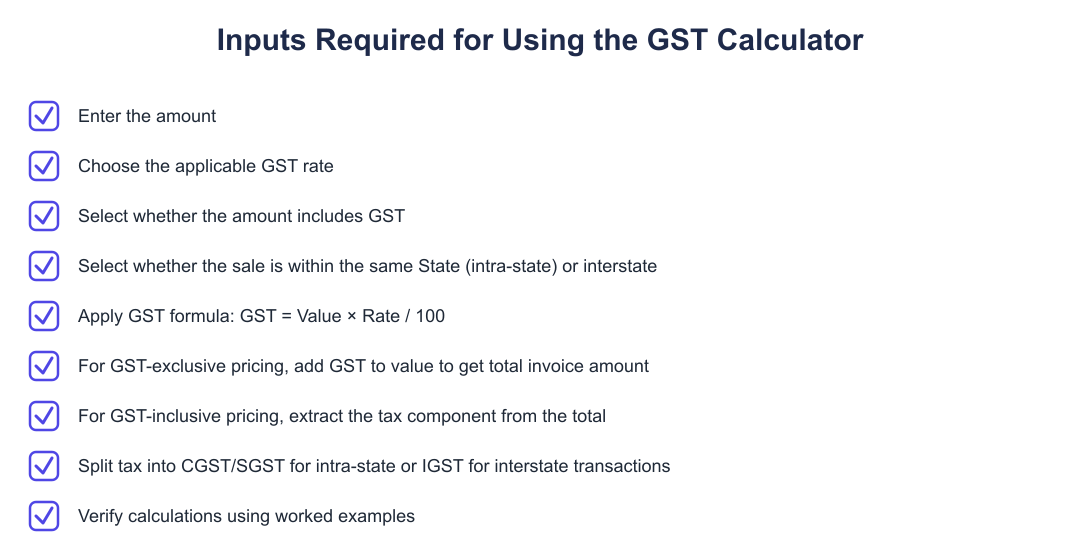
Use an online GST calculator by entering the base amount, selecting the applicable GST rate and whether the amount is GST-inclusive or exclusive, then choosing intra-state or inter-state sale to split tax components. Most calculators ask for: the taxable amount, the GST rate (e.g., 5%, 12%, 18%, 28%), whether the entered amount already includes GST, and whether the sale is within the same State (to apply CGST+SGST) or between States (to apply IGST). After you input these, the tool shows the GST amount, the total invoice price, and often the tax breakup (CGST/SGST or IGST). For example, entering ₹100,000 at 18% GST will show GST = ₹18,000 and invoice price = ₹118,000 for an exclusive amount on an intra-state sale.
What formula does a GST calculator use for GST-exclusive prices?
For GST-exclusive prices the calculator uses GST amount = (Taxable value × GST rate) / 100 and Invoice price = Taxable value + GST amount. This means if your taxable value is ₹100,000 and GST is 18%, GST amount = (100,000 × 18) / 100 = ₹18,000 and the invoice price becomes ₹118,000. The calculator will also split the ₹18,000 into CGST and SGST of ₹9,000 each for intra-state transactions, or show IGST ₹18,000 for inter-state transactions. Many online tools display these formulas next to the results so you can verify the calculation.
How do I calculate the taxable value if the invoice amount already includes GST?
If the invoice amount includes GST, compute taxable value = Invoice amount × 100 / (100 + GST rate) and GST amount = Invoice amount - Taxable value. For example, with an invoice amount of ₹118,000 that includes 18% GST: Taxable value = 118,000 × 100 / 118 = ₹100,000 and GST amount = ₹18,000. Online GST calculators perform this reverse calculation automatically when you select the 'amount includes GST' option. This reverse method ensures correct tax reporting and helps derive the base price from a GST-inclusive total.
How does the calculator show tax components for intra-state and inter-state sales?
For intra-state sales the calculator splits GST into CGST and SGST equally, while for inter-state sales it shows a single IGST amount. Specifically, an 18% GST on an intra-state sale will be displayed as CGST 9% + SGST 9% (total 18%), whereas inter-state will show IGST 18%. The choice of intra vs inter-state is usually a checkbox or dropdown in the calculator and affects only the tax breakup, not the total GST amount. This split is important for filing and input tax credit claims under GST rules.
Can I use the GST calculator for different GST rates like 5%, 12%, 18% and 28%?
Yes, GST calculators support standard GST rates such as 5%, 12%, 18% and 28%, and you can select the rate applicable to your goods or services. After selecting the rate, the tool computes the exact GST amount and updates the invoice total or taxable value accordingly; for instance 18% on ₹100,000 gives ₹18,000 GST. Some calculators also allow custom percentage entry for non-standard situations or cess calculations. Always select the correct rate for your product or service to ensure accurate invoicing and compliance.
Does an online GST calculator show the calculation formula and an example?
Yes, most online GST calculators display the formula used and a worked example alongside the result to help you verify calculations. For example, they will show GST @18% on ₹100,000 as (100,000 × 18) / 100 = ₹18,000 and Invoice price = ₹100,000 + ₹18,000 = ₹118,000. The visible formulas help users understand whether the tool used an inclusive or exclusive method and how the CGST/SGST or IGST split was applied. This transparency is useful for validation before issuing invoices or filing returns.
Is the GST calculator suitable for business invoicing and tax filing?
Yes, an online GST calculator is suitable for preparing invoice values and for quick tax computations, but it should be used alongside proper accounting records for filing returns. It accurately computes taxable value, GST amount and CGST/SGST or IGST splits which you can copy to invoices and GSTR returns, for example ₹100,000 + 18% = ₹118,000. However, for complex transactions (like composition scheme, reverse charge, or cess) you should verify with accounting software or a tax professional. The calculator is primarily a calculation aid trusted by many businesses for everyday billing and estimation.
How accurate are online GST calculators and what should I watch out for?
Online GST calculators are accurate for straightforward GST-inclusive or -exclusive price calculations and tax splits, but you should ensure you select the correct GST rate and intra/inter-state option. Rounding practices can slightly alter the displayed amount, some tools round tax components to the nearest rupee, so confirm rounding rules when finalizing invoices. For special cases like cess, reverse charge, or composition scheme rules, calculators may not apply additional provisions, so consult a tax advisor or accounting system for those scenarios. Always keep supporting documentation and reconcile calculator outputs with your accounting records before filing.
Need help staying Calculators compliant?
MoneyGence's AI Finance OS tracks your compliance, wallet share, and finances in one place, built for agencies and growing businesses.
Get started with MoneyGence