Generate Form 16A for Non-Salary Payments – Step-by-Step Guide
This guide explains what Form 16A is, when it is issued, who issues it and what information it contains, so you can understand its role in TDS reporting for non-salary payments. If your business receives payments such as professional fees, rent or amounts related to the sale of immovable property, Form 16A is the certificate that documents the tax deducted at source for those transactions. Knowing the difference between Form 16 (for salary) and Form 16A (for non-salary), the typical issuers, the kinds of payments covered, and the mandatory contents of the certificate helps you reconcile TDS credits, substantiate your tax filings and follow up with deductors when details are missing or incorrect. This article covers: what Form 16A is and how it relates to Section 203 of the Income Tax Act, who issues Form 16A and how its issuance frequency differs from Form 16, the common categories of payments for which Form 16A is issued, and the key fields you must check on the certificate. The practical focus is on helping taxpayers and small businesses identify and verify Form 16A documents so they can claim tax credits correctly and maintain clean books. Where regulatory specifics are relevant, this guide relies only on the authoritative rules that govern issuance and contents, so you get accurate and dependable explanations for compliance and reconciliation.
What Is Form 16A
Form 16A is the TDS certificate issued for tax deducted at source on payments other than salary. It serves as proof of tax deducted and deposited on various non-salary payments, and is a key document for deductees who need to claim TDS credits against their income-tax liability.
Form 16A is governed by Section 203 of the Income Tax Act, 1961, the same statutory provision that prescribes TDS certificate requirements. While Form 16A is distinct from the salary-specific Form 16, both certificates arise from the same section of the Act and exist to document compliance with TDS obligations.
Difference between Form 16 and Form 16A
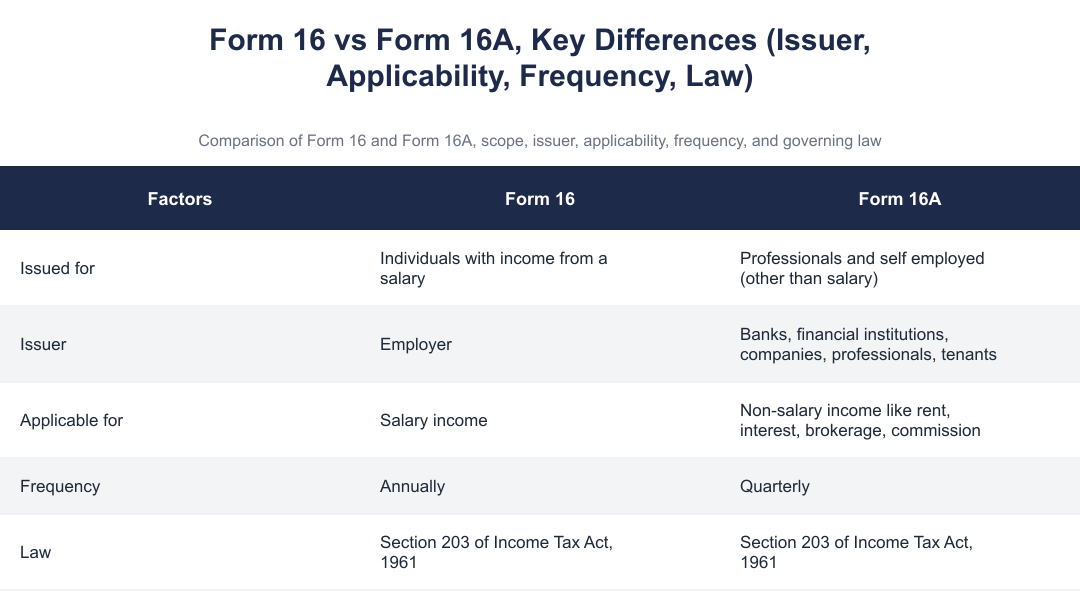
The primary distinction between Form 16 and Form 16A is the nature of income they cover. Form 16 is issued for individuals with income from salary, while Form 16A is issued for professionals and self-employed persons for non-salary payments. This separation helps taxpayers and the tax department categorise TDS credits according to the income head.
Another important difference is the frequency of issuance. Form 16 for salary is issued annually, reflecting the annual nature of salary reporting. Form 16A for non-salary payments is issued quarterly, aligning with the periodic reporting and deposit cycle for many categories of TDS on non-salary payments. Both certificates remain rooted in Section 203 of the Income Tax Act, 1961.
Payments for Which 16A Is Issued
Form 16A covers a range of non-salary payments where tax is deducted at source by the payer. Among the specific payments for which Form 16A is issued are amounts in connection with sale of immovable property under section 194-IA and rental income from property under section 194-IB. These are examples of payments falling outside the salary head but subject to TDS obligations.
Issuers of Form 16A include a variety of payers who deduct tax at source: banks, financial institutions, companies, professionals and even tenants where applicable. If any of these deductors have withheld tax on a payment to you, they are responsible for issuing the Form 16A certificate documenting that deduction.
Contents of Form 16A
| Field |
|---|
| Deductor's name, PAN and TAN |
| Deductee’s name and PAN |
| Payment details |
| TDS challan number |
| Date of deposit |
| TDS amount deposited |
Step-by-Step Procedure to Download Form-16A
The mechanics of obtaining Form 16A can differ depending on the deductor's processes and the digital platforms they use. Because issuers range from banks and financial institutions to companies and professionals, some will make Form 16A available via online portals while others may provide it on request. Since Form 16A is issued quarterly, check for the certificate after the close of each quarter in which TDS was deducted.
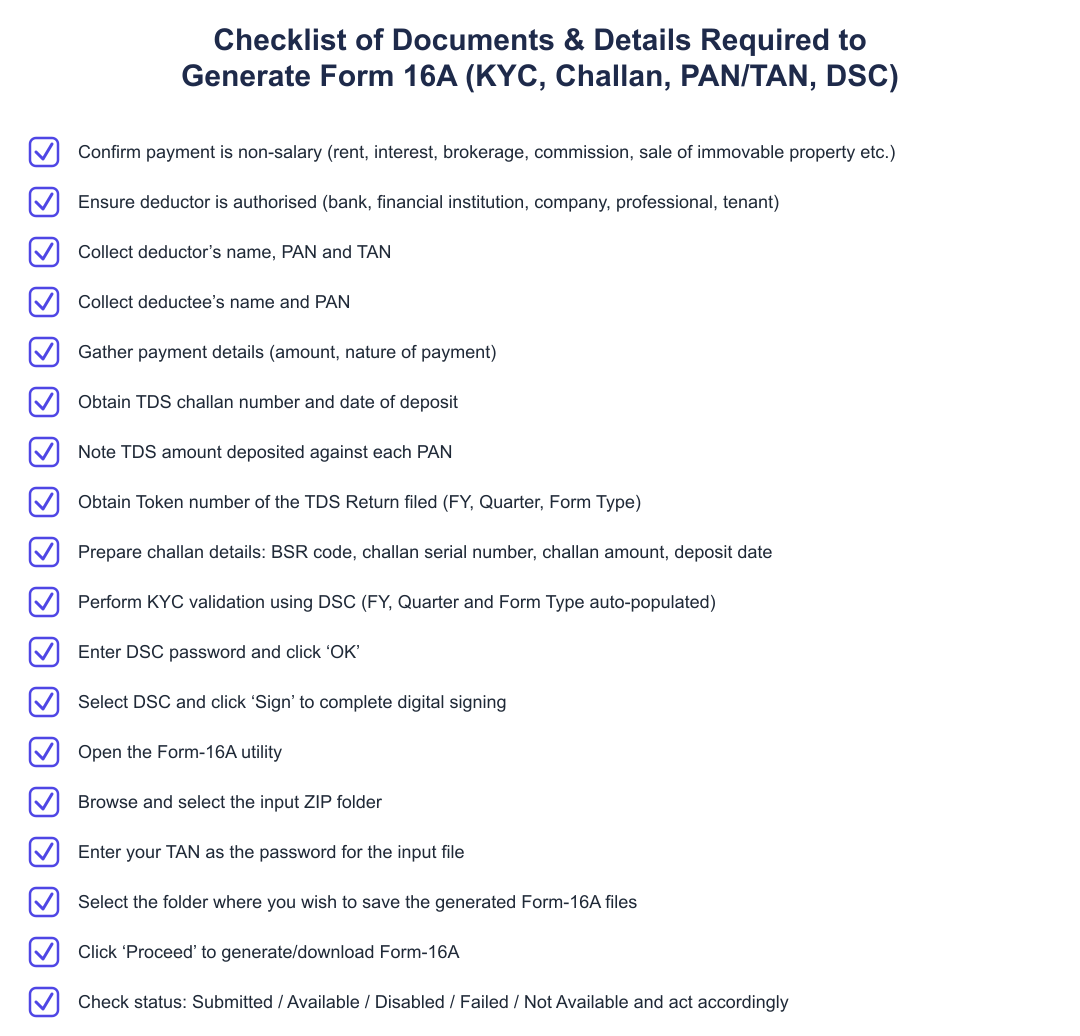
If you do not receive a Form 16A from a deductor, first contact the deductor's accounts or tax department and request the certificate. The presence and accuracy of the fields listed above, deductor/deductee identity, payment details and challan and deposit information, are essential for claiming TDS credit, so verify those details when you receive the certificate.
Sample of Form 16A
A Form 16A certificate displays the deductor and deductee particulars, particulars of the payment(s) on which tax was deducted, and the challan-related information that shows tax was deposited. The elements described in the Contents section above are the core components you will find on such a sample certificate.
When reviewing any sample or actual Form 16A, focus on matching PANs, TAN (where applicable), payment descriptions and the challan number and deposit date so that the TDS can be reconciled against your books and the government’s records.
Frequently Asked Questions
Who issues Form 16A? Issuers of Form 16A include banks, financial institutions, companies, professionals and tenants, essentially the deductors who withhold tax on non-salary payments.
Is Form 16A the same as Form 16? No. Form 16 is the certificate for TDS on salary, issued annually, while Form 16A is for non-salary payments (such as professional fees, rent and certain property transactions) and is issued quarterly. Both certificates are governed by Section 203 of the Income Tax Act, 1961.
Form 16A is the essential TDS certificate for non-salary payments: verify it each quarter, confirm the key fields (deductor/deductee identity, payment and challan details) and follow up with the deductor if information is missing or incorrect. Keeping Form 16A certificates in order helps ensure you can claim the correct TDS credit and maintain accurate tax compliance records.
Frequently asked questions
What is Form 16A and who issues it?
Form 16A is a TDS certificate issued for tax deducted at source on payments other than salary; it is issued by deductors such as banks, financial institutions, companies, professionals and tenants. It records TDS details like deductor’s name, PAN/TAN, deductee’s name and PAN, payment details, challan number, deposit date and TDS amount deposited. Form 16A is issued quarterly under Section 203 of the Income Tax Act, 1961 and covers non-salary payments such as rent, interest, brokerage and professional fees. The certificate is necessary for the deductee to claim the TDS credit while filing income tax returns.
How is Form 16A different from Form 16?
Form 16A is issued for TDS on non-salary payments and is issued quarterly, whereas Form 16 is issued annually for salary income under Section 192 of the Income Tax Act. The issuer of Form 16 is the employer, while Form 16A is issued by banks, companies, professionals, tenants and other deductors. Form 16 covers salary-specific details and tax computation for the financial year, while Form 16A contains payment-wise TDS details such as challan number, deposit date and amount of TDS deposited. Both forms are governed by Section 203 of the Income Tax Act, 1961 but apply to different kinds of income and frequencies.
What kinds of payments require Form 16A to be issued?
Form 16A is issued for non-salary payments subject to TDS such as sale of immovable property (section 194-IA), rental income from property (section 194-IB), interest, brokerage, commission and professional fees. Any person or entity deducting tax at source on these payments must issue Form 16A to the deductee to certify the tax deducted and deposited. The form is generated quarterly and the specific sections of the Income Tax Act determine thresholds and rates for different payment types. If tax is deducted under the relevant sections, the deductor must generate Form 16A so the deductee can claim credit for the deposited TDS.
What information does Form 16A include?
Form 16A contains the deductor’s name, PAN and TAN, the deductee’s name and PAN, detailed payment particulars, TDS challan number, date of deposit and the amount of TDS deposited. It lists payment-wise entries so the deductee can reconcile the TDS claimed with amounts actually deposited by the deductor. The certificate also indicates the financial year and quarter for which the TDS return was filed and the form type, enabling accurate tax credit claims. These details make Form 16A essential for verifying TDS credits while filing income tax returns.
How do I generate Form 16A using ClearTDS step-by-step?
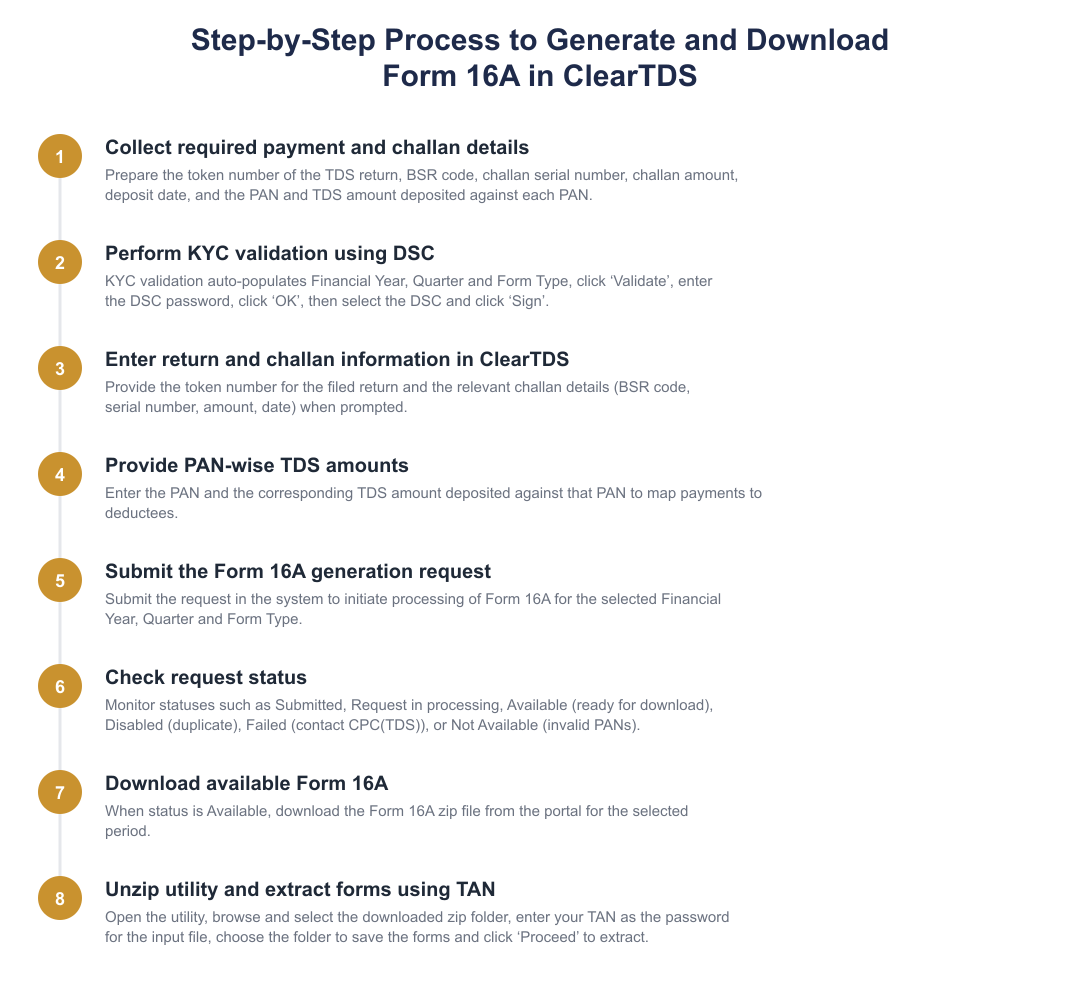
To generate Form 16A in ClearTDS, first validate KYC using DSC which auto-populates Financial Year, Quarter and Form Type, then click ‘Validate’, enter the DSC password, select the DSC and click ‘Sign’. Next, upload the TDS return token number and challan details (BSR code, serial number, challan amount and deposit date) and enter the PAN and TDS amount deposited against that PAN to prepare the certificate. After submission you will see status updates such as Submitted, Available, Disabled, Failed or Not Available; when Available, download the Form 16A. Finally, open the provided utility, browse and select the zip folder, use your TAN as the password for the input file, choose a folder to save the forms and click ‘Proceed’ to extract the certificates.
What do the different Form 16A status messages mean in ClearTDS?
ClearTDS shows statuses such as Submitted (submitted successfully, request in processing), Available (Form 16A ready for download), Disabled (duplicate request submitted for downloading), Failed (user should contact CPC(TDS)) and Not Available (PANs mentioned in the statement are invalid). 'Submitted' means the certificate generation request is accepted and being processed; 'Available' means you can download the Form 16A; 'Disabled' indicates a duplicate request and prevents downloading. If the status is 'Failed' you must contact CPC(TDS) for resolution, and 'Not Available' signals invalid PAN entries that need correction before the certificate can be generated.
How do I download and open the Form 16A zip file from ClearTDS?
After Form 16A is marked 'Available' in ClearTDS, download the zip folder, open the utility, browse and select the zip folder and enter your TAN as the password for the input file to extract the forms. Then select the folder where you want to save the forms and click ‘Proceed’ to extract and save the Form 16A PDFs. Using the TAN as the password is mandatory to successfully decrypt the input file generated by the CPC(TDS) utility. Ensure you save the extracted PDFs securely as these contain sensitive TDS and PAN details required for tax filing.
Can Form 16A be issued quarterly and under which law?
Yes, Form 16A is issued quarterly and is governed by Section 203 of the Income Tax Act, 1961. Unlike Form 16 for salaries which is furnished annually, Form 16A must be prepared and issued for each quarter in which TDS on non-salary payments was deducted and deposited. The quarterly issuance ensures deductees receive timely certification of TDS to claim credit in their income tax returns for the corresponding financial year and quarter. Failure to issue Form 16A can lead to compliance issues for the deductor under the Income Tax Act.
What should I do if PANs in the TDS statement are invalid or missing?
If PANs in the TDS statement are invalid or missing, the status will show 'Not Available' and the deductor should correct the PAN details and re-submit the TDS statement before Form 16A can be generated. Invalid PAN entries prevent the CPC(TDS) system from creating certificates, so verify PANs against official records and request corrected PANs from deductees if necessary. After correcting and re-filing the Statement and challan details, regenerate the Form 16A; only valid PANs will allow the certificate to be produced for download. Keep records of communications and corrected submissions to support any follow-up with CPC(TDS).
Need help staying TDS compliant?
MoneyGence's AI Finance OS tracks your compliance, wallet share, and finances in one place, built for agencies and growing businesses.
Get started with MoneyGence