Form 16 Excel Format: Download Editable Form 16 & Form 16A
This guide explains how to work with Excel formats of salary TDS certificates commonly called Form 16 and Form 16A, why having an Excel template matters for payroll and compliance teams, and what practical steps make issuing, reconciling and storing these certificates easier. You will learn how an Excel version helps standardise employer-issued tax certificates, speeds up year‑end processes, and reduces errors when preparing employee tax computation and TDS summaries. The guide is written for payroll managers, HR professionals, accountants and employees who need to generate, verify or request an electronic copy of their salary or other TDS certificates in a spreadsheet-friendly layout. The content focuses on how to structure an Excel template so it captures pay and deduction components, TDS particulars, and employee identifiers in a clear manner. It also covers best practices for linking templates to payroll data, performing data validation and simple reconciliation checks, and tips for secure storage and distribution. You will find practical recommendations on working with annexures or supporting breakdowns in separate worksheet tabs, producing a clean printable certificate from Excel, and common checks to spot mismatches before certificates are issued. This guide does not provide legal interpretations or specific statutory text; instead it aims to help you create and use Excel-based formats that make administration and employee communication more efficient.
Why use an Excel format for salary and TDS certificates
An Excel template translates payroll and tax data into a reusable, editable format that can be tailored to organizational needs. For payroll teams, the advantage of a spreadsheet is the ability to link cells to payroll ledgers, apply formulas for repetitive calculations, and standardise presentation across employees and years. For employees, an Excel-based certificate is easy to save, print, and import into personal tax-preparation tools.
Using a structured Excel layout also facilitates internal controls: columns and rows make it simpler to run consistency checks, highlight missing entries, and compare month-on-month entries. When the template is split into logical sections, employee identification, pay breakup, deductions, and TDS details, reviewers can inspect each part quickly and correct anomalies before finalisation.
Designing a clear Excel template: recommended sections and tabs
A practical Excel format separates information into distinct blocks so users can find and verify data without scrolling a long sheet. Commonly used blocks include an employee details section, a pay structure breakdown (basic, allowances, reimbursements), a deductions section (contributions, declared investments), and a tax computation/TDS block. Keeping the certificate layout visually similar to any printed certificate helps when the worksheet is exported to PDF.
Use separate worksheet tabs for annexures or supporting schedules that require detailed line-by-line entries, such as month-wise salary or challan/payment summaries. This approach keeps the main certificate concise while preserving drill-down detail for auditors or employees who want to verify individual entries. Consider protecting formula cells and locking headers to avoid accidental changes while still allowing authorised staff to edit input rows.
Practical Excel features and controls to reduce errors
Leverage basic spreadsheet features to enforce data quality: drop-down lists for fixed values (such as department or pay period), conditional formatting to flag negative amounts or missing mandatory fields, and cell-level comments for clarifications. Simple formulas for totals and reconciliations reduce manual addition errors and speed up review.
Implement validation rules for key identifiers so that employee ID, PAN or similar unique fields are entered in a consistent format. Use cross-sheet lookup functions to pull payroll figures into the certificate automatically. Where multiple people work on the template, track changes or maintain a changelog sheet to record edits and approvals.
Issuance, reconciliation and distribution best practices
Before issuing certificates, reconcile the TDS totals shown in the Excel format against payroll registers and bank/challan payment evidence. Conduct a sample verification of certificates to confirm that totals and employee-identifying information are correct. A brief checklist for each certificate helps ensure consistency across the workforce.
When distributing digital copies, consider exporting the Excel sheet to an uneditable PDF for employees while securely retaining the master Excel file for records. If sending certificates by email or internal portal, use password protection, secure links or access controls to protect personal and financial data. Maintain a central registry of certificates issued with version references and distribution dates.
Common queries and how to handle requests for templates
Employees frequently ask for a template copy or a reprint of their certificate. Establish a standard request-and-fulfilment workflow so HR or payroll can verify identity and retrieve the correct year’s certificate from records. Keep copies organised by financial year and employee identifier to simplify retrieval.
If you provide a ready Excel template for users, include brief instructions within the file, e.g., which fields must not be altered, where to enter supporting details, and who to contact for corrections. Clear in-file guidance reduces back-and-forth and accelerates issue resolution when employees spot discrepancies.
An Excel format for salary and other TDS certificates can streamline year‑end processes, reduce errors, and make distribution simple, provided the template is well designed, validated, and secured. Use separate tabs for supporting detail, apply spreadsheet controls to protect formulas and identifiers, reconcile figures before issue, and keep a clear retrieval and correction workflow to support employees.
Frequently asked questions
Where can I download the Excel format of Form 16 and Form 16A?
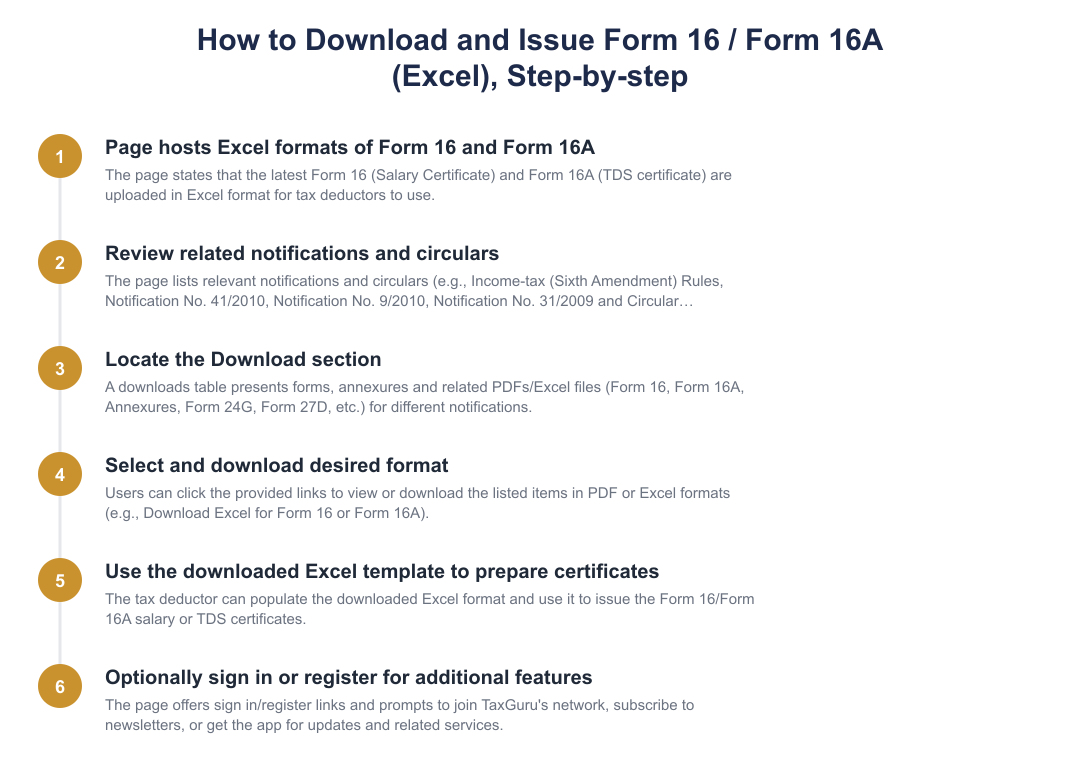
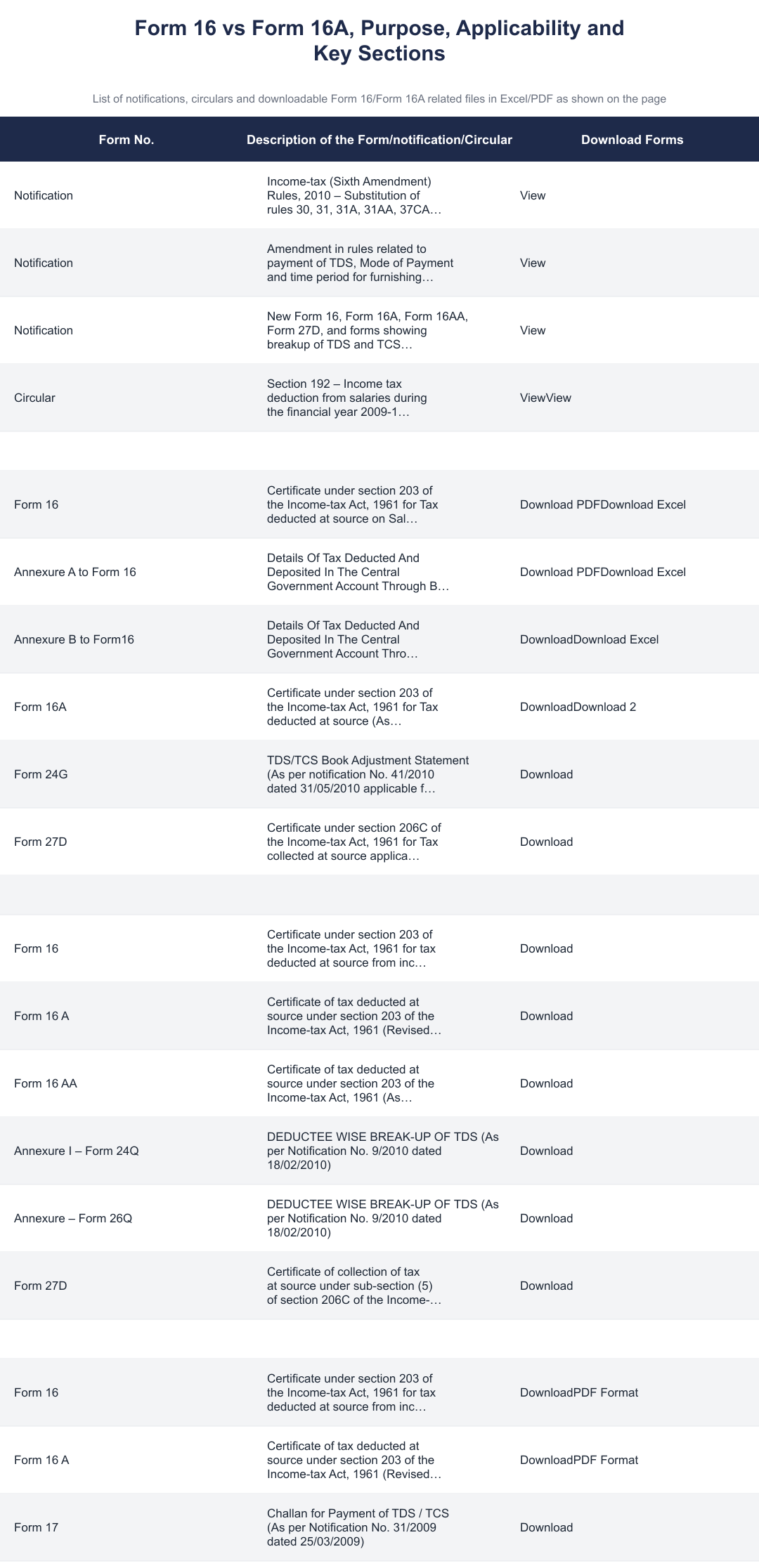
You can download the Excel formats of Form 16 and Form 16A from the TaxGuru page where the official notification-based forms are provided; the page hosts Excel and PDF downloads for Form 16, Form 16A, Annexure A, Annexure B and related forms. The downloads include revised formats issued under Notification No. 41/2010 dated 31/05/2010 (applicable from 01.04.2010) and older revisions such as Notification No. 9/2010 dated 18/02/2010 and Notification No. 31/2009 dated 25/03/2009. Look for the specific “Download Excel” links next to each form on that page to get the template ready for use by the tax deductor.
What is the difference between Form 16 and Form 16A in these Excel templates?
Form 16 is the TDS certificate for tax deducted on salary income under section 203 and the Excel template is specifically for salary certificates, while Form 16A is the TDS certificate for tax deducted on other incomes (non-salary) under section 203 and has a separate Excel template. Form 16 templates on the page include Part A (tax deposited details/Annexures) and Part B (salary breakup) formats and government-employee-specific Annexures A and B; Form 16A templates follow the notification revisions and are provided separately to capture non-salary deductee-wise TDS details. Use Form 16 for salaries and Form 16A for payments such as professional fees, rent or interest where TDS has been deducted.
What are Part A and Part B of Form 16 in the Excel format and how do they differ?
Part A of Form 16 contains deductor/deduction details and tax deposited entries while Part B contains the breakup of salary income, exemptions and computation of taxable salary; both parts are provided as linked templates in the Excel format. Part A captures TAN/PAN of deductor and deductee, tax deposited entries (Annexure A/Annexure B for government deductors) and challan/book-entry details as per Notification No.41/2010, whereas Part B shows gross salary, exemptions (e.g., HRA), deductions under Chapter VI-A and net tax computation for the employee. When issuing Form 16 the employer must complete both parts so the employee can file ITR with accurate salary and tax details.
Are there special Annexure formats for government employees in the Excel downloads?
Yes, the page includes Annexure A and Annexure B Excel formats specifically for government employees to show tax deducted and deposited through book entry and challan entry respectively, as per Notification No.41/2010 dated 31/05/2010. Annexure A is used for book-entry tax deposits (government accounting adjustments) and Annexure B for challan-based deposits; both annexures are downloadable in Excel and PDF so government deductors can report TDS details in the prescribed government format. Use the appropriate annexure based on how the tax was deposited to ensure the Form 16 Part A matches central government accounts.
Do these Excel templates reflect the latest notifications and from which date are they applicable?
Yes, the Excel templates on the page reflect the revised forms notified by the Income-tax Department, including Notification No.41/2010 dated 31/05/2010 which is applicable from 01.04.2010, and earlier revisions such as Notification No.9/2010 (18/02/2010) and Notification No.31/2009 (25/03/2009). The page groups downloads by notification so you can pick the template version applicable to the financial year you are preparing certificates for; for example, use the forms revised as per Notification No.41/2010 for FYs from 2010-11 onward where applicable. Always check the notification date and the “applicable from” date shown alongside each download before issuing certificates to ensure compliance.
Can a deductor use the Excel format to issue multiple Form 16/16A certificates in bulk?
Yes, the Excel templates are provided so tax deductors can populate deductee-wise details and issue multiple certificates, and many deductors use these editable Excel files for bulk issuance after filling repetitive fields and downloading individual certificates or consolidated reports. The templates include deductee-wise breakups (Annexure I – Form 24Q or Annexure – Form 26Q equivalents for TDS returns) which help prepare data for filing quarterly TDS returns and issuing certificates. However, ensure accuracy of PAN/TAN, challan entries and tax computations before issuing the certificates and cross-check against the quarterly TDS return data to avoid mismatches.
How do I choose the correct Form 16/16A Excel template for different assessment years?
Choose the Form 16/16A Excel template version that corresponds to the notification applicable to the assessment or financial year you are reporting, the page lists templates revised under Notification No.31/2009, No.9/2010 and No.41/2010 with download links for specific years. For example, forms revised by Notification No.41/2010 are applicable from 01.04.2010, so use those for FY 2010-11 onward unless a later amendment applies; older formats are available on the page for pre-2010 years. Verify the notification date shown with the template and match it to your filing year to ensure the certificate's format complies with statutory requirements.
What other related TDS forms and annexures are available for download on the same page?
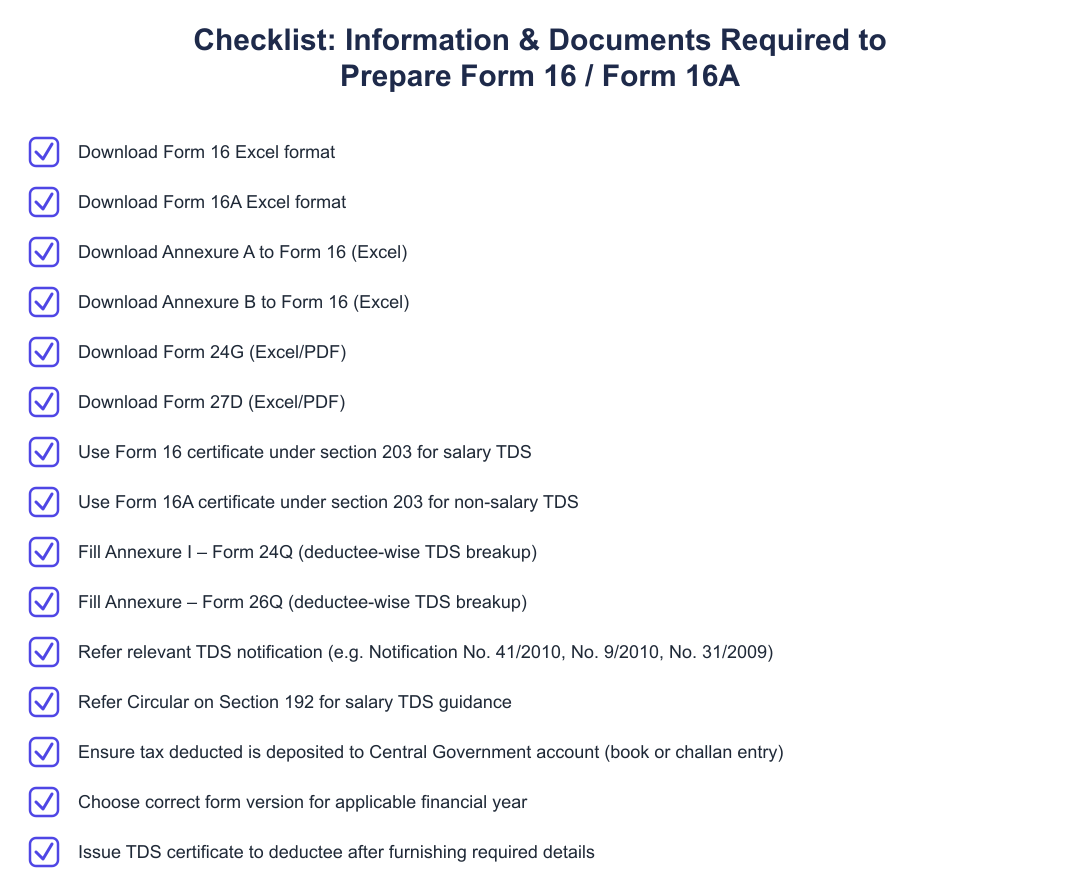
Along with Form 16 and Form 16A Excel templates, the page provides downloads for Form 16AA, Form 24G (book adjustment statement), Form 27D (TCS certificate), Annexure I – Form 24Q, Annexure – Form 26Q and the challan (Form 17) formats as per various notifications. These auxiliary forms help prepare deductee-wise TDS breakups, book adjustments for government deductees, TCS certificates and challan evidence required while furnishing quarterly TDS returns and issuing certificates. Use the relevant annexure (24Q/26Q) when preparing quarterly returns and cross-check those figures with information populated in the Form 16/16A Excel templates.
If I lost my Form 16, can I recreate it using these Excel templates?
Yes, if you have the underlying salary and tax deduction details, you can recreate a Form 16 using the Excel template provided and populate Part A and Part B to reflect the original figures; however, an employer or authorized signatory should ideally issue or certify the reconstructed Form 16 for official use. Recreating Form 16 yourself is useful for filing income tax returns when the employer does not provide the certificate, but ensure the TAN/PAN, tax deposit (challan) dates and amounts match the records and the employer’s TDS returns to avoid discrepancies. For a legally valid duplicate, request the employer to issue an official duplicate or request Form 26AS and TDS return details to reconcile before issuing or submitting a recreated certificate.
Need help staying Finance Templates compliant?
MoneyGence's AI Finance OS tracks your compliance, wallet share, and finances in one place, built for agencies and growing businesses.
Get started with MoneyGence