EPF Balance Check 2026: 5 Ways to Check PF Balance
This guide explains five reliable ways to check your Employees’ Provident Fund (EPF) balance in 2026, via the EPFO Member Portal, UMANG app, DigiLocker, missed call and SMS services, and what you must have in place before you can use each method. Knowing how to access your PF balance quickly helps you track contributions, verify employer deposits, plan for withdrawals and transfers, and ensure your KYC is in order to avoid delays or higher tax on withdrawals. The guide also covers common reasons you might be unable to view your balance (like UAN not being activated or KYC mismatches), what to do if your PF is managed by an exempted establishment, and how to download your passbook as a PDF when needed. You will learn which methods require a registered mobile number or UAN activation, how KYC affects access, and practical next steps to resolve access issues. This is focused on the verified EPFO services and constraints so you can confidently pick the right route to check or download your passbook and keep your PF account up to date.
Prerequisites Before Checking PF Balance
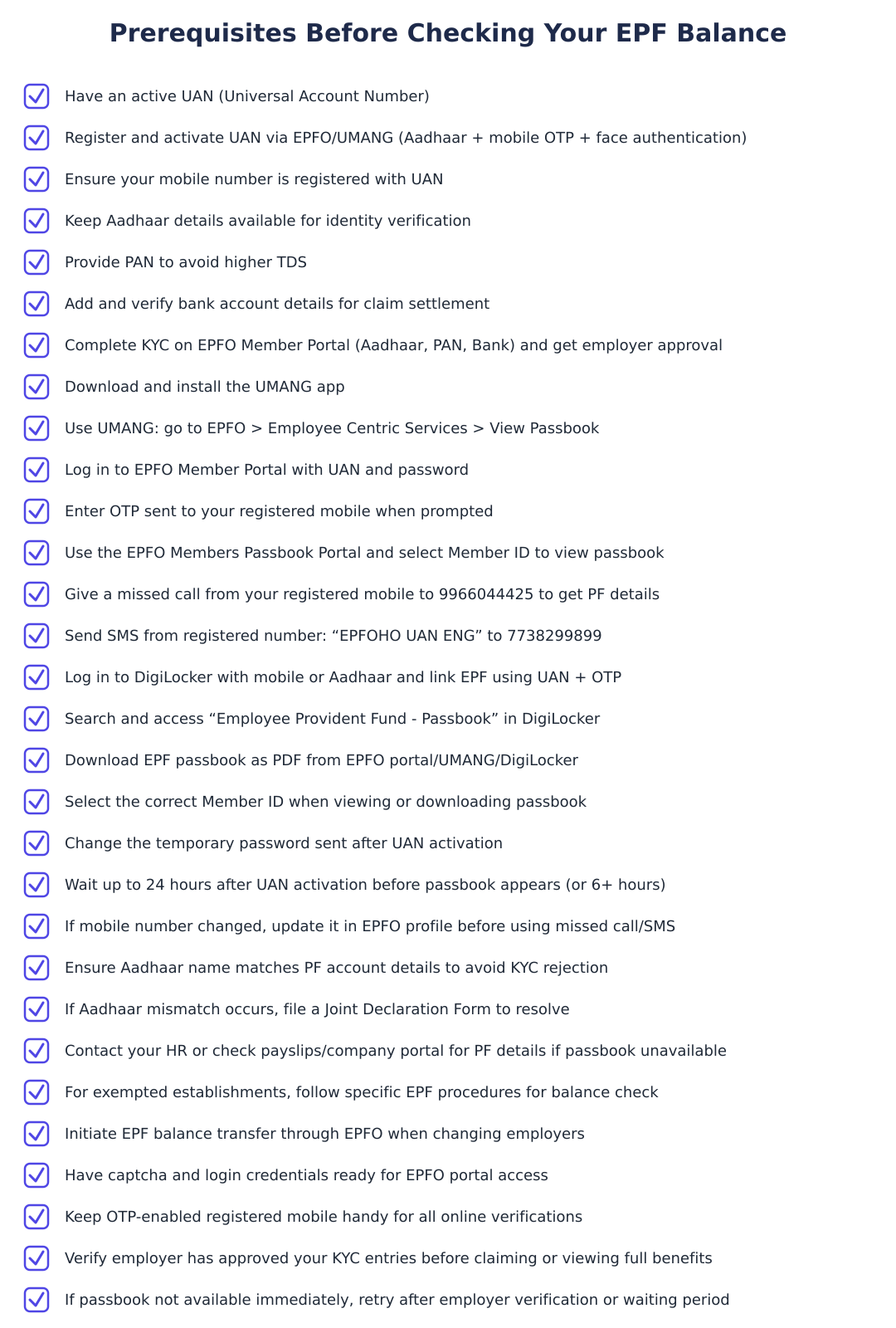
To use online EPF services you must have an active UAN. If your payslip shows a UAN but it has not been activated, online UAN services will not work until activation is completed. Activating the UAN is therefore the first prerequisite for accessing most EPF facilities.
KYC details are also important. Typical KYC for EPF includes Aadhaar for identity verification, PAN to avoid higher TDS on withdrawals, and bank account details for settlement of claims. If your KYC is incomplete or has mismatches (for example, an Aadhaar name mismatch), online services may be blocked and you may need to resolve the discrepancy, in some cases by filing a Joint Declaration Form.
Finally, many EPF access methods use OTPs or operate only from the mobile number linked to your UAN. Ensure your current mobile number is the one registered with your UAN before relying on missed call, SMS or OTP-based methods.
How to Activate UAN?
An activated UAN is mandatory to use online EPF services. If you discover that your UAN appears on salary records but you cannot use online facilities, activation is the likely issue preventing access.
Activation is the gateway to other services, without it you cannot log in to the EPFO Member Portal, use UMANG or DigiLocker to view your passbook, nor access missed-call or SMS-based balance checks that depend on UAN linkage.
How to Complete KYC?
KYC typically includes Aadhaar (for identity verification), PAN (to avoid higher TDS) and bank account details (for claim settlement). These documents help the EPFO validate your identity and ensure smooth processing of claims and tax treatment.
On the EPFO portal you must log in, go to Manage > KYC, add your Aadhaar, PAN and bank details, save them and then await employer verification. If details do not match (for example, an Aadhaar name mismatch) online services may be blocked until the discrepancy is resolved, which can require submitting a Joint Declaration Form.
Where and how you can access EPF passbook / balance
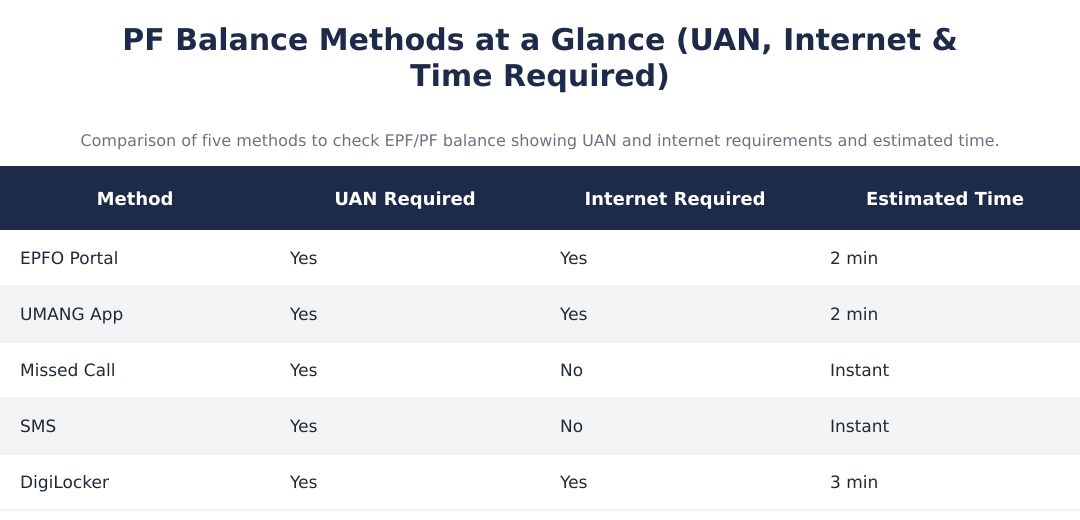
| Method | Can access passbook / balance | Notes |
|---|---|---|
| EPFO Member Portal | Yes | Passbook/balance can be accessed after logging in with UAN; passbook can be downloaded as PDF after selecting Member ID. |
| UMANG App | Yes | Supports viewing and downloading EPF passbook; uses OTP verification on registered mobile. |
| DigiLocker | Yes | DigiLocker can fetch Employee Provident Fund - Passbook by linking UAN and verifying via OTP on registered mobile. |
Missed Call and SMS-based PF Balance Check
Missed call and SMS facilities are widely used for quick EPF balance checks, but these methods work only when used from the mobile number linked to your UAN. If your current mobile is not the one registered with UAN, these services will not provide your balance.
Because missed call and SMS methods depend on the registered mobile, make sure that your UAN profile has the correct number. If you cannot use these services, the EPFO Member Portal, UMANG app and DigiLocker are alternative routes, though they too rely on UAN activation and OTP verification tied to the registered mobile in many cases.
PF Balance Check without Registered Mobile Number
If your mobile number is not registered with your UAN, missed call and SMS facilities will not work because those services only operate from the mobile number linked to UAN. Similarly, OTP-based access on UMANG, DigiLocker and some portal functions depends on the registered mobile.
In that situation, use the EPFO Member Portal after ensuring your UAN is activated and KYC is completed, or contact your employer/HR for assistance in updating the mobile number and resolving KYC issues so you can regain online access.
How to Check EPF Balance for Exempted Establishments?
If you are employed at an exempted establishment whose provident fund is managed by an employer trust (an exempted PF trust), your balance may not appear on the EPFO portal because EPFO does not hold those records.
In such cases check your salary slips, your employer’s internal employee portal, or contact HR to obtain PF contribution and balance details maintained by the employer trust.
How to Download EPF Passbook?
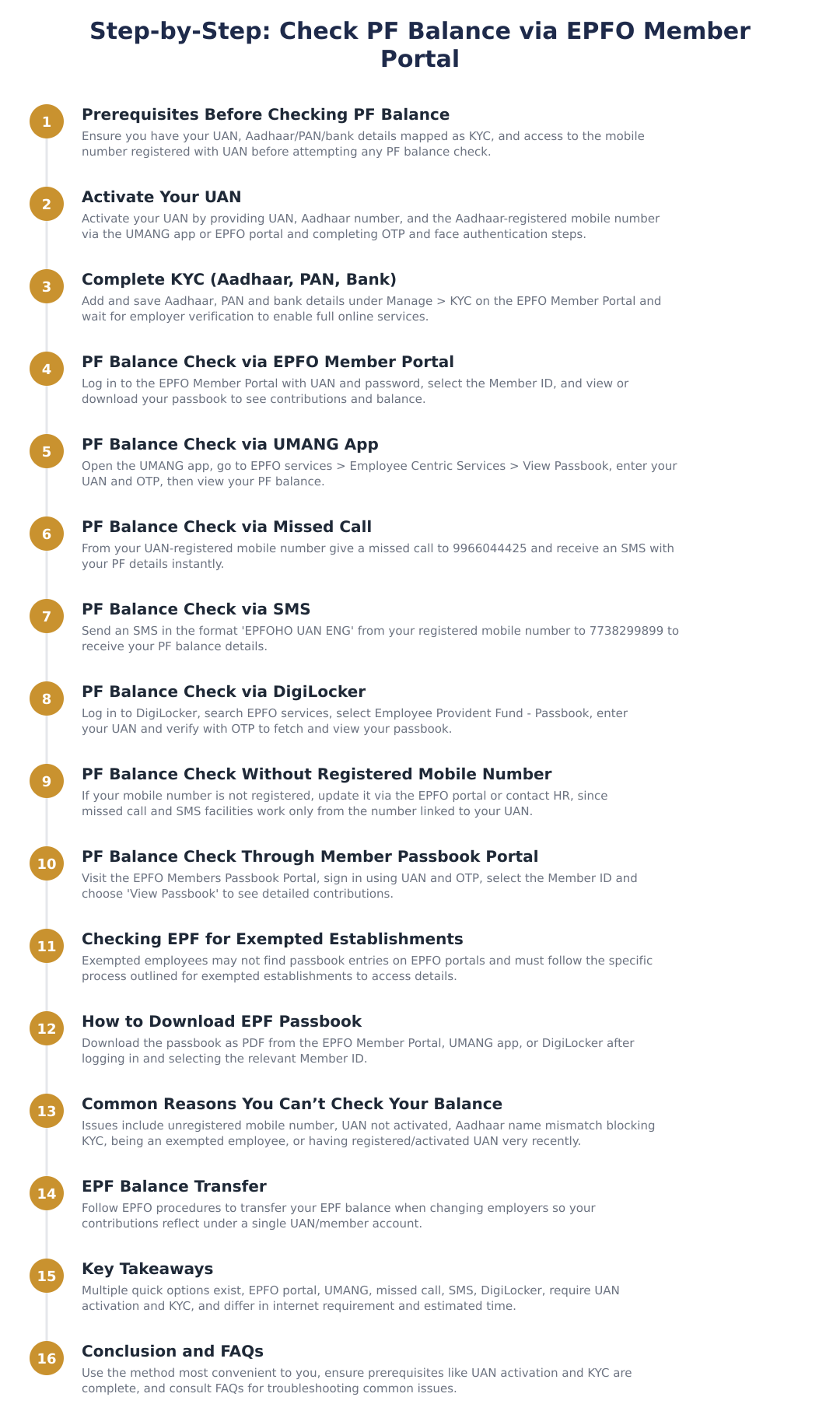
You can download your passbook as a PDF from the EPFO Member Portal once you log in with your UAN and select the relevant Member ID. This provides an official record of employee contributions, employer contributions and EPS (pension) entries.
The UMANG app also supports viewing and downloading the EPF passbook after OTP verification on your registered mobile, and DigiLocker can fetch the EPF passbook to your account once UAN is linked and OTP verification is completed.
Why Can't I Check My Balance?
Common reasons you may be unable to view EPF balance include: UAN not activated, KYC mismatch (such as Aadhaar name mismatch) blocking online services, or being employed in an exempted establishment whose PF is managed by an employer trust.
Resolution typically involves activating your UAN if it is not active, completing and getting KYC verified through the EPFO portal (Manage > KYC) and resolving any mismatches, which may require a Joint Declaration Form, or contacting your employer/HR if your PF is under an exempted trust.
EPF Contributions, What the Passbook Shows
Your EPF records show contributions split into employee share, employer share, and pension contributions (EPS), where the pension portion is part of the employer’s contribution. Reviewing the passbook helps ensure both employee and employer deposits are correctly being credited.
Regularly checking the passbook or balance helps you detect missed or delayed employer contributions early so you can address discrepancies with HR or through EPFO grievance channels.
Key Takeaways
An active UAN and correct KYC are prerequisites for most online EPF services. KYC should include Aadhaar, PAN and bank details, and employer verification is required for KYC to become effective on the portal.
EPF balance and passbook can be accessed via the EPFO Member Portal, UMANG app and DigiLocker; missed call and SMS options are convenient but work only from the mobile number linked to your UAN. If your PF is managed by an exempted trust, check employer sources such as salary slips or HR.
If you cannot check your balance, verify UAN activation status, complete and correct your KYC, and coordinate with your employer to update any details or obtain PF information from exempted trust records.
Checking your EPF balance is straightforward once your UAN is activated and KYC is complete. Use the EPFO Member Portal, UMANG or DigiLocker for full passbook access and PDF downloads; rely on missed call or SMS only from the mobile number linked to your UAN. If you don’t see your balance, confirm UAN activation, resolve any KYC mismatches (which may need a Joint Declaration Form) or contact HR when your PF is maintained by an exempted employer trust.
Frequently asked questions
How can I check my PF balance on the EPFO member portal?
You can check your PF balance on the EPFO member portal by logging in with your UAN and password and viewing the Member Passbook. After login, go to the 'Manage' or 'Passbook' section, select the relevant Member ID and click 'View Passbook' to see employee, employer and interest credits; you will need the mobile number linked to your UAN to receive an OTP for login. The process typically takes about 2 minutes and requires an activated UAN and internet access; if the passbook shows 'not available' you may be in an exempted establishment or you just activated UAN (wait up to 24 hours).
How do I check my PF balance using the UMANG app?
You can check your PF balance on UMANG by opening the app, navigating to Services > Social Security > EPFO and selecting 'View Passbook' under Employee Centric Services. Enter your UAN and verify via the OTP sent to your UAN-registered mobile number to access and download the passbook; the whole process usually takes around 2 minutes. UMANG requires internet access and an activated UAN; you can also use face authentication for UAN activation within UMANG if your Aadhaar is linked.
Can I get my PF balance by giving a missed call?
Yes, you can get your PF balance instantly by giving a missed call from your UAN-registered mobile number to 99660 44425. Make sure the call is made from the same number that is linked to your UAN; after the missed call you will receive an SMS with your EPF details including balance and last contribution. This method does not need internet and is immediate, but it won't work if your mobile number is not registered with EPFO or your UAN is not activated.
How do I check PF balance via SMS and what is the format?
You can check your PF balance via SMS by sending 'EPFOHO UAN ENG' from your UAN-registered mobile number to 77382 99899. After sending the SMS in this format, you will receive a reply containing your PF balance and recent contribution details; this service is instant and does not require internet. The SMS facility works only from the mobile number registered with your UAN and only if your UAN is activated.
How can I check my EPF passbook through DigiLocker?
You can check your EPF passbook in DigiLocker by logging in, searching for 'EPFO' services and selecting 'Employee Provident Fund - Passbook', then entering your UAN and verifying with an OTP sent to your registered mobile. Once linked, DigiLocker fetches your EPF passbook automatically and you can view or download the passbook as a PDF; the process usually takes about 3 minutes and requires internet. DigiLocker requires your UAN to be active and the mobile number to be linked to your UAN for OTP verification.
What do I do if my mobile number is not registered with UAN but I want to check my PF balance?
If your mobile number is not registered with your UAN you cannot use missed call or SMS methods and must update the mobile number on the EPFO portal or contact your employer/HR to update KYC. Alternatively, you can ask HR for the latest passbook or check via company portals or salary slips; to enable online methods you should register the new mobile number in your UAN profile which may require employer approval and KYC updates (Aadhaar/PAN/Bank details). Without the registered mobile number, OTP-based online access (EPFO portal, UMANG, DigiLocker) will not work.
How do I activate my UAN for checking PF balance online?
You can activate your UAN by using the EPFO portal or UMANG: go to 'UAN Activation', provide your UAN, Aadhaar number and the Aadhaar-registered mobile number, verify the OTP and complete any face authentication if required. After successful activation you will receive a temporary password on your mobile which you should change on first login; activation usually completes within minutes but allow up to 24 hours for services to become fully available. An activated UAN is mandatory for EPFO portal, UMANG, SMS and missed-call PF balance services.
How do I download my EPF passbook from the EPFO portal or apps?
You can download your EPF passbook by logging into the EPFO member portal or UMANG, selecting the relevant Member ID and clicking 'Download as PDF' or 'Download' in the app; DigiLocker also lets you save the passbook as a PDF. On the EPFO portal, sign in with UAN and password, select the Member ID under 'View Passbook' and choose 'Download as PDF', the whole process typically takes 2–3 minutes and requires the mobile number linked to your UAN for OTP. If you are in an exempted establishment, the passbook may not be available online and you should request the statement from your employer.
Why can't I check my PF balance even after trying online methods?
You may not be able to check your PF balance because your mobile number is not registered with UAN, your UAN is not activated, your KYC (Aadhaar or PAN) has mismatches, or you are an employee of an exempted establishment. If Aadhaar name and PF account name don't match your KYC will fail and online services may be blocked (you may need a joint declaration form), and passbook unavailability can also occur if you activated UAN very recently, wait 24 hours. To fix access issues update mobile/KYC on the EPFO portal or contact your employer/HR for help.
Need help staying Payroll compliant?
MoneyGence's AI Finance OS tracks your compliance, wallet share, and finances in one place, built for agencies and growing businesses.
Get started with MoneyGence