e-Invoice Format: JSON, Schema & Template Guide
This guide explains the e‑invoice format, the JSON/schema/template concept used for electronic invoicing in India, and how the IRN (Invoice Reference Number) fits into the process. You will learn why a standard schema matters for automated accounting, how e‑invoices are submitted and acknowledged, and what to expect on the invoice once it has been registered. Understanding these points helps finance teams, software developers, GST consultants and business owners design invoicing systems that integrate smoothly with the GSTN/IRP ecosystem and ensure invoices are usable for compliance and downstream accounting. The article focuses on practical implications of the e‑invoice structure and the key step of IRN generation by the government system, an important control that makes an e‑invoice valid for use after successful registration.
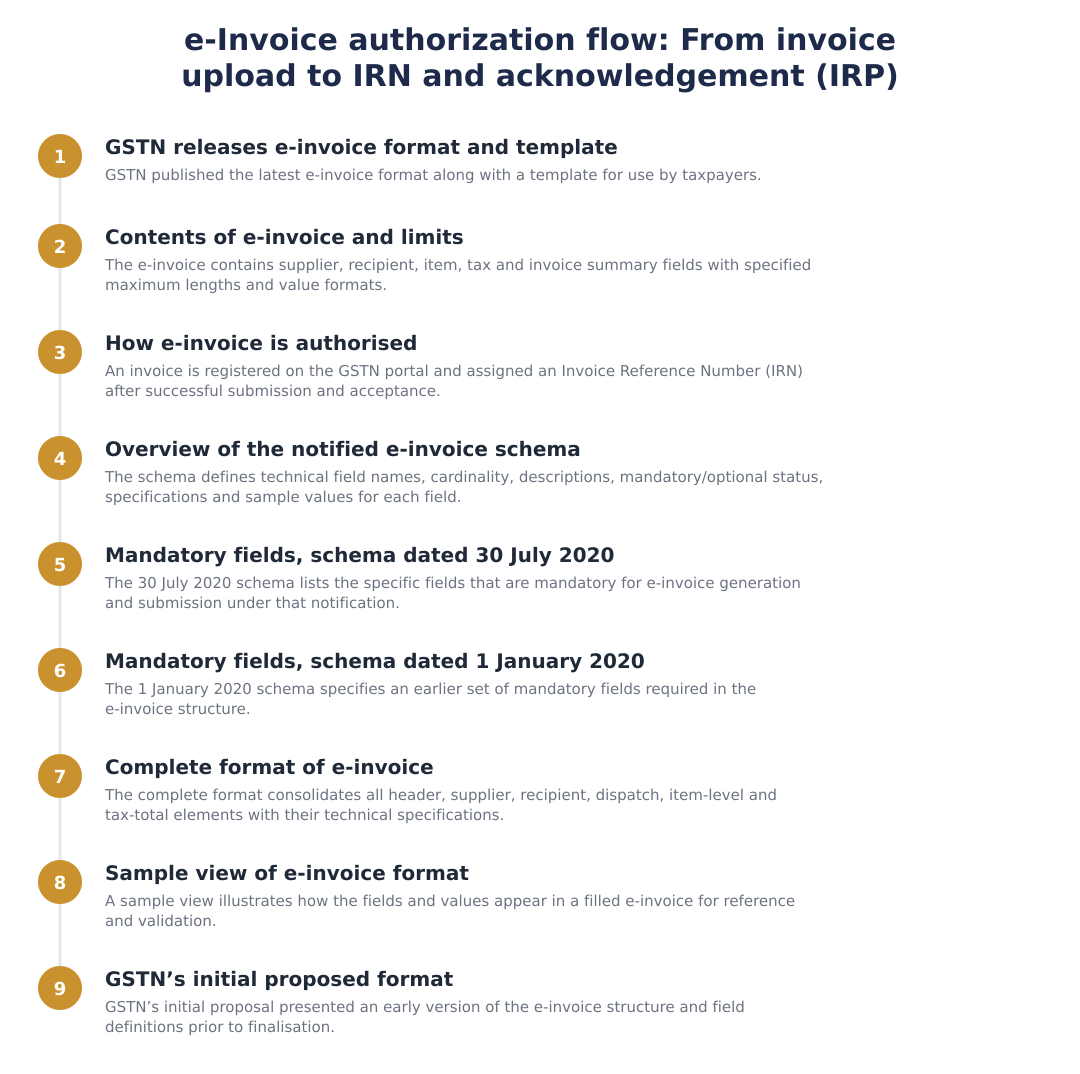
Contents of e-invoice and limits
An e‑invoice is a structured digital representation of a business invoice. Typical e‑invoice payloads capture the core commercial information that stakeholders need: supplier identity, recipient identity, line‑level goods or services information, tax breakdowns and document totals. The structured format makes it possible for accounting software, GST return filing tools and third‑party systems to read, validate and process invoices automatically.
Beyond the content categories, a schema for e‑invoicing also defines limits and constraints, such as which fields are mandatory, which are optional, allowed character lengths, numeric precision and enumerated choices. These constraints exist to ensure interoperability and to prevent ambiguous or malformed data entering the system. When software generates the e‑invoice JSON, it should validate field presence and format against the applicable schema before submission to the government portal.
How is e-invoice authorised?
Authorization of an e‑invoice is the process by which the central e‑invoicing system (IRP/GSTN) accepts an uploaded invoice and returns a government‑issued acknowledgement that makes the invoice valid for use. This authorization step creates a trust anchor: once the invoice is accepted, downstream parties and systems can rely on the registered invoice metadata for compliance and reconciliation.
As part of this process, the supplier uploads the e‑invoice payload to the IRP. At the time of registration request, the IRN field is left empty by the supplier; later a unique number (IRN) will be generated by GSTN/IRP after uploading of the e‑invoice on the GSTN portal; an acknowledgement is sent back after successful acceptance. After receiving this acknowledgement and the generated IRN, the supplier should display the IRN on the invoice and use the registered e‑invoice for all compliance purposes.
Overview of the notified e-invoice schema
A notified e‑invoice schema is a formal specification that lists every field, its meaning, cardinality (mandatory or optional), data type and any sample values or enumerations. The schema serves as the contract between business accounting systems and the government portal: software must produce JSON that conforms to this schema so that the IRP can validate and accept the submission.
Because business needs and regulation evolve, notified schemas may be revised over time. Each schema version may introduce new fields, change cardinality or tighten validation rules. Producers of e‑invoice JSON should therefore design for versioning and make schema validation a part of the invoice generation workflow to avoid rejections at the submission stage.
Mandatory fields and practical expectations
Mandatory fields in any e‑invoice schema typically cover the minimal information required for tax and commercial identification: document identifiers, supplier and recipient identification, key item details and document totals. Software must ensure these mandatory fields are populated correctly before attempting submission because missing mandatory fields will cause the IRP to reject the request.
From a practical perspective, implementers should treat mandatory fields as data quality gates: validate presence, normalise formats (for example, date formats and numeric precision) and run business‑level checks (like totals matching line sums) prior to upload. Remember that even if you prepare a complete e‑invoice payload, the IRP will still generate the IRN itself during the registration step and return an acknowledgement.
Complete format of e-Invoice and display after registration
A complete e‑invoice message exchanged with the IRP will contain the business data plus any IRP‑added metadata returned in the acknowledgement. After successful registration, the government response typically includes confirmation details that the seller should print or store alongside the invoice for audit and reconciliation.
Because the IRN is generated by the IRP, suppliers must update their stored invoice records to include the returned IRN and any other acknowledgement elements. The registered invoice, containing the IRN, is then the authoritative document for downstream processes such as filing, input tax credit claims by recipients and cross‑reference during audits.
In summary, the e‑invoice schema structures the invoice data for automated processing and the IRP/GSTN issues the IRN only after a supplier uploads the invoice payload. Design your invoicing system to validate against the applicable schema and to capture and persist the IRP acknowledgement (including the IRN) so your invoices remain valid and auditable.
Frequently asked questions
What is the e‑invoice format under GST and what does the JSON file contain?
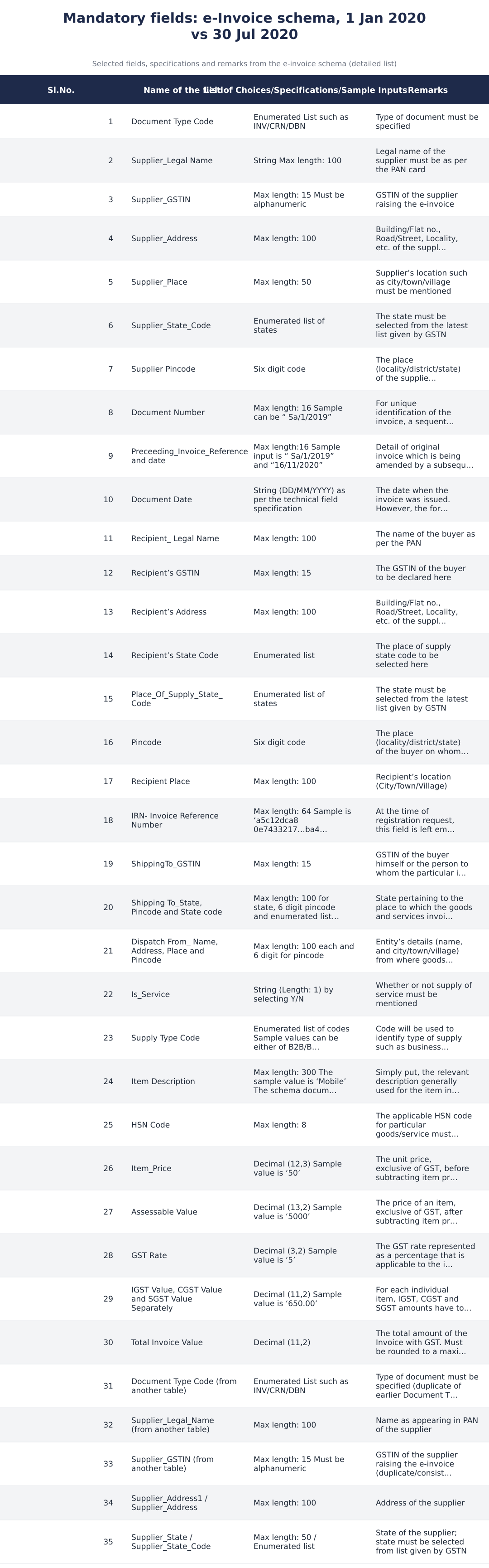
The e‑invoice format is a standard JSON schema notified by GSTN that defines all fields, types and length limits required for a GST e‑invoice. The JSON file contains header fields (invoice number, date, IRN if present), supplier and recipient details (legal name, GSTIN, address, state code and pincode), line‑level item details (description, HSN, unit price, assessable value, GST rate and IGST/CGST/SGST amounts), tax totals and invoice-level amounts (total invoice value rounded to 2 decimals). The schema also specifies technical constraints such as Supplier_Legal_Name max length 100, Supplier_GSTIN max length 15, Item_Price as Decimal(12,3) and Total Invoice Value as Decimal(11,2).
Which fields are mandatory in the e‑invoice schema notified on 30 July 2020?
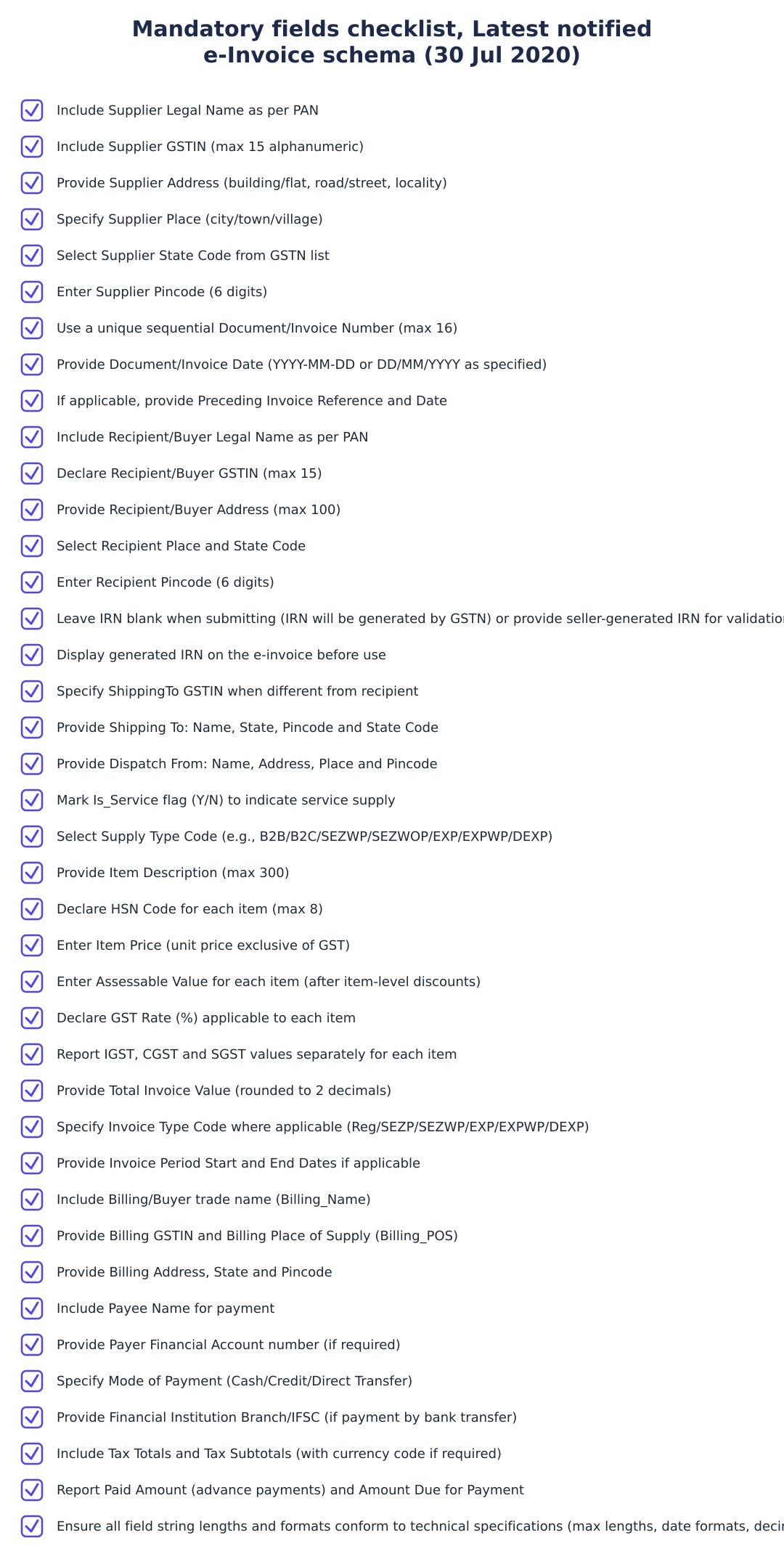
The mandatory fields in the e‑invoice schema dated 30th July 2020 include key header, supplier, recipient and line item elements that must be populated for registration on the IRP. Examples of mandatory elements are Invoice Number (max length 16), Invoice Date (DD/MM/YYYY), Supplier_Legal_Name (max length 100), Supplier_GSTIN (max length 15), Billing_GSTIN (where applicable), item description, HSN code and tax components (IGST/CGST/SGST) for each item. The IRP will accept the e‑invoice only when these required fields are correctly filled and values conform to the specified formats and cardinality rules in the schema.
What were the mandatory fields in the initial e‑invoice schema dated 1 January 2020?
The initial e‑invoice schema dated 1st January 2020 required core invoice identifiers, supplier and buyer details, dispatch/ship‑to details, item list and tax totals as mandatory elements. Key examples include IRN (if pre‑supplied), Invoice_Type_Code, Invoice Number (max length 16), Invoice Date, Supplier_Legal_Name (max 100), Supplier_GSTIN (max 15), Billing_GSTIN, Billing_POS (place of supply code), and Tax_Total and Amount_due_for_payment fields. The original schema contained similar technical constraints for string lengths and numeric precision (for instance Paid_amount and Amount_due_for_payment as Decimal(10,2)).
How is an e‑invoice authorised and what is an IRN?
An e‑invoice is authorised when it is uploaded to the GSTN e‑invoice system (IRP) and the system returns a unique Invoice Reference Number (IRN) and acknowledgement. The IRN is a unique reference (sample length shown up to 64/50 in different docs) generated by GSTN for a registered invoice; suppliers may leave the IRN field blank when submitting and the system will generate and return it upon successful registration. Once the IRN is issued the supplier must display the IRN on the physical or PDF invoice for it to be treated as a valid e‑invoice under the system.
What are the key item‑level fields I must include (and their limits) for each invoice line?
Each invoice line must include item description (max length 300), HSN Code (max length 8), Item_Price as Decimal(12,3), Assessable Value as Decimal(13,2), GST Rate as Decimal(3,2) and tax amounts IGST/CGST/SGST as Decimal(11,2). You must also provide the assessable value after discounts (Gross price minus discount) and the system expects separate tax values for each tax head per item. These numeric fields have fixed precision and the Total Invoice Value must be rounded to a maximum of 2 decimals.
What are the common technical field specifications I should follow (formats and cardinality)?
Technical field specifications define maximum string lengths, date formats and numeric precision and also indicate cardinality (mandatory/optional and whether a field can repeat). Examples include date formats often specified as DD/MM/YYYY in tables (though explanatory notes sometimes reference YYYY‑MM‑DD), Supplier_Pincode as a six‑digit code, and numeric precisions like Decimal(13,2) for assessable value or Decimal(11,2) for tax amounts. Cardinality tells you whether a group (for example a list of items) is repeatable and which fields within it are mandatory, so you must follow both the format and cardinality rules to avoid validation errors on upload.
What are the standard codes for Supply Type and Invoice Type I must use?
Supply Type and Invoice Type must use enumerated codes predefined in the e‑invoice schema such as Supply Type codes B2B/B2C/SEZWP/SEZWOP/EXPWP/EXPWOP/DEXP and Invoice_Type_Code values like Reg/SEZP/SEZWP/EXP/EXPWP/DEXP. You must pick the appropriate code that identifies the nature of supply (for example B2B for business‑to‑business, SEZWP for SEZ with payment) or nature of document (regular, export, deemed export, etc.). Using the correct code is mandatory for correct tax treatment and for IRP validation.
Where do I mention shipping, dispatch and place of supply details in the JSON file?
Shipping, dispatch and place of supply details must be included in dedicated groups in the JSON such as ShippingTo_GSTIN, ShippingTo_Address, Dispatch_From_Details and Place_Of_Supply_State_Code with appropriate state codes and pincodes. ShippingTo_GSTIN must be a max 15‑character GSTIN where applicable, ShippingTo_Pincode is a six‑digit code and Dispatch_From fields accept address, place and pincode with lengths generally up to 100 or as specified. Accurate place of supply state code is important because it determines whether IGST or CGST+SGST apply and the schema enforces enumerated state codes provided by GSTN.
Where can I find a sample e‑invoice template and how should I use it?
GSTN and related guidance pages publish a sample view of the complete e‑invoice format showing all header, supplier, recipient, item and tax fields with sample values and explanatory notes which you should follow when preparing your JSON. The sample templates include defined columns (technical field name, cardinality, small description, mandatory flag, technical specifications, sample values and explanatory notes) and practical examples such as Invoice Number sample 'Sa/1/2019' and IRN sample hashes. Use the template to map your billing system fields to the exact technical names and formats (lengths, date formats, decimal precision) required by the e‑invoice schema to avoid validation errors.
Need help staying Finance Templates compliant?
MoneyGence's AI Finance OS tracks your compliance, wallet share, and finances in one place, built for agencies and growing businesses.
Get started with MoneyGence