CRN Number in Income Tax: What It Is & How to Generate
This guide explains the Challan Reference Number (CRN) in the context of income tax, what it is, why it matters to taxpayers and tax administrators, and practical considerations around generating and using a CRN. You will learn how a CRN functions as the link between a tax payment and a taxpayer’s account identification, why that linkage is important for reconciliation and compliance, common benefits that arise from using CRNs in tax administration, and how payment method rules can affect which channels are available after a challan is created. The guide also outlines what to keep in mind if you need to generate a CRN without logging into a government portal, and how certain statutory audit provisions can limit payment options. Whether you are an individual taxpayer, a tax professional, or run a business, understanding CRNs helps ensure payments are credited correctly, reduces follow-up work with the tax department, and improves your record-keeping. This article focuses on the conceptual and practical aspects so you can use CRNs effectively and avoid common pitfalls.
What is CRN in Income Tax?
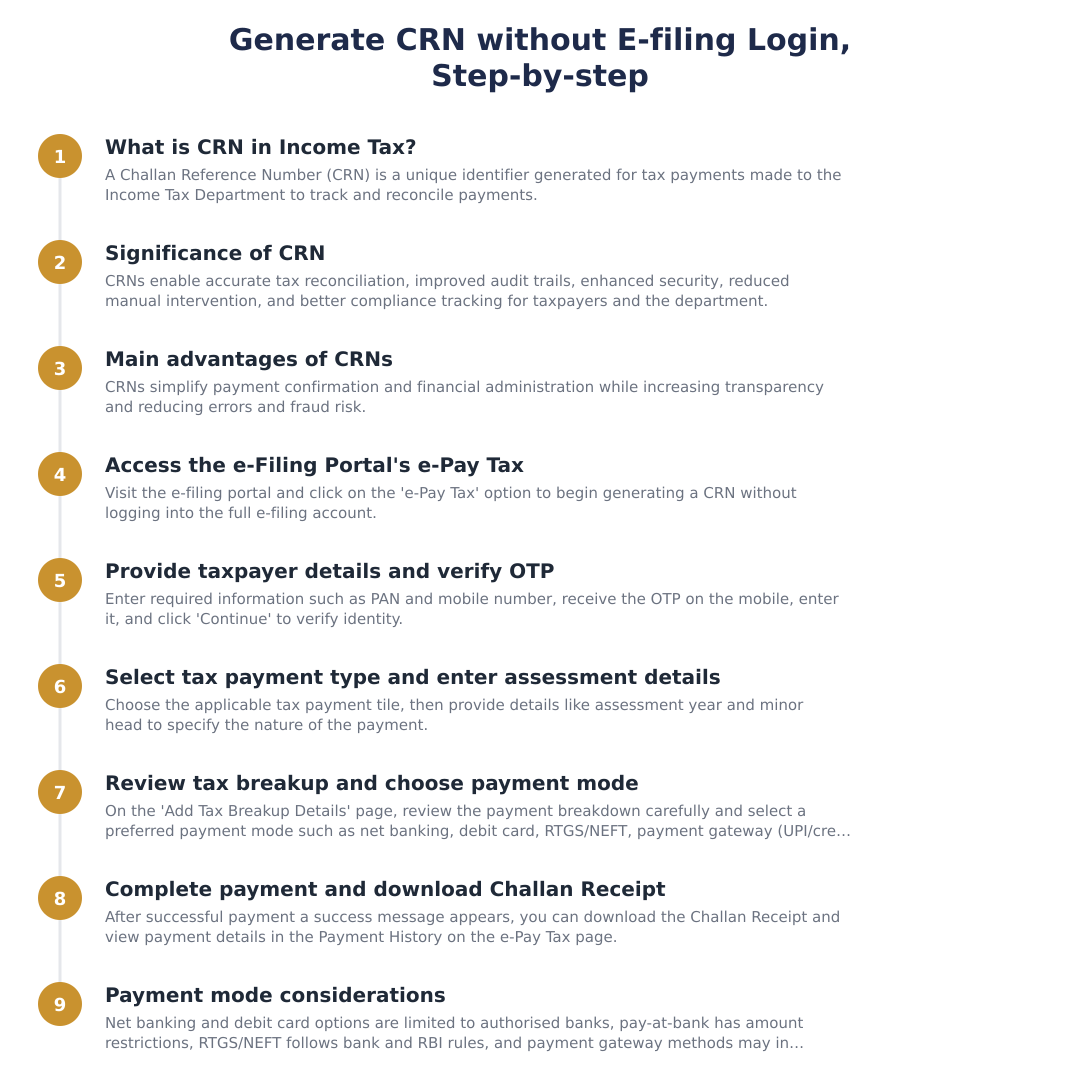
A Challan Reference Number (CRN) is an identifier tied to a specific tax challan and payment transaction. Its primary purpose is to connect or link a tax payment with the taxpayer’s account identification so the department can confirm that the payment has been credited correctly and matched to the right taxpayer.
In practical terms, a CRN functions as a receipt identifier: when a payment is made and a challan is created, the CRN serves as the unique reference that appears on payment records and can be used both by taxpayers and by tax officials to trace and verify the payment against the relevant tax account.
Significance of CRN in Income Tax
The linkage that a CRN provides between payment and taxpayer account is central to accurate reconciliation. When tax authorities receive remittances, the CRN enables them to match bank or challan receipts to the correct PAN or other taxpayer identifier, reducing the risk of misallocation.
For taxpayers, the CRN is an important piece of evidence. It helps verify that a payment was initiated and processed, and supports records for future reference, for example, when checking credit in tax ledgers or resolving discrepancies. Well-maintained CRN information simplifies communication with tax authorities, speeding up any corrective action if required.
The Main Advantages of Challan Reference Numbers
CRNs create a clear audit trail for tax payments. Because each payment receives a unique reference, it becomes straightforward to trace the flow of funds from the point of payment to when the amount is credited to the taxpayer’s account, which aids both internal accounting and external audits.
CRNs also improve efficiency and transparency in tax administration. They reduce manual intervention required to reconcile payments, lower ambiguity when multiple payments are made by the same taxpayer, and support faster resolution when taxpayers raise queries about uncredited amounts.
How to Generate CRN without Logging into the E-filing Portal
Methods to obtain or generate a CRN can vary depending on the systems provided by the tax department and intermediary services. In some regimes, certain channels permit creation of a challan and issuance of a CRN without requiring login to the taxpayer e-filing portal; in others, authentication may be necessary. Because implementations differ, check the official channels or guidance before proceeding.
If you are attempting to generate a CRN without portal login, keep records of any reference, acknowledgement, or receipt you receive. These references serve the same practical purpose as a CRN for verification and reconciliation, and retaining them will help if you need to demonstrate payment to tax authorities.
Modes Available for Making Payment After Generation of Challan
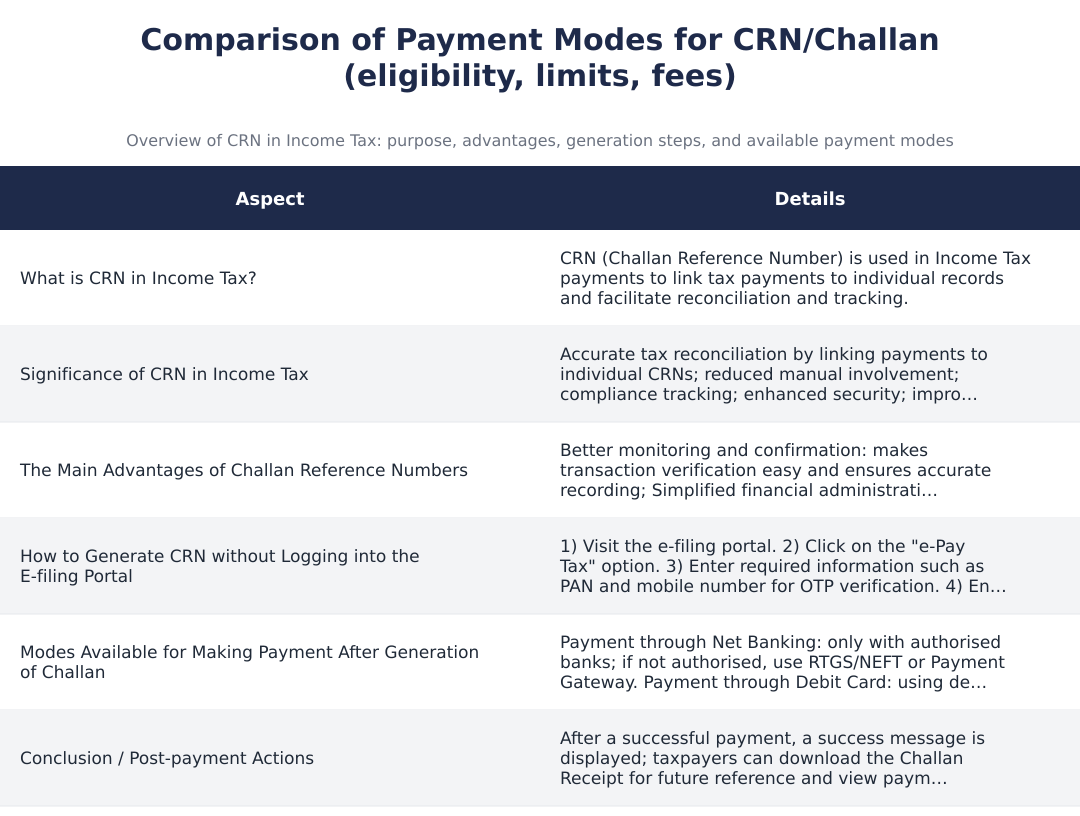
Tax administrations typically offer multiple payment channels once a challan is generated, and the appropriate channel may depend on the taxpayer’s status and the nature of the payment. The key point for taxpayers is to choose a payment mode that is permitted for their particular case so that the payment can be successfully credited and matched using the CRN.
Certain statutory provisions can limit payment options for specific taxpayers. For example, taxpayers to whom the audit provisions under Section 44AB of the Income-tax Act, 1961 apply may face restrictions on using some modes of payment. If you fall under such provisions, confirm which payment methods are allowed to avoid creating a challan that cannot be accepted through your chosen channel.
A CRN is a simple but powerful tool: it links a tax payment to the taxpayer’s account identification and helps ensure payments are credited correctly. Understanding how CRNs work, why they matter for reconciliation and record-keeping, and how statutory rules such as the audit provisions under Section 44AB can affect payment choices will help you manage tax payments more confidently. When in doubt, refer to official guidance or consult a tax professional to select the right payment channel and preserve the necessary references for future verification.
Frequently asked questions
What is a CRN in Income Tax and how many digits is it?
A CRN (Challan Reference Number) in Income Tax is a unique 14‑digit code generated by the Income Tax Department to identify and track a tax payment. It is created automatically on the e‑filing portal when you make payments such as self‑assessment tax, TDS/TCS payments or advance tax, and links the payment to your PAN so the credit can be reconciled. The CRN appears on the challan receipt and serves as proof of payment for future reference or reconciliation. Keep the CRN safe because it is used to track the status of the payment in payment history and during audits.
Why is the CRN important for taxpayers?
The CRN is important because it ensures accurate reconciliation and confirmation of tax payments with the Income Tax Department. By linking each payment to a unique CRN and the taxpayer's PAN, the department reduces errors and discrepancies, improves audit trails and compliance tracking, and lowers manual intervention. This makes it easier to locate payments, resolve mismatches, and substantiate tax payment during assessments or notices. The CRN also enhances security and transparency by making every transaction uniquely identifiable.
How do I generate a CRN without logging into the Income Tax e‑filing portal?
You can generate a CRN without logging in by using the e‑Pay Tax option on the Income Tax e‑filing portal's public pages and providing required details like PAN and mobile number for OTP verification. The process involves visiting the e‑filing portal, selecting e‑Pay Tax, entering PAN and mobile to receive an OTP, verifying the OTP, choosing the relevant tax payment tile, filling assessment year and minor head details, reviewing tax breakup and proceeding to payment, after which the CRN and challan receipt are generated. You can download the challan receipt immediately and later view payment details in Payment History on the e‑Pay Tax page. No registered account sign‑in is required for this one‑time challan generation flow.
What payment modes are available after generating a challan/CRN?
After generating a challan/CRN you can pay via Net Banking (through authorised banks), debit card of authorised banks, RTGS/NEFT from any bank account, payment gateway options (including UPI and credit card), or by paying at the bank counter subject to conditions. Payment at a bank counter is allowed only for amounts below Rs. 10,000 and cannot be used by companies or persons covered by Section 44AB of the Income-tax Act, 1961; RTGS/NEFT must follow RBI and bank policies; and payment gateways may levy transaction charges which are extra. Choose the mode that your bank supports and compare gateway charges before finalising the payment to avoid extra costs.
Can I use net banking of any bank to pay tax after CRN generation?
You can use net banking only of authorised banks listed by the Income Tax Department; if your bank is not authorised you should use RTGS/NEFT or a payment gateway instead. Using an authorised bank's net banking offers a direct and often hassle‑free payment route, while RTGS/NEFT works from any bank subject to RBI and bank rules. Always check the list of authorised banks on the e‑filing portal before selecting Net Banking to avoid payment failures or extra steps.
Are there limits or restrictions when paying tax at the bank counter using the CRN?
Yes, payment at the bank counter using the CRN is allowed only for amounts below Rs. 10,000 and is not permitted for companies or persons subject to Section 44AB audit provisions. This mode is intended for small value payments and individuals who cannot use online modes; larger amounts must be paid online via net banking, RTGS/NEFT, or payment gateway. Always confirm the bank's acceptance policy before visiting and carry the generated challan/CRN to facilitate the transaction.
Will I get a receipt after paying tax via CRN and where can I find it?
Yes, after successful payment using the CRN you will immediately see a success message and can download the challan receipt for future reference. The receipt contains the 14‑digit CRN and payment details; additionally you can view the transaction details later in the Payment History menu on the e‑Pay Tax page of the e‑filing portal. Keep the downloaded challan receipt and CRN for reconciliations, filing returns, or responding to any notices from the Income Tax Department.
Does generating a CRN guarantee that the tax is credited to my PAN immediately?
Generating a CRN and completing payment does not always mean the tax is credited instantly to your PAN; crediting depends on the bank and the payment mode, though the CRN provides a unique identifier for reconciliation. Payments via authorised net banking or payment gateways typically reflect faster, while RTGS/NEFT and bank processes may take longer according to RBI and bank timelines; you should check Payment History to confirm posting. If the payment is not matched with your PAN within expected timelines, you can use the CRN and challan receipt to request reconciliation with the Income Tax Department or the bank.
How does CRN improve security and audit trail for tax payments?
CRN improves security and audit trail by assigning a unique, traceable identifier to each tax payment, which reduces the chance of misuse and makes it easier to track transactions during audits. This unique 14‑digit number, linked to the taxpayer's PAN, enables the Income Tax Department to automate reconciliation, detect non‑compliance, and maintain a clear history of payments for verification. The system also reduces manual intervention and errors in posting payments, strengthening transparency and accountability in tax administration.
Need help staying Income Tax compliant?
MoneyGence's AI Finance OS tracks your compliance, wallet share, and finances in one place, built for agencies and growing businesses.
Get started with MoneyGence